30 ENGLISH
Menu item
Selectable setting, [
Initial: Underlined
]
DEMO
On
:
Display demonstration will be activated automatically if no operation is done for
about 20
seconds. /
Off
:
Cancels. (page 4)
Clock
Set Clock
For settings, see page 4.
24H / 12H
For settings, see page 4.
Clock Adjust *
1
Auto
: The built-in clock is automatically adjusted using the clock data provided via the
satellite radio channel. /
Off
: Cancels.
Time Zone *
1,
*
2
Eastern
/
Atlantic
/
Newfndlnd
/
Alaska
/
Pacific
/
Mountain
/
Central
: Select your residential area from one of the time zones for clock adjustment.
DST *
1,
*
2
On
: Activates daylight savings time if your residential area is subject to DST. /
Off
: Cancels.
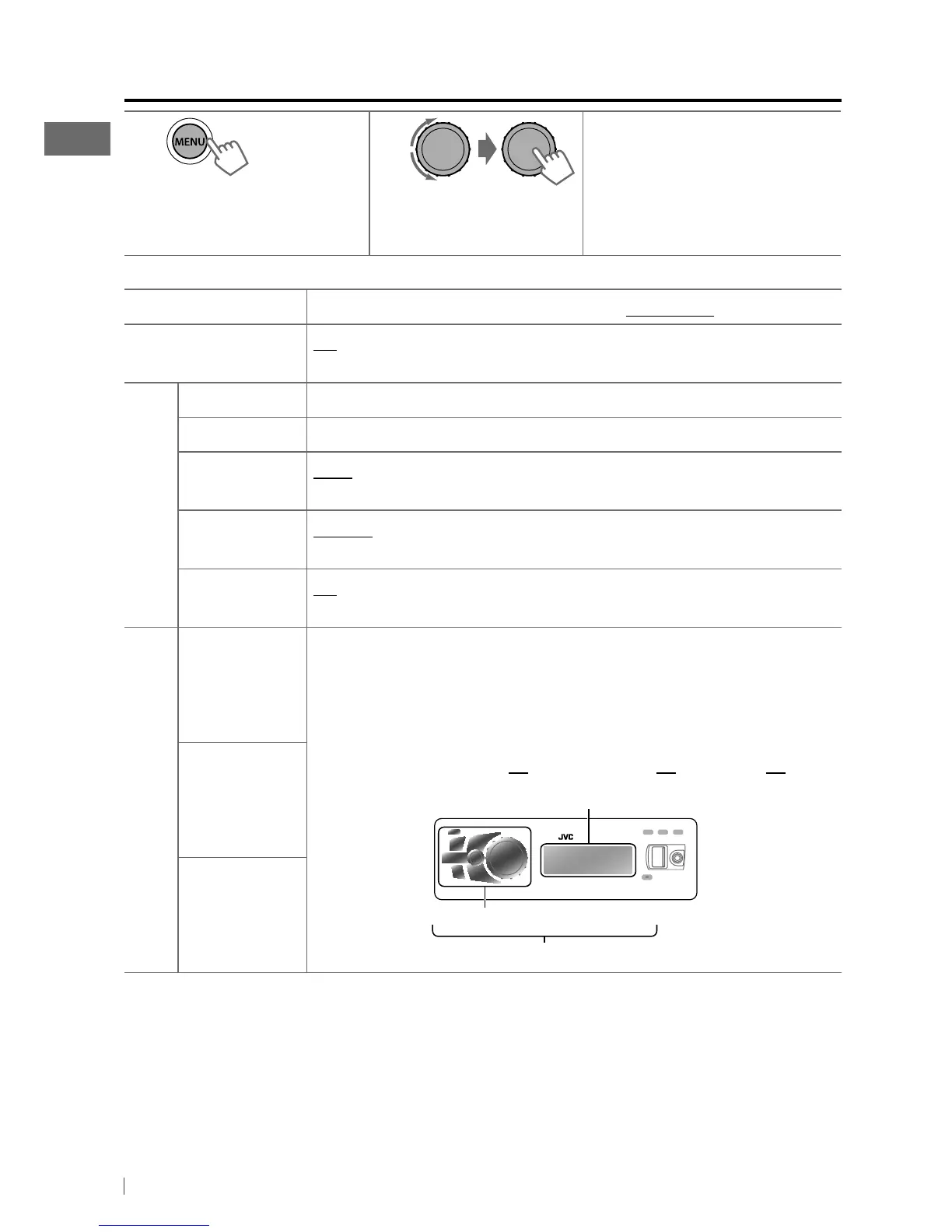
Color
Button Zone
29 preset colors
/
User
/
COLORFLOW 1/ 2/ 3
: Selects your preferred color for
buttons illumination (except for
EQ
/
DISP
/
OPEN
/
BRIGHTNESS
) and display
color separately.
• If <All Zone> is selected, the button and display illumination will change to the
current/selected <Button Zone> color.
• Initial color :
Button Zone
[
06
],
Display Zone
[
01
],
All Zone
[
06
]
Display Zone
All Zone
*
1
Displayed only when SIRIUS Satellite radio or XM Satellite radio is connected.
*
2
Displayed only when <Clock Adjust> is set to <Auto>.
All zone
Display zone
Button zone
Menu operations
1
If no operation is done
for about 60 seconds, the
operation will be canceled.
2 3
Repeat step 2 if necessary.
• To return to the previous
menu, press BACK.
• To exit from the menu, press
MENU.
[Hold]
EN02-39_KD-A925BT[J]4.indd 30 1/28/11 9:11:09 AM


 To Next Page