iPod/iPhone
{Only
for
KD-AV41
BT}
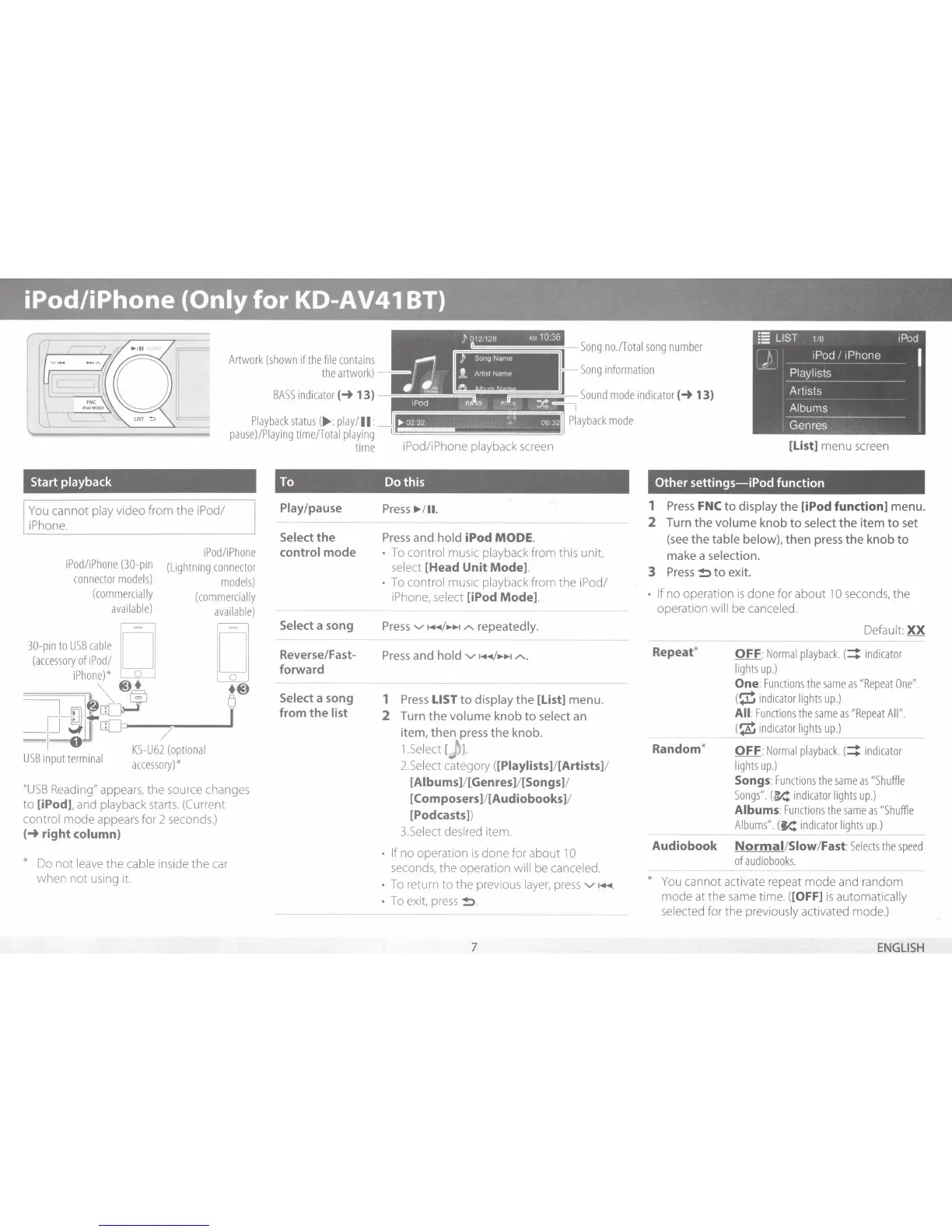
Artwork
(shown
if
the
file
conta
i
ns
the
artwork)
BASS
ind
icator
(-+
13)
Playback
status
(
~
:play/
II:
pause)/P
i
aying
time/To
tal pl
aying
time
iPod/iPhone
playback
screen
Song
no./Total
song
number
Song
information
[List] menu
screen
Start
playback
To
Dothis
Other
settings-iPod
function
You
c
an
not pl
ay
video from the
iPod/
J
iPhone.
i
Pod/iP
h
one
iPo
d
/iP
hone
(30-pin
(Lig
h
tning
connector
co
n
nector
mode
l
s)
models)
(commercia
ll
y
(commercially
available)
available)
30-pin
to
USB
cable
D=
o=o
(accessory
of
iPod/
iPhone)*
o
@)+
+@)
~
~~
iY
~
~
-IJ
~
il
·
o
--
7
-;--.....IJ
--
o
/.
USB
. .
1
KS-U62
(optional
1np
ut
termma
accessory)*
"USB
Reading"
appears,
the source changes
to [iPod], and playback starts.
(Current
control mode appears for 2
seconds.)
(-+
right
column)
*
Do
not l
eave
the cable
ins
ide the
car
when not using it.
Play/pause
Select
the
control
mode
Select
a song
Reverse/Fast-
forward
Select
a song
from
the
list
Press
~
/
11.
Press
and
hold
iPod
MODE.
•
To
control music playback from this unit,
select [Head
Unit
Mode].
•
To
control music playback from the iPod/
iPhone,
select [iPod Mode].
Press
v-
~+~~/~A.
repeatedly.
Press
and
hold
v-
~+~~
/
~A..
1
Press
LIST
to
display
the
[List] menu.
2
Turn
the
volume knob
to
select
an
item, then
press
the
knob.
1
.Select
[
jl
2.Select category ([Piaylists]/
[Artists]
/
[Aibums]
/[Genres]/ [Songs]/
[Composers]![Audiobooks]
/
[Pod casts])
3.Select desired item.
• If
no operation
is
done for about
1
0
seconds,
the operation
will
be canceled.
•
To
return
to
the previous
layer,
press
v-
~+~~
.
•
To
exit,
press
~
.
7
1
Press
FNC
to
display
the
[iPod
function]
menu.
2
Turn the
volume
knob
to
select
the
item
to
set
(see
the
table below),
then press the knob
to
make a selection.
3
Press
~to
exit.
• If
no operation
is
done for about
10
seconds,
the
operation will
be canceled.
Repeat*
Random*
Default
XX
OFF
:
Normal
playback.
(4
indicator
lights
up.)
One:
Functions
the
same
as
"Repeat
One".
(
~
indicator
ligh
ts
up.)
All
:
Func
t
ions
t
he
same
as
"Repeat
All
".
(
~
in
d
icator
li
gh
ts
up.)
OFF
:
Normal
playback.
(4
indicator
lights
up.)
Songs:
Functions
the
same
as
"Shuffle
Songs".
(
~
indicator
lights
up.)
Albums
:
Functions
the
same
as
"Shuffle
A
l
bums"
.
(
~
indicator
lights
up.)
----
Audiobook
Normal
/
Slow
/Fast:
Selects
the
speed
of
au
d
iobooks.
*
You
cannot activate repeat mode
and
random
mode at the
same
time. ([OFF]
is
automatically
selected for the previously activated mode.)
ENGLISH


 To Next Page