Disc/USB
Start playback
Disc
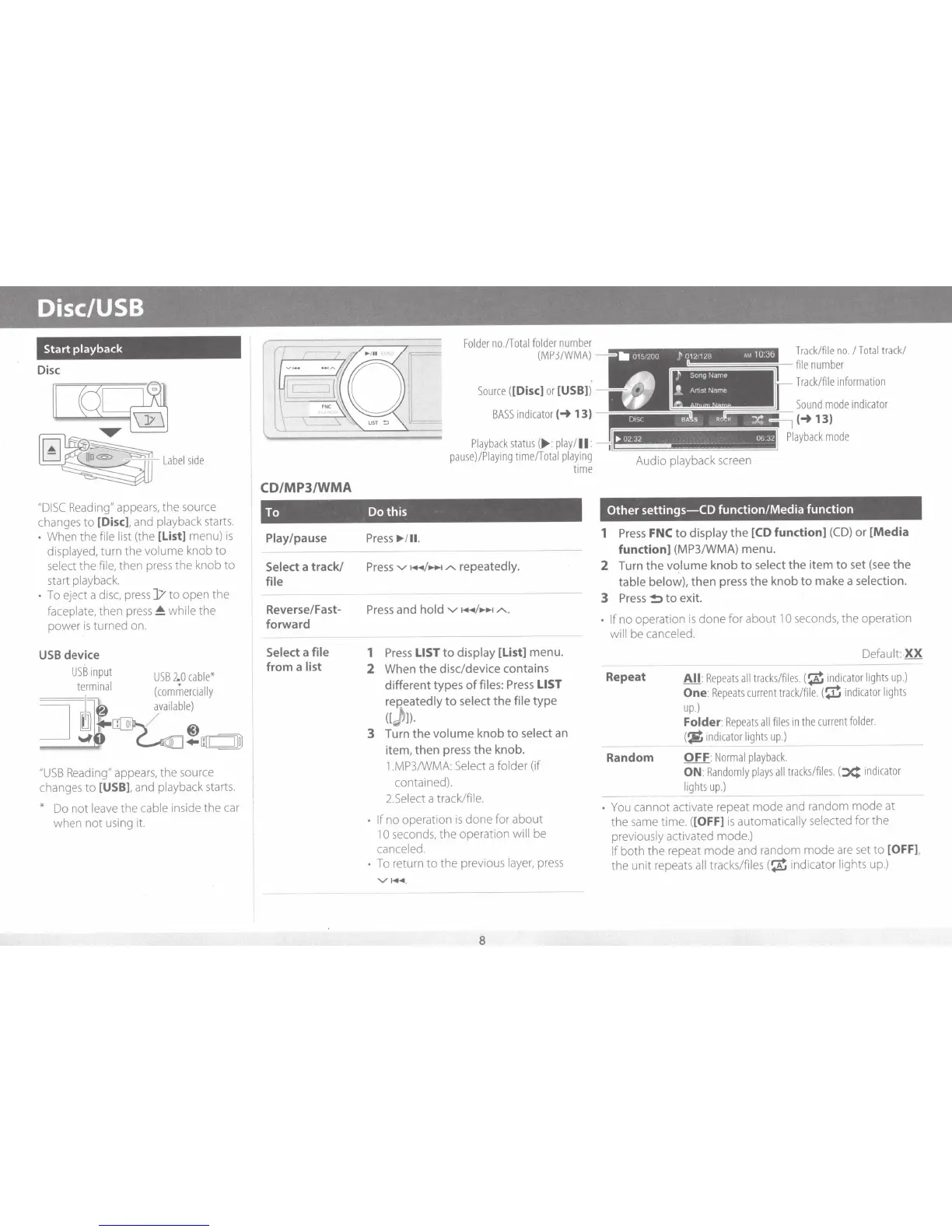
"D
I
SC
Reading"
appears,
the
source
changes
to
[Disc].
and
playback
starts.
•
When the
file list
(the
[list]
menu)
is
displayed,
turn the
volume
knob
to
select
the
file,
then
press
the knob to
start
playback.
•
To
eject a
disc,
press
]/
to open the
faceplate,
then
press
~
while
the
power
is
turned
on.
USB
device
USB
input
USB
2.0
cable*
terminal
(commercially
=1==1
~8
availab
le
)
_j
~
1--
~
@)
..,_.....,.,..
--r
_;...c
~
+
mr::::J1ID
"USB
Reading"
appears,
the
source
changes
to
[USB].
and
playback
starts.
*
Do
not
leave
the
cable
inside the
car
when not using
it.
CD/MP3/WMA
Folder
no./Total
folder
number
(MP3/WMA)
Source
([Disc]
or
[USB])
BASS
indicator
(-t
13)
Playback
status
(
..,.
:
play
I
II:
pause)/Piaying
time/Total
playing
time
To Do this
Play/pause
Select
a track/
file
Reverse/Fast-
forward
Select a
file
from a
list
Press
...
Ill
.
Press.....,
~+~~
/
-.t
/'.
repeatedly.
Press
and
hold
.....,
~+~~/-..
/'.,
1
Press
LIST
to
display
[List]
menu.
2
When the disc/device contains
different types
of
files:
Press
LIST
reP.eatedly
to
select the
file
type
([)]).
3
Turn the
volume
knob
to
select
an
item, then press the knob.
1.MP3/WMA:
Select
a
folder (if
contained).
2.Select
a track/file.
• If
no operation
is
done for about
1 0
seconds,
the operation
will
be
canceled.
•
To
return
to
the previous
layer,
press
'V
1+11
.
8
T
rack/file
no.
I
Total
track/
file
number
Track/f
i
le
i
nformation
Sound
mode
indicator
(-t13)
Playback
mode
Audio
playback
screen
Other
settings-CO
function/Media function
1
Press
FNC
to
display
the
[CD
function]
(CD)
or
[Media
function]
(MP3/WMA)
menu.
2
Turn the
vqlume
knob
to
select
the item
to
set
(see
the
table below),
then press
the
knob
to
make a
se
lection.
3
Press
!:>to
exit.
• If
no operation is done for about
10
seconds,
the operation
wi
ll
be
canceled.
Repeat
Random
Default:.
XX
All
:
Repeats
all
tracks/files.(
~
i
nd
i
cator
li
ghts
up.)
One
:
Repeats
current
track/fi
l
e.
(
~
indicator
li
ghts
up.)
Folder:
Repeats
a
ll
files
in
the
current
folder.
(
~
indicator
lights
up.)
OFF
:
Normal
pl
ayback.
ON
:
Randomly
plays
all
tracks
/
files.
(
~
indicator
lights
up.)
---
•
You
cannot activate repeat mode
and
random mode
at
the
same
time.
([
Off]
is
automatically
selected
for the
previously activated mode.)
If
both the repeat mode and random mode
are
set
to
[OFF].
the unit
repeats
all
tracks/files
(
~
indicator
lights
up.
)


 To Next Page