18
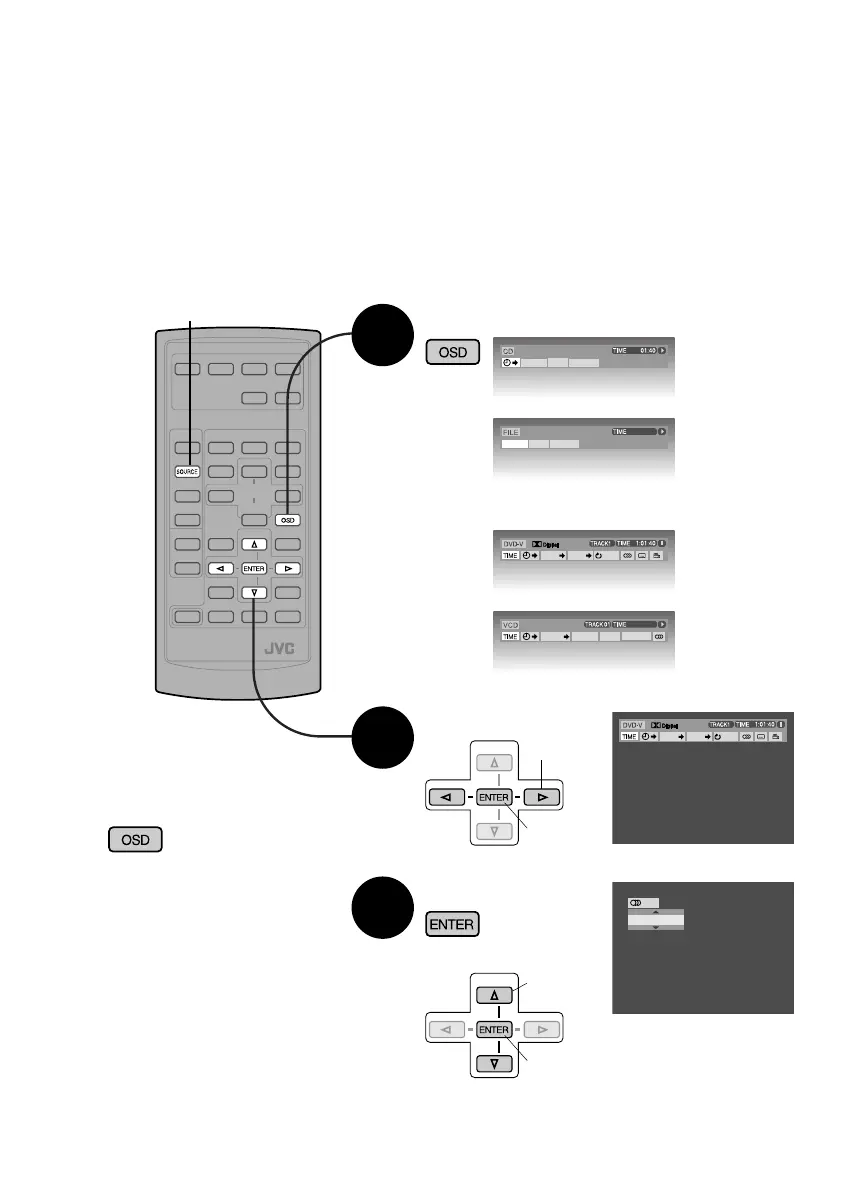
Display on-screen bar
Select item
When unit is connected to a monitor, discs can be operated from the on-screen bar.
Information displayed and functions available may vary depending on disc. (Remote
controller only)
Preparation: Select “DISC” as source
2 Set
1 Select
REPEAT
INTRO
RANDOM
7 When playing DVD Video or Video CD
Disc playback
1
2
TITLE
CHAP
OFF
5.1ch
Select contents
2 Set
3
ENGLISH
1/3
¶ Entering time \ (P.19)
¶ Entering numbers \ (P.9)
7 Removing on-screen bar
• The original
screen is
returned
to after 5
seconds.
(Twice)
e.g. DVD Video
REPEAT
INTRO
RANDOM
00:00:36
TITLE
CHAP
OFF
5.1ch
PBC
00:36
TRACK REPEAT
INTRO
RANDOM
(MP3)
(CD)
(Video CD)
(DVD Video)
1 Select
SOURCE
If pop–up menu appears
EN_KD-DV4200[J]_f.indd 18EN_KD-DV4200[J]_f.indd 18 12/16/05 1:01:56 PM12/16/05 1:01:56 PM



 To Next Page