8
Basic operations
¶ Adjusting sound (P.31)
¶ Personal settings (P.26)
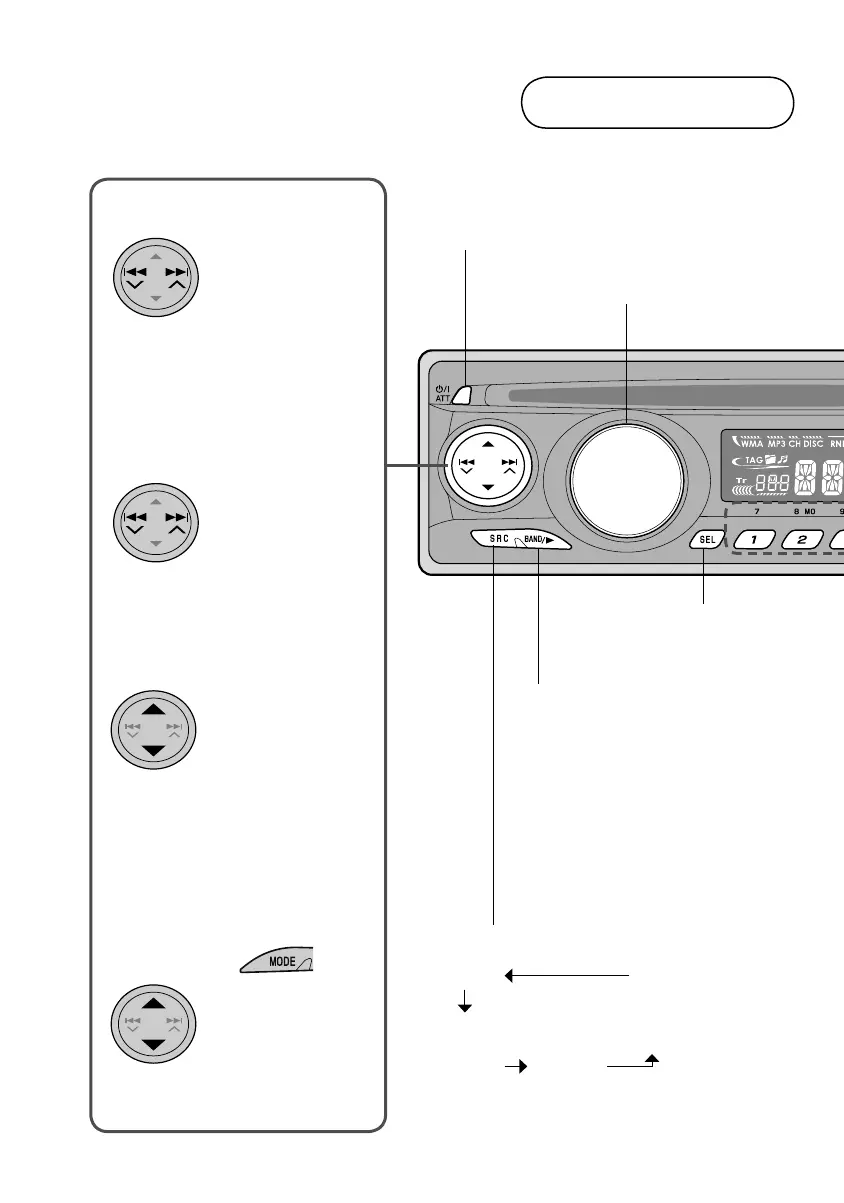
Power On/Off (Hold)/
Attenuate On/Off
Change radio band
(FM1/FM2/FM3/AM)
(SIRIUS1/SIRIUS2/SIRIUS3)
(XM1/XM2/XM3)
Play disc
(Playback will usually commence
upon insertion of disc)
Select source
Adjust volume
Main unit
FM/AM
SIRIUS*
XM* DISC*
CD-CH/
IPOD/
D.PLAYER*
(or EXT IN)
* Only selectable if connected or inserted.
4 ¢ keys ...
Select
(Radio)
• frequency-Auto
(Disc)
• chapter/track
(Satellite radio)
• channel
(iPod/D. player)
• track
Search
(Radio)
• frequency-Manual
(Disc)
• forward/reverse
search
(Hold)
5 ∞ keys ...
Select
(Radio)
• preset station
(Disc)
• folder
(Satellite radio)
• category
(CD changer)
• folder
After pressing ...
Jump
(Disc)
• 10, 20, 30...
chapters/tracks
• Controls may function differently depending on source, etc. Refer to each relevant page for
details.
or
EN_KD-DV4200[J]_f.indd 8EN_KD-DV4200[J]_f.indd 8 12/16/05 1:01:34 PM12/16/05 1:01:34 PM



 To Next Page