EasyManua.ls Logo

JVC KD-DV4200 - Page 9

JVC KD-DV4200
40 pages
Print Icon
To Next Page IconTo Next Page
To Previous Page IconTo Previous Page
Loading...
9
English
Prepare
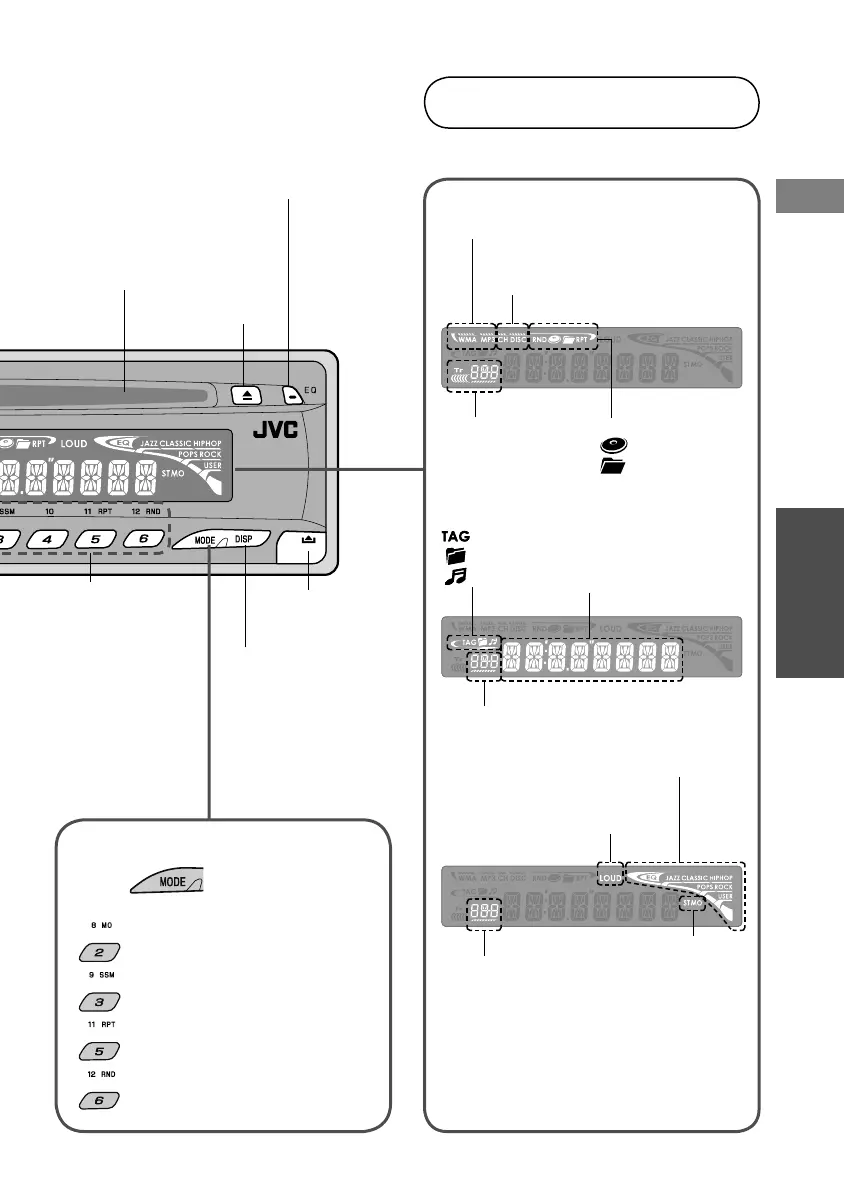
Eject disc
Select sound mode
(P.31)
Remove
panel
Change display
(Time, playback
information, etc)
Insert disc
(Disc will be taken in
automatically)
Display window
MP3/WMA fi le type
Disc playback device
CH: CD changer
DISC: Main unit
Preset No./Track No./
Folder No./Disc No./
Chapter No./
Channel No.
Repeat/random play
: Disc
: Folder
Disc information
: Tag
: Folder
: Track
Time, menu,
playback information
Source display
Sound mode
LOUD (Loudness)
Volume level
indicator
Audio reception
ST: stereo
MO: monaural
MODE function
Press , then one of these
buttons within 5 seconds.
: Suppress static noise on FM
broadcast (P.13)
: Automatically preset FM
stations (P.13)
: Repeat play (P.25)
: Random play (P.25)
Call up
1–6/7–12 (Hold)
(Radio)
preset station
(Disc)
chapter/title/
folder/track/disc
EN_KD-DV4200[J]_f.indd 9EN_KD-DV4200[J]_f.indd 9 12/19/05 9:57:23 AM12/19/05 9:57:23 AM

Related product manuals