22
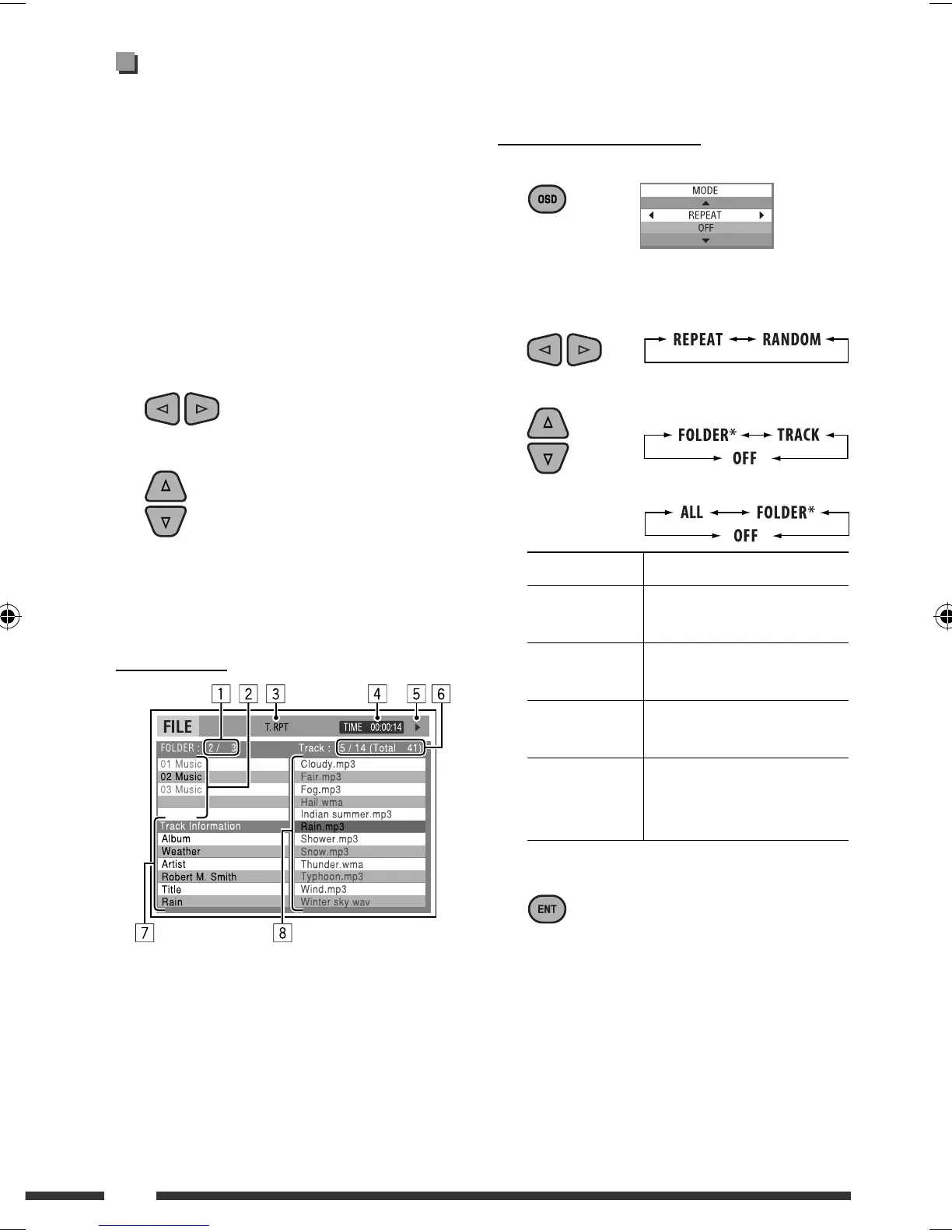
7 Track information
8 Track list with the current track selected
To select a playback mode
1 While control screen is displayed...
Playback mode selection screen appears on the
folder list section of the control screen.
2 Select a playback mode.
3 Select an item.
REPEAT:
RANDOM:
Mode Playback functions
F. RPT
(folder repeat):
Repeat current folder
T. RPT
(track repeat):
Repeat current track
A. RND
(all random):
Randomly play all tracks
F. RND
(folder random):
Randomly play all tracks of
current folder, then tracks of
next folders
4 Confirm the selection.
* Not selectable for CD.
Operations using the control
screen
(DivX/MPEG Video/MP3/WMA/WAV/CD)
These operations are possible on the monitor using the
remote controller.
1 Show the control screen.
DivX/MPEG Video: Press
7 during play.
MP3/WMA/WAV/CD: Automatically appear during
play.
2 Select “Folder” column or “Track” column
(except for CD).
3 Select a folder or track.
4 Start playback.
DivX/MPEG Video: Press ENT (enter) or 3/8.
MP3/WMA/WAV/CD: Playback starts automatically.
Control screen
1 Current folder number/total folder number
2 Folder list with the current folder selected
3 Selected playback mode
4 Elapsed playing time of the current track
5 Operation mode icon ( 3, 7, 8, ¡, 1 )
6 Current track number/total number of tracks in the
current folder (total number of tracks on the disc)
Ex.: MP3/WMA/WAV disc
EN18-25_KD-DV7406_005A_f.indd 22EN18-25_KD-DV7406_005A_f.indd 22 2/12/08 2:02:20 PM2/12/08 2:02:20 PM


 To Next Page