EasyManua.ls Logo

JVC KD-HDR70 - User Manual

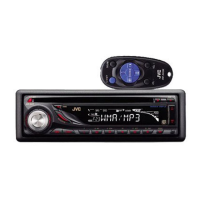
JVC KD-HDR70
2 pages
Print Icon
To Next Page IconTo Next Page
Loading...
2011 JVC Product Tech Guide
C M Y K
KD-HDR70
Headunits
20W x 4
RMS
MOS-FET
50W x 4
MP3/WMA
2-Way Control
for iPod/iPhone
iPod Headunit
The built-in HD Radio
®
tuner offers a multitude of programs in premium digital sound. The iTunes Tagging feature lets you “tag” songs
playing on the radio for purchase on the iTunes store. The dual AUX input offers flexible options including Bluetooth
®
connection with
an optional adapter. You can easily play iPod/iPhone songs via the front USB. With External Mode, you can enjoy the sound of
iPod/iPhone apps. The players can be controlled on either the headunit or the player side. You can quickly search songs by a simple
operation using the menu key and the volume knob. Enjoy superior sound with MOS-FET power amp and 24-bit DAC. With the
Separated Variable-Color, you can customize the keys and display from 30,000 x 30,000 color combinations. Other features include
Front AUX-IN,High-Pass Filter, and 3-band parametric iEQ.
Recommended Features
Key Benefits
KD-HDR70
HD Radio
®
/USB/CD Receiver with Dual AUX
Built-in HD Radio
®
Enjoy a multitude of HD Radio
®
programs in
premium digital sound, without having to connect
external tuners. FM radio sounds equivalent to CD
quality, and AM as good as FM.
External Mode
for
iPod/iPhone
Radio Ready
SAT
iTunes Tagging
iTunes Tagging lets you
“tag” songs playing on
the radio, so you can
purchase later from the
iTunes store.
To save information of a
song played on the radio,
press the “TAG” key.
Information is transferred
to your iPod when you
connect to the headunit.
Information is transferred
to iTunes when you sync
your iPod on the PC.
The song shows up on
iTunes’s “Tagged” playlist.
Click on button to
purchase the song from
iTunes Store.
1 2 3 4 5
How It Works:
Tagging
Data
Tagging
Data
Tagging
Data
iTunes
Tagging
This HD Radio receiver enables:
Separated
V
ariable-Color
Separated
Variable-Color
iPod/iPhone
USB G3
Phone Book
Access
Profile
Dual
AUX
2 Phones
(Full Time)
Connects
Ready for
Bluetooth
®
Adapter
Built-in
HD Radio
Tuner
(Front+Rear+Subwoofer)
3
Pre-Output
Full Digital
Full Speed Charging
Question and Answer IconNeed help?

Do you have a question about the JVC KD-HDR70 and is the answer not in the manual?

JVC KD-HDR70 Specifications

General IconGeneral
TypeCar Receiver
BrandJVC
ModelKD-HDR70
TunerAM/FM
HD RadioYes
Power Output50W x 4
BluetoothYes
USB PortYes
DisplayLCD
EqualizerYes
Equalizer Type13-Band
Faceplate TypeDetachable
Remote ControlYes
Preamp Outputs3
Compatible FormatsMP3, WMA, AAC
Media TypeUSB
SourceUSB

Summary

Core Audio and Digital Features

Built-in HD Radio

Enjoy HD Radio programs in premium digital sound, equivalent to CD quality.

iTunes Tagging Functionality

Tag songs played on the radio for later purchase on the iTunes store.

USB Audio for iPod;iPhone

Connect and play music from iPod/iPhone via USB with clear digital sound and charging.

Connectivity and Customization Options

Dual AUX Input

Offers flexible audio input options, including Bluetooth connectivity.

Separated Variable-Color Illumination

Customize key and display colors from over 30,000 combinations.

Bluetooth Adapter Compatibility

Enables hands-free calling, voice dialing, and audio streaming with an optional adapter.

Advanced Audio Technologies

DIAS II Digital Tuner

All-digital tuner delivering versatile performance, higher sensitivity, and improved FM separation.

High-Pass Filter

Control high-frequency sound settings by filtering out specific frequencies.

3-Band Parametric iEQ

Adjustable EQ with presets for customizing sound, plus subwoofer level control.

Usage Guide: iTunes Tagging

How It Works

Step-by-step instructions for tagging songs played on the radio.

Related product manuals