ENGLISH
4
Basic operations
Using the control panel
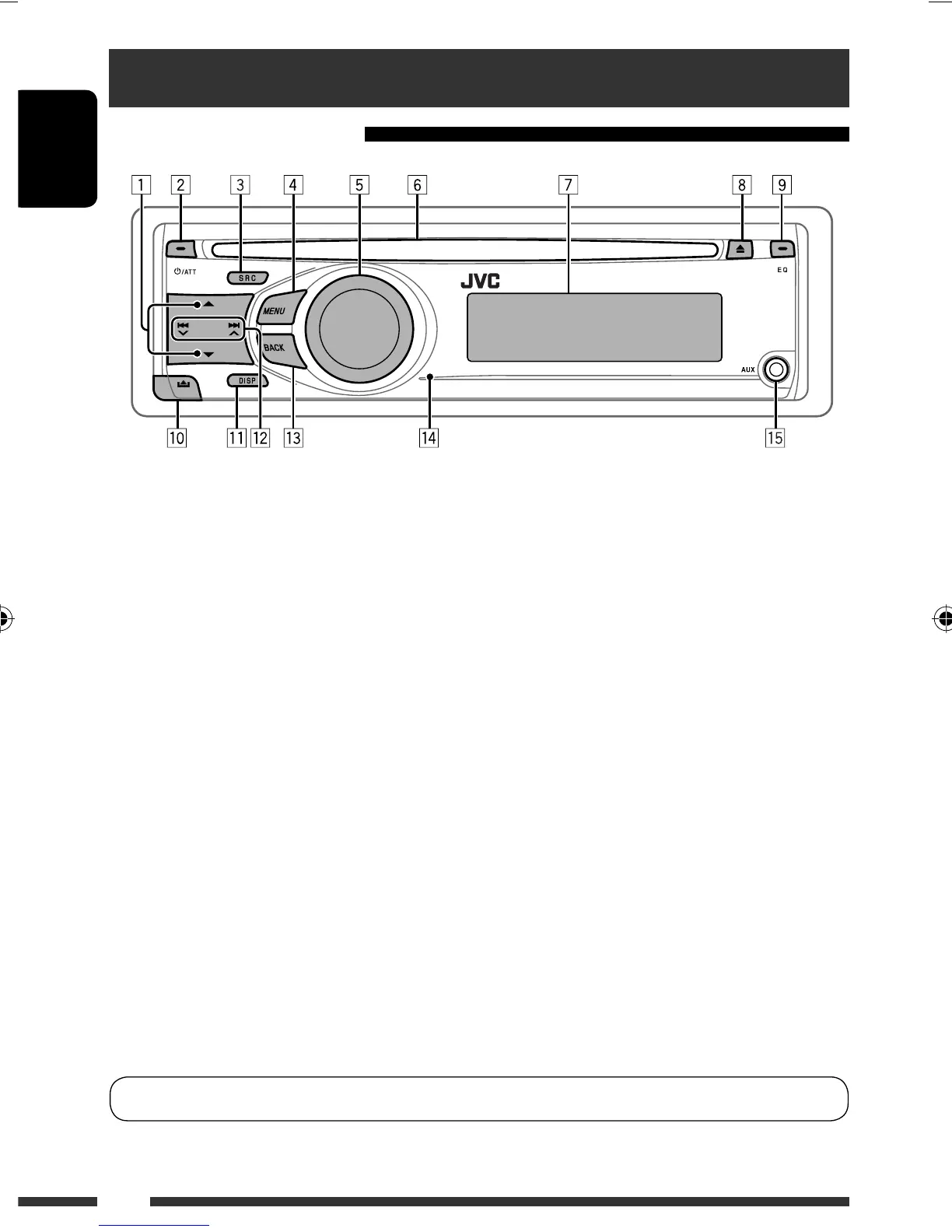
8 Eject disc.
9 Select the sound mode.
p Detach the panel.
q Change the display information.
w • FM/AM: Search for station.
• CD/CD-CH: Select track.
• IPOD: Select track.
• BT-PHONE/BT-AUDIO: Select setting item/
registered device.
e Return to the previous menu.
r Remote sensor
t AUX (auxiliary) input jack
*
1
You cannot select these sources if they were disabled
in the Menu (see “Menu operations” on page 22).
*
2
You cannot select these sources if they are not ready
or not connected.
*
3
Also known as “Control dial” in this manual.
1 • FM/AM: Select preset station.
• CD/CD-CH: Select folder.
• IPOD: Enter the main menu/Pause playback/
Confirm selection.
• BT-PHONE/BT-AUDIO: Enter/go back to
previous Bluetooth menu.
2 • Turn on the power.
• Attenuate the sound (if the power is on).
• Turn off the power [Hold].
3 Select the source.
FM = AM *
1
= CD *
2
= CD-CH *
2
/IPOD *
2
(or
EXT INPUT) = BT-PHONE *
2
= BT-AUDIO *
2
=
AUX IN *
1
= (back to the beginning)
4 • Enter list operations.
• Enter Menu setting [Hold] .
5 • Control the volume or selection [Turn]. *
3
• Confirm the selection [Press] . *
3
• FM: Enter SSM preset mode [Hold] . *
3
• CD/CD-CH/IPOD: Enter playback mode [Hold] . *
3
6 Loading slot
7 Display window
You can change the display and button illumination (see “COLOR” on page 21).
EN02-09_KD-R406_001A_f.indd 4EN02-09_KD-R406_001A_f.indd 4 9/2/08 3:47:25 PM9/2/08 3:47:25 PM



 To Next Page
 Loading...