
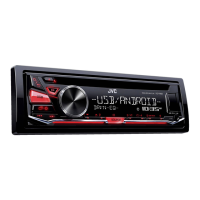
Why sound cannot be heard on my JVC KD-R482 Car Receiver?
- CccamachoAug 12, 2025
If there is no sound from your JVC Car Receiver, make sure the volume is at an audible level and verify that all cords and connections are properly secured.

Why sound cannot be heard on my JVC KD-R482 Car Receiver?
If there is no sound from your JVC Car Receiver, make sure the volume is at an audible level and verify that all cords and connections are properly secured.
What to do if my JVC Car Receiver disc cannot be ejected?
If the disc cannot be ejected from your JVC Car Receiver, press and hold the eject button to forcibly eject the disc. Be careful not to drop the disc when it is ejected.
What to do if my JVC Car Receiver displays 'MISWIRING CHECK'?
If your JVC Car Receiver shows 'MISWIRING CHECK', turn off the power. Check the speaker wires to ensure the terminals are properly insulated, and then turn the power back on.
Why is radio reception poor on my JVC KD-R482 Car Receiver?
If you're experiencing poor radio reception on your JVC Car Receiver, ensure the antenna is firmly connected.
What to do if my JVC KD-R482 playback is intermittent?
If the playback on your JVC Car Receiver is intermittent, turn off the power saving mode on the Android device.
Why is playback order not as intended on my JVC KD-R482?
The playback order on your JVC Car Receiver is determined by the file name (USB) or the order in which files were recorded (disc).
Why is elapsed playing time not correct on my JVC KD-R482?
The accuracy of the elapsed playing time on your JVC Car Receiver depends on the recording process used earlier.
Why correct characters are not displayed on my JVC KD-R482?
If the correct characters are not displayed on your JVC Car Receiver: * The unit can only display uppercase letters, numbers, and a limited number of symbols. * Depending on the display language selected, some characters may not be displayed correctly.
| Type | Car Receiver |
|---|---|
| Maximum Output Power | 50 W x 4 |
| RMS Power | 22 W x 4 |
| Tuner | FM/AM |
| Bluetooth | Yes |
| USB Port | Yes |
| AUX Input | Yes |
| Display | LCD |
| Pre-Output Voltage | 2.5 V |
| Speaker Impedance | 4-8 ohms |
| Frequency Response | 20 Hz - 20 kHz |
| AM Frequency Range | 530 - 1710 kHz |
| Detachable Faceplate | Yes |
| Channels | 4 |
| CD Player | Yes |
| iPod/iPhone Control | Yes |
| Steering Wheel Control | Yes |
| Equalizer | 13-Band |
| Playback Media | USB |
| Supported Audio Formats | MP3, WMA |
General instructions for safe and proper use of the product.
Critical safety warnings for operation to prevent hazards.
Important cautions for safe operation to prevent damage or accidents.
Explains symbols, abbreviations, and cross-references used in the manual.
Details and functions of the unit's front panel controls and display.
Description of the functions of the included remote control.
Instructions for resetting the unit to factory default settings.
Step-by-step guide for replacing the battery in the remote control.
Steps to disable the unit's demonstration mode.
Guide for setting the current time and date.
Configuration of initial system parameters and preferences.
How to begin playback from different sources.
Location and connection method for USB devices.
Connecting and configuring Android devices for playback.
Choosing operational modes for connected Android devices.
Selecting the correct storage drive for USB playback.
Navigating and selecting audio files from storage.
Techniques for rapidly locating specific files within large libraries.
Methods for finding and tuning into radio stations.
Procedures for storing and recalling preset radio stations.
Accessing tuner settings like Radio Timer and SSM.
Adjusting sensitivity for local radio station searching.
Optimizing FM tuner selectivity for interference reduction.
Enabling mono reception to improve FM signal quality.
Automatically switching to news broadcasts if available.
Instructions for connecting and playing audio from external devices.
Choosing pre-defined sound profiles for different music genres.
Saving custom audio configurations for later use.
Accessing general audio adjustment menus.
Detailed configuration options for the equalizer.
Enhancing low-frequency sound at low volume levels.
Adjusting the output volume of the subwoofer.
Activating or deactivating the subwoofer output.
Setting the low-pass filter frequency for the subwoofer.
Adjusting screen brightness for day and night conditions.
Controlling how text information is displayed on the screen.
Adjusting the intensity of the display illumination.
Procedures for cleaning the unit and its connectors.
Precautions and guidelines for handling audio discs.
List of supported audio file formats for playback.
Compatibility notes and limitations for USB storage devices.
How to cycle through different display modes and information.
Troubleshooting steps for sound issues and wiring problems.
Solutions for poor radio reception or static noise.
Troubleshooting playback errors and display issues with CDs/USB.
Solutions for problems with Android device connection and playback.
Critical safety warnings regarding unit installation.
Recommendations for professional installation services.
Step-by-step instructions for dashboard installation.
List of all components included for unit installation.
Procedure for safely detaching the unit from the dashboard.
Detailed diagrams and explanations for connecting the unit's wiring harness.
Performance specifications for FM and AM radio reception.
Technical specifications related to CD playback.
Technical specifications for USB device connectivity and data transfer.
Specifications for the auxiliary audio input.
Adjusting screen brightness for day and night conditions.
Controlling how text information is displayed on the screen.
Adjusting the intensity of the display illumination.
Enhancing low-frequency sound at low volume levels.
Adjusting the output volume of the subwoofer.
Activating or deactivating the subwoofer output.
Setting the low-pass filter frequency for the subwoofer.
Pre-set equalizer options for various music genres.
Adjusting custom sound settings for personalized audio.
Advanced equalizer settings for fine-tuning audio profiles.
Adjusting the bass boost level for enhanced low-end sound.
Instructions for connecting and playing audio from external devices.
Adjusting sensitivity for local radio station searching.
Optimizing FM tuner selectivity for interference reduction.
Enabling mono reception to improve FM signal quality.
Methods for finding and tuning into radio stations.
Procedures for storing and recalling preset radio stations.
Automatic station scanning and storage function.
Accessing additional radio tuner configurations.
Choosing operational modes for connected Android devices.
Selecting the correct storage drive for USB playback.
Navigating and selecting audio files from storage.
Techniques for rapidly locating specific files within large libraries.
Procedures for initiating media playback from different sources.
Quick access to USB/Android sources.
Location and connection method for USB devices.
Connecting and configuring Android devices for playback.
Steps to disable the unit's demonstration mode.
Guide for setting the current time and date.
Configuration of initial system parameters and preferences.
How to properly connect and use the remote control.
Step-by-step guide for replacing the battery in the remote control.
Procedure for powering the device on.
Methods for controlling the audio playback volume.
General instructions for safe and proper use of the product.
Critical safety warnings for operation to prevent hazards.
Important cautions for safe operation to prevent damage or accidents.
Guide on understanding manual structure, symbols, and references.
Performance specifications for FM and AM radio reception.
Technical specifications related to CD playback.
Technical specifications for USB device connectivity and data transfer.
Specifications for the auxiliary audio input.
Detailed diagrams and explanations for connecting the unit's wiring harness.
Recommendation for professional installation services for safety.
Step-by-step instructions for dashboard installation.
List of all components included for unit installation.
Procedure for safely detaching the unit from the dashboard.
Common issues encountered during device operation.
Troubleshooting playback errors and display issues with CDs/USB.
Solutions for problems with Android device connection and playback.
Troubleshooting steps for sound issues and wiring problems.
Solutions for poor radio reception or static noise.
Troubleshooting disc ejection, reading, and file format issues.
Procedures for cleaning the unit and its connectors.
Precautions and guidelines for handling audio discs.
List of supported audio file formats for playback.
Compatibility notes and limitations for USB storage devices.
Adjusting screen brightness for day and night conditions.
Controlling how text information is displayed on the screen.
Adjusting the intensity of the display illumination.
Enhancing low-frequency sound at low volume levels.
Adjusting the output volume of the subwoofer.
Activating or deactivating the subwoofer output.
Setting the low-pass filter frequency for the subwoofer.
Pre-set equalizer options for various music genres.
Adjusting custom sound settings for personalized audio.
Advanced equalizer settings for fine-tuning audio profiles.
Adjusting the bass boost level for enhanced low-end sound.
Instructions for connecting and playing audio from external devices.
Adjusting sensitivity for local radio station searching.
Optimizing FM tuner selectivity for interference reduction.
Enabling mono reception to improve FM signal quality.
Methods for finding and tuning into radio stations.
Procedures for storing and recalling preset radio stations.
Automatic station scanning and storage function.
Accessing additional radio tuner configurations.
Choosing operational modes for connected Android devices.
Selecting the correct storage drive for USB playback.
Navigating and selecting audio files from storage.
Techniques for rapidly locating specific files within large libraries.
Procedures for initiating media playback from different sources.
Quick access to USB/Android sources.
Location and connection method for USB devices.
Connecting and configuring Android devices for playback.
Steps to disable the unit's demonstration mode.
Guide for setting the current time and date.
Configuration of initial system parameters and preferences.
How to properly connect and use the remote control.
Step-by-step guide for replacing the battery in the remote control.
Procedure for powering the device on.
Methods for controlling the audio playback volume.
General instructions for safe and proper use of the product.
Critical safety warnings for operation to prevent hazards.
Important cautions for safe operation to prevent damage or accidents.
Guide on understanding manual structure, symbols, and references.
Performance specifications for FM and AM radio reception.
Technical specifications related to CD playback.
Technical specifications for USB device connectivity and data transfer.
Specifications for the auxiliary audio input.


