To Next Page
A
Amy PerezSep 12, 2025
What does 'NO SKIPS' mean on my JVC KD-R486?
- Aamber19Sep 12, 2025
If “NO SKIPS” appears on your JVC Car Receiver, the skip limit has been reached.

What does 'NO SKIPS' mean on my JVC KD-R486?
If “NO SKIPS” appears on your JVC Car Receiver, the skip limit has been reached.
What to do if sound cannot be heard during playback on JVC Car Receiver?
If you cannot hear sound during playback on your JVC Car Receiver, try the following: 1. Reconnect the Android device. 2. If in [AUDIO MODE], launch any media player application on the Android device and start playback. 3. If in [AUDIO MODE], relaunch the current media player application or use another media player application. 4. Restart the Android device.
How to eject a disc from JVC KD-R486 Car Receiver if it's stuck?
If a disc cannot be ejected from your JVC Car Receiver, press and hold the eject button to forcibly eject the disc. Be careful not to drop the disc when it is ejected.
What does 'NOT CONNCTD' mean on my JVC Car Receiver?
If “NOT CONNCTD” appears on your JVC Car Receiver, link to the application is impossible.
What does 'NO STATIONS' mean on my JVC KD-R486?
If “NO STATIONS” appears on your JVC Car Receiver, no stations are found.
What does 'SAVE ERROR' mean on my JVC KD-R486?
If “SAVE ERROR” appears on your JVC Car Receiver, addition to the favorite category failed.
What does 'PLS LOGIN' mean on my JVC KD-R486?
If the message “PLS LOGIN” appears on your JVC Car Receiver, log in again.
What does 'STATION NOT AVAILABLE' mean on my JVC KD-R486?
If “STATION NOT AVAILABLE” appears on your JVC Car Receiver, it means the broadcast from the station is over.
What does 'DISCONNCTED' mean on my JVC Car Receiver?
If “DISCONNCTED” appears on your JVC Car Receiver, check the connection to the device.
Why can't I playback in [AUTO MODE] on my JVC KD-R486 Car Receiver?
If you cannot playback in [AUTO MODE] on your JVC Car Receiver: * Make sure the JVC MUSIC PLAY APP is installed on your Android device. * Reconnect the Android device and select the appropriate control mode. * If the problem persists, the connected Android device may not support [AUTO MODE].
Steps to cancel demonstration, set clock/date, and configure basic system settings.
Detailed configuration of preset, easy, and pro equalizers for sound tuning.
Adjusting volume, amplifier gain, and configuring speaker output configurations.
Troubleshooting steps for common issues across different sources like Radio, iPod, and Android.
Specific solutions for errors encountered with Pandora and iHeartRadio applications.
Critical safety warnings and step-by-step guides for unit installation.
Detailed guide for connecting the unit's wiring harness to the vehicle's electrical system.
 General
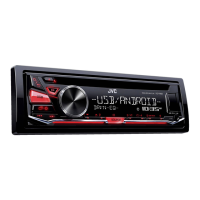
| Brand | JVC |
|---|---|
| Model | KD-R486 |
| Type | Car Receiver |
| Maximum Output Power | 50W x 4 |
| RMS Power | 22W x 4 |
| USB | Yes |
| AUX Input | Yes |
| MP3 Playback | Yes |
| WMA Playback | Yes |
| FLAC Playback | No |
| AAC Playback | Yes |
| AM/FM Radio | Yes |
| RDS | Yes |
| Display Type | LCD |
| Display Color | White |
| Button Illumination | Red |
| Steering Wheel Control Ready | Yes |
| Bluetooth | No |
| Detachable Face | Yes |
| iPod Control | Yes |
| iPhone Control | Yes |
| Pre-Output Voltage | 2.5V |
| Frequency Response | 20Hz - 20kHz |
| Signal-to-Noise Ratio | 80dB |
| Remote Control | Optional |
| Pre-Output Impedance | 10k ohms |