EasyManua.ls Logo

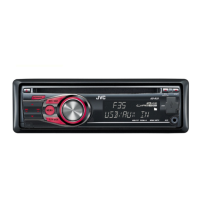
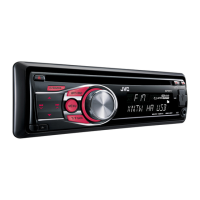
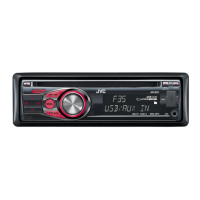
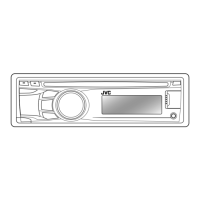
JVC KD-R415 - User Manual

JVC KD-R415
26 pages
Print Icon
To Next Page IconTo Next Page
Loading...
ENGLISH
GET0623-001A
[U/UH]
EN, TH
1009DTSMDTJEIN© 2009 Victor Company of Japan, Limited
For canceling the display demonstration, see page 4. /
CD RECEIVER /
KD-R416 / KD-R415 /
KD-R316 / KD-R315
INSTRUCTIONS
For installation and connections, refer to the separate manual.
Having TROUBLE with operation?
Please reset your unit
Refer to page of How to reset your unit
CoverRear_KD-R416_001A_f.indd 1-2CoverRear_KD-R416_001A_f.indd 1-2 10/8/09 9:05:08 AM10/8/09 9:05:08 AM

Questions and Answers

  • F
    fmitchellSep 9, 2025
    Why does my JVC KD-R415 interrupt disc sound sometimes?
    • K
      Krista BaileySep 9, 2025
      If the disc sound is sometimes interrupted, stop playback while driving on rough roads. You can also try changing the disc or checking the cords and connections.
  • A
    alyssapenaAug 23, 2025
    Why is my JVC KD-R415 Car Receiver not working at all?
    • R
      ronald29Aug 23, 2025
      Reset the unit.
  • J
    Jose BarkerAug 25, 2025
    What to do if my JVC KD-R415 Car Receiver displays 'PROTECT'?
    • R
      robin14Aug 26, 2025
      If the display shows “PROTECT” and no operations are possible, ensure the speaker lead terminals are properly covered with insulating tape. Then, reset the unit. If the issue persists, consult your JVC car audio dealer or a company supplying kits.
  • K
    Kiara PughAug 27, 2025
    Why does my JVC Car Receiver say 'NO USB'?
    • K
      Kevin DaltonAug 27, 2025
      If “NO USB” appears on the display, it means the unit isn't detecting the USB device. Try attaching a USB device that contains tracks encoded in an appropriate format or reattaching the USB device.
  • J
    Jessica FreemanAug 28, 2025
    What to do if my JVC KD-R415 is making static noise while listening to the radio?
    • L
      leechristianAug 28, 2025
      If you are experiencing static noise while listening to the radio, make sure the antenna is firmly connected.
  • K
    Katherine DavisSep 22, 2025
    Why can't my JVC Car Receiver play back a disc with MP3/WMA tracks?
    • D
      Dana PrestonSep 22, 2025
      Use a disc with MP3/WMA tracks recorded in a format compliant with ISO 9660 Level 1, Level 2, Romeo, or Joliet. Add the extension code or to the file names.
  • B
    Brian WilsonSep 16, 2025
    Why is the elapsed playing time not correct on my JVC Car Receiver?
    • J
      Jason MurraySep 16, 2025
      This sometimes occurs during playback and is caused by how the tracks are recorded on the disc.
  • T
    Tony SawyerSep 18, 2025
    What does “NO FILE” mean on my JVC KD-R416/KD-R415 Car Receiver?
    • M
      meghan66Sep 18, 2025
      If “NO FILE” appears on the display, the selected folder is an empty folder. Select another folder that contains MP3/WMA tracks.
  • N
    Nancy McdonaldSep 7, 2025
    Why is my JVC KD-R415 Car Receiver displaying wrong characters?
    • C
      Carol SharpSep 7, 2025
      This unit can only display letters (upper case), numbers, and a limited number of symbols.
  • M
    Matthew SmithSep 4, 2025
    Why is my JVC KD-R415 Car Receiver not playing tracks in the order I intended?
    • A
      Andre MccoySep 4, 2025
      The playback order is determined by the write-in time stamp. The first track/folder written into the USB device will be the first track/folder for playback.

Summary

Instructions Overview

Important Safety Information

Laser Product Safety

Warnings and cautions related to Class 1 Laser Product and radiation.

Safe Operation Practices

Guidelines for safe use, including driving, volume, and temperature considerations.

Understanding the Manual

Icon and Symbol Guide

Explains the meaning of icons and symbols used in the manual.

Control Panel Operations

Attaching and Detaching Panel

Instructions on how to attach and detach the control panel.

Unit Reset Procedure

How to reset the unit to its default settings.

Forcible Disc Ejection

Steps to forcibly eject a disc if it cannot be ejected normally.

Demonstration and Clock Settings

Canceling Display Demonstration

How to turn off the display demonstration feature.

Setting the Clock

Instructions on how to set the unit's clock.

Remote Controller Setup and Safety

Battery Handling Precautions

Warnings and cautions for safe battery replacement and handling.

Basic Operations

Listening to the Radio

Radio Tuning Methods

Explains manual search and automatic presetting (SSM) for radio stations.

Improving FM Reception

Steps to take when an FM stereo broadcast is difficult to receive.

Display Information

How to change the information displayed for radio stations.

Radio Presetting and Selection

Manual Station Presetting

How to manually preset FM/AM radio stations.

Preset Station Selection

Methods for selecting preset radio stations using the unit or remote.

Disc Playback Operations

Disc Handling

How to stop playback, eject discs, and prohibit ejection.

Disc Playback Volume Caution

Warning to lower volume before playing discs to prevent speaker damage.

MP3;WMA Playback Control

Playback Mode Selection

Explains repeat, random, and track/folder selection modes.

Track and Folder Navigation

How to select tracks and folders using the unit or remote controller.

Display Information Management

How to change the information displayed during playback.

USB Device Playback

USB Device Handling

How to stop playback, detach USB devices, and general operational notes.

USB Playback Cautions

Important warnings and cautions for using USB devices, including volume and compatibility.

Connecting External Components

Using the AUX Input

How to connect and listen to external audio components via the AUX input.

Sound Mode Selection

Preset and Custom Sound Modes

How to select preset sound modes and store custom sound settings.

Menu Operations

Display and Clock Configuration

Settings for display illumination, scrolling, demonstration, and clock.

Tuner and Audio Configuration

Adjusting tuner functions (SSM, Mono, IF Band) and display information.

Audio Settings Menu

Speaker Balance and Tone Control

Adjusting fader, balance, loudness, and tone control ranges.

Subwoofer and Auxiliary Settings

Configuring subwoofer output, cutoff frequency, and auxiliary input adjustments.

Source and Miscellaneous Settings

Beep Tones and Amplifier Gain

Configuring beep tones and amplifier gain settings.

Source Selection and Title Assignment

Managing source selection and assigning titles to radio stations.

Erasing Titles

Procedure to erase an entire title entry.

Maintenance and Disc Care

Unit and Connector Maintenance

Procedures for cleaning connectors and managing moisture condensation.

Disc Handling and Cleaning

Proper methods for handling, cleaning discs, and playing new discs.

Disc Compatibility Warnings

Lists types of discs that are not compatible or may cause issues.

Additional Unit Information

Tuner Station Memory

Details on storing radio stations using SSM and manual methods.

Disc Playback Considerations

Notes on DualDisc compatibility and playing CD-R/CD-RW discs.

MP3;WMA Disc Operation

General information on playing MP3/WMA discs and their formats.

MP3;WMA Disc Playback Details

CD-R;CD-RW Compatibility Warnings

Lists types of CD-Rs/CD-RWs that are not compatible with the unit.

MP3;WMA Disc Specifications

Details on supported bit rates, sampling frequencies, formats, and file naming.

USB MP3;WMA Playback

Requirements and operational notes for playing MP3/WMA files from a USB device.

Troubleshooting Guide

General Operation Issues

Solutions for common problems like no sound, "PROTECT" message, and unit unresponsiveness.

Radio Reception and Source Issues

Remedies for SSM errors, radio static, and inability to select AUX or AM sources.

Disc Playback Troubleshooting

Disc Playback Errors

Solutions for discs not playing, ejecting, or displaying errors like "NO DISC".

CD-R;CD-RW Playback Issues

Troubleshooting for CD-R/CD-RW playback, skipping, and finalize errors.

MP3;WMA Playback Problems

Solutions for MP3/WMA playback issues including noise, incorrect time, and unsupported files.

USB Device Playback Troubleshooting

USB Device Connection and Recognition

Solutions for "NO USB", "CANNOT PLAY", and unit not detecting USB device.

USB File Playback Issues

Remedies for noise, unsupported files, incorrect order, and character display problems.

Specifications

Troubleshooting Assistance

Unit Reset Procedure

Guide on how to reset the unit to resolve operational issues.

Installation Safety and Warnings

Installation Precautions

Critical warnings and precautions for safe electrical connections and installation.

Installation Procedure

In-Dash Mounting

Step-by-step guide for installing the unit in a dashboard.

Installation Without Sleeve

Instructions for mounting the unit without using the provided sleeve.

Unit Removal

Procedure for safely removing the unit from the vehicle.

Electrical Connections and Wiring

Power and Speaker Connection Precautions

Critical safety precautions for connecting power supply and speakers.

External Component Wiring

Guide for connecting external amplifiers or subwoofers to the unit.

Troubleshooting Electrical Issues

Power, Sound, and Protection Faults

Solutions for blown fuses, no sound, distortion, and "PROTECT" errors.

Unit Responsiveness and Noise

Troubleshooting for unresponsive units, overheating, and noise interference.

JVC KD-R415 Specifications

General IconGeneral
BrandJVC
ModelKD-R415
CategoryCar Receiver
LanguageEnglish

Related product manuals