10
Data Size: B6L (182 mm x 128 mm)
Book Size: B6L (182 mm x 128 mm)
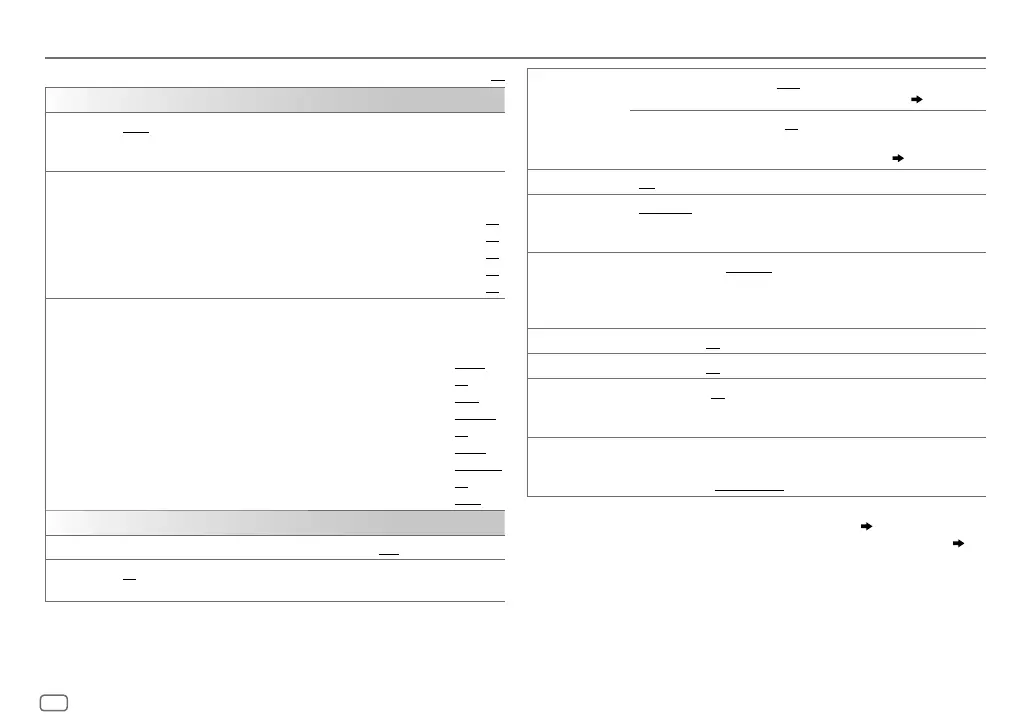
SUB.W LEVEL
*
1
SPK-OUT
*
2
00
to
+06
(
+03
):Adjusts the output level of the
subwoofer connected via speaker lead. (
17
)
PRE-OUT
*
3
–08
to
+08
(
00
):Adjusts the output level of the
subwoofer connected to the lineout terminals (REAR/
SW) through an external amplifier. (
17
)
SUB.W
*
3
ON
/
OFF
: Turns on or off the subwoofer output.
SUB.W
LPF
*
1
THROUGH
:All signals are sent to the subwoofer. ;
LOW
55HZ
/
MID
85HZ
/
HIGH120HZ
:Audio signals with frequencies lower than
55Hz/ 85Hz/ 120Hz are sent to the subwoofer.
SUB.WPHASE
*
1
REVERSE
(180°)/
NORMAL
(0°):Selects the phase of the subwoofer
output to be in line with the speaker output for optimum performance.
(Selectable only if a setting other than [
THROUGH
] is selected for
[
SUB.W
LPF
].)
FADER R06
—
F06
(
00
):Adjusts the front and rear speaker output balance.
BALANCE
*
4
L06
—
R06
(
00
):Adjusts the left and right speaker output balance.
VOL
ADJUST –05
—
+05
(
00
):Presets the volume adjustment level of each source
(compared to the FM volume level). Before adjustment, select the
source you want to adjust. (“VOLADJFIX” appears if FM is selected.)
AMP
GAIN LOW
POWER
:Limits the maximum volume level to 30. (Select if the
maximum power of each speaker is less than 50W to prevent damaging
the speakers.);
HIGHPOWER
:The maximum volume level is 50.
*
1
Displayed only when [
SUB.W
] is set to [
ON
].
*
2
Displayed only when [
SPK/PRE
OUT
] is set to [
SUB.W/SUB.W
]. (
11
)
*
3
Displayed only when [
SPK/PRE
OUT
] is set to [
REAR/SUB.W
] or [
SUB.W/SUB.W
]. (
11
)
*
4
This adjustment will not affect the subwoofer output.
AUDIO SETTINGS
Default:
XX
EQSETTING
EQPRESET
FLAT
/
HARD ROCK
/
JAZZ
/
POP
/
R&B
/
TALK
/
USER1
/
USER2
/
VOCALBOOST
/
BASSBOOST
/
CLASSICAL
/
DANCE
:Selects a preset
equalizer.
EASYEQ
1
USER1
/
USER2
:Select a preset name.
2
Adjust your own sound settings.
SUB.W SP
*
1
*
2
:
00
to
+06
(Default:
03
SUB.W
*
1
*
3
:
–08
to
+08
00
BASS
LVL
:
–06
to
+06
00
MID
LVL
:
–06
to
+06
00
TRE
LVL
:
–06
to
+06
00
)
PRO EQ
1
USER1
/
USER2
:Select a preset name.
2
BASS
/
MIDDLE
/
TREBLE
:Select a sound tone.
3
Adjust the sound elements of the selected sound tone.
BASS
Frequency:
60
/
80
/
100
/
200HZ
(
Default:
80HZ
Level:
–06
to
+06
00
Q:
Q1.0
/
Q1.25
/
Q1.5
/
Q2.0
Q1.0
)
MIDDLE
Frequency:
0.5
/
1.0
/
1.5
/
2.5KHZ
(Default:
1.0KHZ
Level:
–06
to
+06
00
Q:
Q0.75
/
Q1.0
/
Q1.25
Q1.25
)
TREBLE
Frequency:
10.0
/
12.5
/
15.0
/
17.5KHZ
(Default:
10.0KHZ
Level:
–06
to
+06
00
Q:
QFIX
QFIX
)
AUDIO
BASS BOOST
+01
/
+02
: Selects your preferred bass boost level.;
OFF
:Cancels.
LOUD 01
/
02
:Boosts low or high frequencies to produce a well-balanced sound at
low volume.;
OFF
:Cancels.
JS_JVC_KD_R761_E_EN_00_3.indd 10JS_JVC_KD_R761_E_EN_00_3.indd 10 4/8/2014 10:28:47 AM4/8/2014 10:28:47 AM



 To Next Page
 Loading...