ENGLISH
12
Data Size: B6L (182 mm x 128 mm)
Book Size: B6L (182 mm x 128 mm)
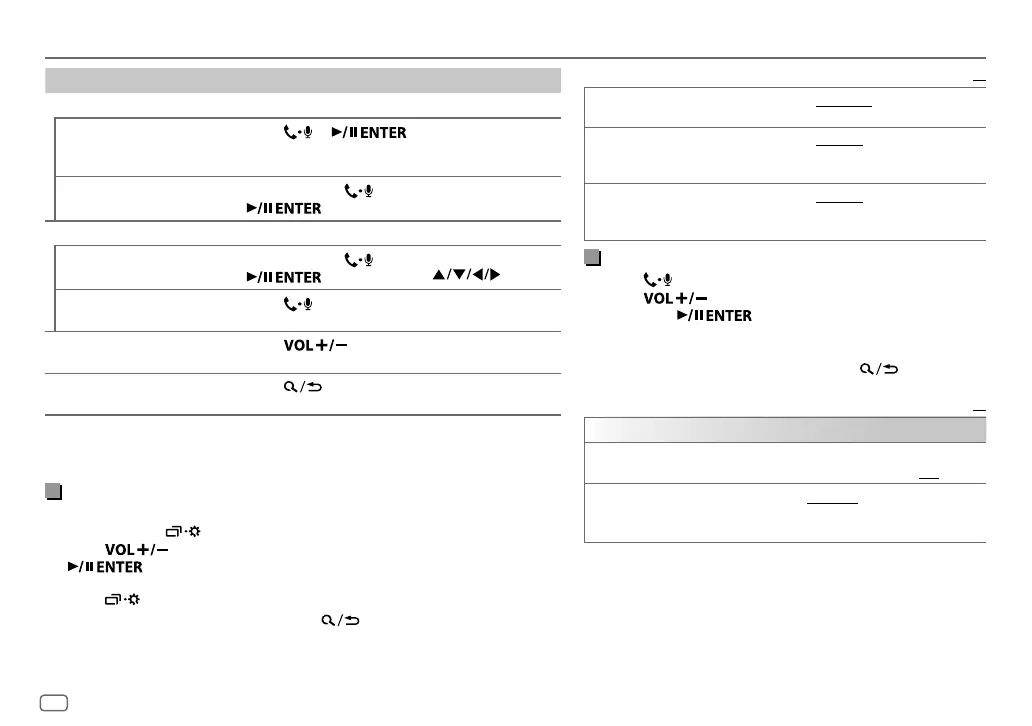
To On the faceplate On the remote control
While talking on the first incoming call...
Answer another incoming
call and hold the current
call
Press
or .
( Not available )
Reject another incoming
call
Press and hold
or
.
( Not available )
While having two active calls...
End current call and
activate held call
Press and hold
or
.
Press and hold
.
Swap between the
current call and held call
Press
.
( Not available )
Adjust the phone volume
*
1
[00]
to
[35]
(Default:
[15]
)
Press
during
a call.
( Not available )
Switch between hands-free
and private talk modes
*
2
Press during a call.
( Not available )
*
1
This adjustment will not affect the volume of the other sources.
*
2
Operations may vary according to the connected Bluetooth device.
Improve the voice quality
While talking on the phone....
1 Press and hold .
2 Press to select an item
(
see the following table
)
, then press
.
3 Repeat step 2 until the desired item is selected or activated.
4 Press to exit.
To return to the previous setting item, press .
Default:
XX
MIC GAIN LEVEL –10
to
LEVEL +10
(
LEVEL –04
):The sensitivity of the
microphone increases as the number increased.
NR LEVEL LEVEL –05
to
LEVEL +05
(
LEVEL 00
):Adjust the noise
reduction level until the least noise is being heard during a
phone conversation.
ECHO CANCEL LEVEL –05
to
LEVEL +05
(
LEVEL 00
):Adjust the echo
cancellation delay time until the least echo is being heard
during a phone conversation.
Make the settings for receiving a call
1
Press to enter Bluetooth mode.
2 Press to select an item
(
see the following table
)
,
then press
.
3 Repeat step 2 until the desired item is selected or
activated.
To return to the previous setting item, press
.
Default:
XX
SETTINGS
AUTO ANSWER
01 SEC
to
30 SEC
:The unit answers incoming call
automatically in the selected time (in seconds).;
OFF
:Cancels.
RING COLOR COLOR
01
to
COLOR
49
(
COLOR 08
): Selects the illumination
color for symbolic button as notification when there is an
incoming call and during a call.;
OFF
:Cancels.
BLUETOOTH®
JS_JVC_KD_R881BT_M_EN_3.indd 12JS_JVC_KD_R881BT_M_EN_3.indd 12 8/8/2016 10:32:47 PM8/8/2016 10:32:47 PM



 To Next Page
 Loading...