EasyManua.ls Logo

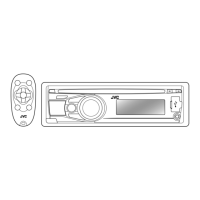
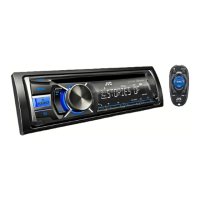
JVC KD-R711 - User Manual

JVC KD-R711
38 pages
Print Icon
To Next Page IconTo Next Page
Loading...
FRANÇAIS
ENGLISH
GET0649-003A
[E/EU]
EN, FR
1209DTSMDTJEIN© 2009 Victor Company of Japan, Limited
For canceling the display demonstration, see page 4. / Pour annuler la démonstration des
affichages, référez-vous à la page 4.
CD RECEIVER / RÉCEPTEUR CD
KD-R711
INSTRUCTIONS
MANUEL D’INSTRUCTIONS
For installation and connections, refer to the separate manual. / Pour l’installation et les
raccordements, se référer au manuel séparé.
Dear Customer,
This apparatus is in conformance with the valid
European directives and standards regarding
electromagnetic compatibility and electrical safety.
European representative of Victor Company of
Japan, Limited is:
JVC Technical Services Europe GmbH
Postfach 10 05 04
61145 Friedberg
Germany
Cher(e) client(e),
Cet appareil est conforme aux directives et
normes européennes en vigueur concernant la
compatibilité électromagnétique et à la sécurité
électrique.
Représentant européen de la société Victor
Company of Japan, Limited:
JVC Technical Services Europe GmbH
Postfach 10 05 04
61145 Friedberg
Allemagne
Having TROUBLE with operation?
Please reset your unit
Refer to page of How to reset your unit
Vous avez des PROBLÈMES de fonctionnement?
Réinitialisez votre appareil
Référez-vous à la page intitulée Comment réinitialiser votre appareil
CoverRear_KD-R711_003A_f.indd 1-2CoverRear_KD-R711_003A_f.indd 1-2 12/10/09 11:05:49 AM12/10/09 11:05:49 AM

Other manuals for JVC KD-R711

Questions and Answers

  • K
    Kaitlyn SmithSep 19, 2025
    Why aren't tracks playing in order on my JVC KD-R711 Car Receiver?
    • M
      Michelle CaseySep 19, 2025
      The playback order is determined by the file name. Folder with numbers on the initial as their names are sorted in numerical order. However, folder with no numbers on the initial of their names are sorted according to the file system of the CD.
  • A
    angela45Aug 25, 2025
    Why is Bluetooth audio skipping on my JVC Car Receiver?
    • S
      stephanie26Aug 25, 2025
      If the sound from a Bluetooth audio player is interrupted or skipped on your JVC Car Receiver: * Reduce the distance between the unit and the Bluetooth audio player. * Disconnect the device connected for Bluetooth Phone. * Turn the unit off, then on again. * If the sound isn't restored, connect the player again.
  • K
    kbaldwinAug 25, 2025
    Why won't my JVC KD-R711 Car Receiver find my Bluetooth device?
    • D
      douglascandaceAug 26, 2025
      If your JVC Car Receiver isn't detecting the Bluetooth device: * Search from the Bluetooth device again. * Reset the unit, then search from the Bluetooth device again.
  • J
    Julia BrewerAug 27, 2025
    What to do if “PROTECT” appears on JVC KD-R711?
    • R
      Robert JacksonAug 27, 2025
      If you see “PROTECT” on the display of your JVC Car Receiver and can't do anything, make sure the speaker lead terminals are properly covered with insulating tape. Then, reset the unit.
  • S
    Sharon DrakeSep 23, 2025
    Why is the elapsed playing time incorrect on my JVC KD-R711?
    • K
      kristenmitchellSep 23, 2025
      This sometimes occurs during playback. This is caused by how the tracks are recorded on the disc.
  • V
    Vanessa SmithSep 23, 2025
    Why are the characters displayed incorrectly on my JVC Car Receiver?
    • C
      Christopher JamesSep 23, 2025
      This unit can only display letters (upper case), numbers, and a limited number of symbols.
  • D
    Dawn BryantSep 10, 2025
    Why won't my iPod/iPhone work with JVC KD-R711?
    • J
      Joseph MillerSep 10, 2025
      If the iPod/iPhone does not turn on or does not work with your JVC Car Receiver: * Check the connecting cable and its connection. * Update the firmware version of the iPod/iPhone. * Charge the battery of the iPod/iPhone. * Reset the iPod/iPhone. * Check whether setting is appropriate.
  • W
    William PerrySep 12, 2025
    How to reduce noise on JVC Car Receiver with iPod?
    • L
      Laurie KerrSep 12, 2025
      If you are getting a lot of noise on your JVC Car Receiver, turn off (uncheck) the “VoiceOver” feature of the iPod.
  • M
    Mrs. Michelle HernandezSep 3, 2025
    How to stop echo on JVC KD-R711 Car Receiver?
    • D
      dennis14Sep 4, 2025
      If you are experiencing echo or noise with your JVC Car Receiver, adjust the microphone unit’s position.
  • G
    gallaghermarkSep 1, 2025
    Why won't my JVC Car Receiver play the disc?
    • R
      Roberto StantonSep 1, 2025
      If a disc cannot be played back on your JVC Car Receiver, insert the disc correctly.

Summary

JVC KD-R711 CD Receiver: Initial Setup and Troubleshooting

Resetting the Unit for Operational Issues

Guide to resetting the unit when facing operational problems.

Important Safety Information and Warnings

Laser Product Safety Precautions

Information and cautions regarding the Class 1 Laser Product.

General Operational and Driving Safety

Warnings and advice for safe operation, including driving safety.

Core Unit Operations and Controls

Basic Operations with Main Unit and Remote

Overview of essential functions performed using the unit's buttons and remote.

Disc Media Playback and File Navigation

Disc Playback: Start, Stop, and Eject Procedures

Instructions for playing discs, stopping, ejecting, and prohibiting ejection.

Disc Playback Modes and USB Audio Playback

Connecting and Playing USB Audio Devices

Connecting and playing audio files from a USB mass storage device.

USB Device Operations and Usage Cautions

USB Device Playback Management

Operating USB devices, stopping playback, and detaching the device safely.

Bluetooth Connectivity and Initial Pairing

Preparing and Connecting the Bluetooth Adapter

Instructions for connecting and preparing the Bluetooth adapter for wireless communication.

Pairing a New Bluetooth Device

Steps for pairing a Bluetooth device with the unit for the first time.

Managing Paired Bluetooth Devices

Bluetooth Pairing Results and Device Management

Details on pairing outcomes and managing connected Bluetooth devices.

Bluetooth Phone Communication Setup

Connecting and Disconnecting Bluetooth Devices

Steps for establishing and terminating connections with registered Bluetooth devices.

Initiating Phone Calls via Bluetooth

Instructions for making phone calls using a connected Bluetooth mobile phone.

Bluetooth Phone Call Handling Procedures

Bluetooth Audio Control and Settings

iPod;iPhone Connectivity and Basic Usage

Connecting and Preparing iPod;iPhone for Playback

Instructions for connecting and setting up iPod/iPhone for audio playback via USB.

External Audio Input and Sound Mode Selection

Connecting and Playing External Components via AUX

Connecting and playing audio from external devices through the AUX input jack.

MP3;WMA;WAV File Playback Specifications

USB Audio File Playback Specifications

Specifications and conditions for playing MP3/WMA/WAV audio files from a USB device.

Troubleshooting: General and Disc Playback Issues

General Unit and Source Selection Troubleshooting

Solutions for sound issues, unit malfunctions, and source selection problems.

Resolving Disc Playback Errors

Steps to resolve common problems encountered during CD/Disc playback.

Troubleshooting: Media File Playback Problems

USB Device File Playback Troubleshooting

Resolving issues with USB device detection, playback order, and file errors.

Troubleshooting: Connectivity and Audio Quality

USB and Bluetooth Device Connection Issues

Solutions for USB device detection, Bluetooth pairing, and connection problems.

Product Specifications: Audio Amplifier Section

Audio Amplifier Technical Specifications

Detailed technical specifications for the unit's audio amplifier components.

Product Specifications: Media Playback and Connectivity

CD Player, USB, and Bluetooth Specifications

Technical details for the CD player, USB interface, and Bluetooth module capabilities.

JVC KD-R711 Specifications

General IconGeneral
Maximum Output Power50W x 4
RMS Power22W x 4
Subwoofer OutputYes
Display TypeLCD
Detachable FaceYes
CD PlaybackYes
MP3 PlaybackYes
WMA PlaybackYes
USB InputYes
AUX InputYes
Radio TunerAM/FM
RDSYes
Built-in BluetoothNo
Remote ControlYes
Channels4
Equalizer3-Band
Preamp Outputs2 pairs (front + rear)

Related product manuals