EasyManua.ls Logo

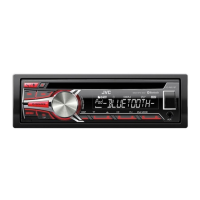
JVC KD-R741BT - User Manual

JVC KD-R741BT
40 pages
Print Icon
To Next Page IconTo Next Page
Loading...
KD-R841BT / KD-R741BT
GET0844-001B [E/EN/EU]
CD RECEIVER
INSTRUCTION MANUAL
RÉCEPTEUR CD
MANUEL D’INSTRUCTIONS
Please read all instructions carefully before operation to obtain the
best possible performance from the unit.
Veuillez lires les instructions attentivement avant d’utiliser l’appareil
afin d’obtenir les meilleures performances possibles de l’appareil.
ENGLISH
FRANÇAIS
EN_KD-R841BT[E]_ff.indd 1EN_KD-R841BT[E]_ff.indd 1 1/4/13 2:06:47 PM1/4/13 2:06:47 PM

Questions and Answers

  • M
    Mathew BarberSep 7, 2025
    What does 'ERROR' mean on my JVC KD-R741BT?
    • C
      Christopher ThorntonSep 7, 2025
      The 'ERROR' message indicates that there was a problem during the operation. Try the operation again. If the error persists, verify that the device supports the function you are attempting to use.
  • A
    Anthony GriffinAug 25, 2025
    What does it mean when my JVC KD-R741BT displays 'BT DEVICE NOT FOUND'?
    • M
      Marcus ClarkAug 25, 2025
      The message 'BT DEVICE NOT FOUND' means the unit couldn't find the registered Bluetooth devices during the automatic connection process. Turn on Bluetooth on your device and connect manually.
  • R
    Rodney StewartAug 25, 2025
    What to do if sound cannot be heard from JVC KD-R741BT Car Receiver?
    • J
      Justin ReyesAug 26, 2025
      If you're not hearing any sound, try the following: * Adjust the volume to an audible level. * Check the cords and connections to ensure they are properly connected. * If grounding is an issue, use a shorter, thicker cord to connect the rear ground terminal to the car's chassis.
  • J
    Jacob DavisSep 16, 2025
    Why is elapsed playing time not correct on my JVC Car Receiver?
    • B
      bruce89Sep 16, 2025
      The elapsed playing time on your JVC Car Receiver depends on the recording process earlier.
  • J
    John DavisSep 23, 2025
    Why the connected Bluetooth audio player cannot be controlled on JVC Car Receiver?
    • A
      Austin GraySep 23, 2025
      If the connected Bluetooth audio player cannot be controlled on your JVC Car Receiver: * Check whether the connected Bluetooth audio player supports Audio/Video Remote Control Profile (AVRCP). * Disconnect and connect the Bluetooth player again.
  • S
    smithmeaganSep 12, 2025
    What does 'READING' keeps flashing on my JVC KD-R741BT Car Receiver mean?
    • W
      Willie GrahamSep 12, 2025
      If 'READING' keeps flashing, it indicates the unit is having trouble reading the disc or USB device. Avoid using too many hierarchical levels and folders. Try reloading the disc or reattaching the USB device.
  • I
    Isabel WelchSep 2, 2025
    Why is the connected Bluetooth audio player not controllable on my JVC KD-R741BT?
    • K
      Kristi CollinsSep 2, 2025
      If you cannot control the connected Bluetooth audio player, verify that it supports the Audio/Video Remote Control Profile (AVRCP). If it does, try disconnecting and reconnecting the Bluetooth player.
  • J
    jshawSep 3, 2025
    What does 'HW ERROR' mean on my JVC Car Receiver?
    • L
      lwestSep 3, 2025
      The 'HW ERROR' message indicates a hardware error. Try resetting the unit and attempting the operation again. If the error persists, it may require professional assistance.
  • S
    Stephen CarterSep 23, 2025
    What does “ERROR” appears mean on JVC Car Receiver?
    • B
      bowentrevorSep 23, 2025
      If “ERROR” appears on your JVC Car Receiver, try the operation again. If “ERROR” appears again, check if the device supports the function you have tried.
  • K
    katherine71Aug 29, 2025
    Why is sound being interrupted during playback of a Bluetooth audio player on my JVC Car Receiver?
    • A
      Amber SandersAug 29, 2025
      If the sound is being interrupted or skipped during playback of a Bluetooth audio player on your JVC Car Receiver, try the following: * Reduce the distance between the unit and the Bluetooth audio player. * Turn off and then turn on the unit, and try to connect again. * Consider that other Bluetooth devices might be trying to connect to the unit.

Summary

Before Use Safety and Operation

Critical Safety Warnings

Crucial safety warnings to prevent accidents during operation.

Operational Cautions and Guidelines

Important operational cautions to ensure safe usage and prevent damage.

Basic Unit Operations

Faceplate Control Overview

Detailed explanation of the unit's front panel controls and display.

Getting Started with Your Unit

Setting the Unit Clock

Instructions for setting the unit's clock time accurately.

CD, USB, and iPod Playback

Playback Control and Navigation

Initiate and control playback from CD, USB, and iPod sources.

Bluetooth Connectivity

Pairing a Bluetooth Device

Steps to establish a wireless connection with a Bluetooth device.

Bluetooth Phone Operations

Call Management and Audio Adjustments

Manage calls, volume, and microphone sensitivity during Bluetooth use.

Hands-Free Mode and Notifications

Activate hands-free mode and receive text message alerts.

Bluetooth Phonebook and Menus

Advanced Bluetooth Features

Bluetooth Audio Player

Audio Settings Customization

Troubleshooting Common Issues

Sound and Operation Troubleshooting

Resolves issues related to audio output, unit functionality, and disc playback.

Connectivity and Bluetooth Problems

Solves issues with Bluetooth pairing, phone calls, and audio streaming.

Installation and Connection Guide

Installation Safety and Warnings

Important safety guidelines and warnings before installing the unit.

Unit Installation Procedures

Step-by-step guide for installing the car audio unit.

Wiring Connections

Wiring Harness Diagram

Diagrams and instructions for connecting the unit's wiring harness.

JVC KD-R741BT Specifications

General IconGeneral
TypeCar Receiver
BrandJVC
ModelKD-R741BT
Power Output50W x 4
RMS Power22W x 4
BluetoothYes
CD PlaybackYes
Display TypeLCD
Preamp Outputs Voltage2.5V
Compatible FormatsMP3, WMA, WAV, FLAC
Subwoofer ControlYes
Detachable FaceplateYes
iPod/iPhone ControlYes
Steering Wheel Control ReadyYes
Bluetooth ProfilesA2DP, AVRCP
USB PortYes (Front)
AUX InputYes (Front)
Radio TunerAM/FM
Presets18 FM, 6 AM
Display ColorsVariable color
Preamp Outputs3 Pairs (Front, Rear, Subwoofer)

Related product manuals