23ENGLISH
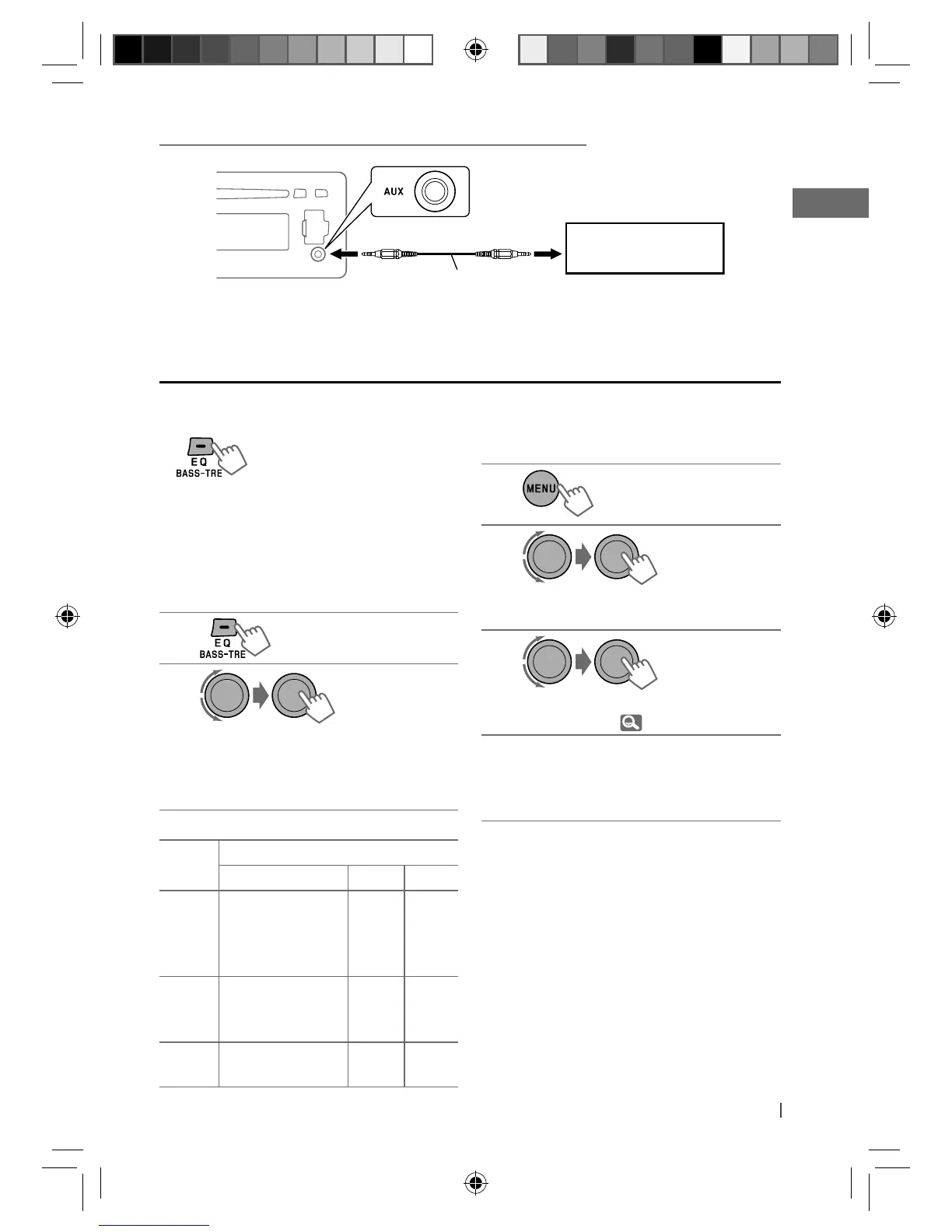
Selecting a preset sound mode
You can select a preset sound mode suitable
for the music genre.
FLAT
=
NATURAL
=
DYNAMIC
=
VOCAL
BOOST
=
BASS BOOST
=
USER
=
(back to
the beginning)
While listening, you can adjust the tone level of
the selected sound mode.
1
2
Adjust the level (–06 to +06) of the
selected tone (BASS / MID / TRE).
The sound mode is automatically stored
and changed to “USER.”
Tone
Sound element
Frequency Level Q
BASS 60 Hz, 80 Hz,
100 Hz, 200 Hz
–06 to
+06
Q1.0,
Q1.25,
Q1.5,
Q2.0
MIDDLE 0.5 kHz, 1.0 kHz,
1.5 kHz, 2.5 kHz
–06 to
+06
Q0.75,
Q1.0,
Q1.25
TREBLE 10.0 kHz, 12.5 kHz,
15.0 kHz, 17.5 kHz
–06 to
+06
Q FIX
Storing your own sound mode
You can store your own adjustments in
memory.
1
2
]
<PRO EQ>
]
<BASS> / <MIDDLE> /
<TREBLE>
3
Adjust the sound elements of the
selected tone. ( table on the left)
4
Repeat steps 2 and 3 to adjust other
tones.
The adjustments made will be stored
automatically in “USER.”
The current sound mode changes to “USER”
automatically.
[Hold]
[Hold]
Connecting an external component to the AUX input jack
3.5 mm stereo mini plug
(not supplied)
Portable audio player,
etc.
EN22-29_KD-R711_003A_5.indd 23EN22-29_KD-R711_003A_5.indd 23 12/17/09 5:23:35 PM12/17/09 5:23:35 PM


 To Next Page
 Loading...