20 ENGLISH
Listening to the iPod/iPhone
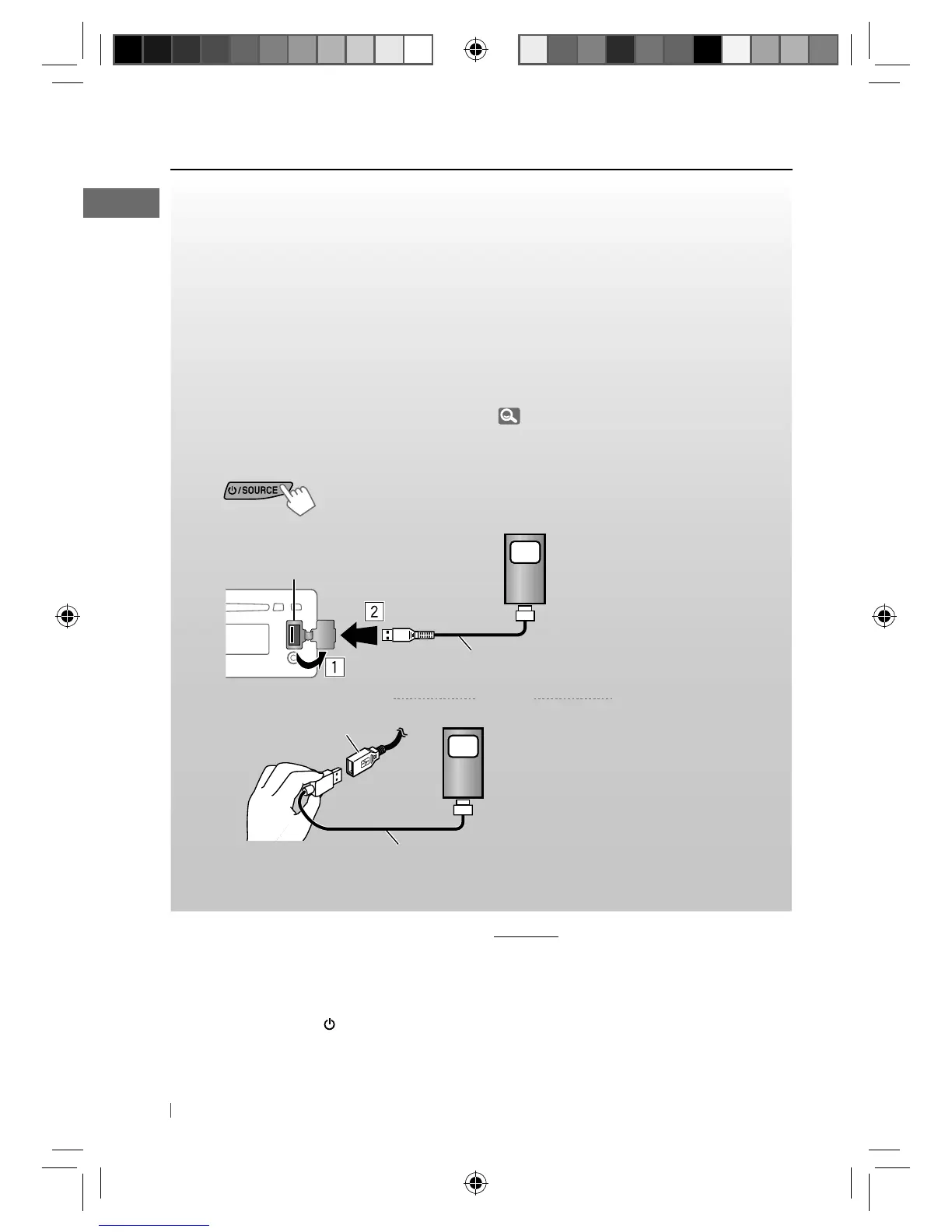
You can connect the iPod/iPhone using the USB 2.0 cable (accessory of the iPod/iPhone) to the
USB input terminal on the control panel or USB cable from the rear of the unit.
There are three control terminals: <HEAD MODE>, control by this unit; <IPOD MODE>, control
by the connected iPod/iPhone; <EXT MODE>, the sound of any functions (musics, games,
applications, etc.) running on the connected iPod/iPhone is emitted through the speakers
connected to this unit.
Preparation:
Select the controlling terminal, <HEAD MODE>, <IPOD MODE>, or <
EXT
MODE> for iPod
playback:
• Press and hold
T/P BACK
button.
• Make the selection from <IPOD SWITCH> setting, 27.
The operations explained below are under <HEAD MODE>.
~
]
Turn on the power.
Ÿ
and/or
Playback starts automatically.
USB input terminal
USB cable from the
rear of the unit
iPod/iPhone
iPod/iPhone
USB 2.0 cable (accessory of the iPod/iPhone)
USB 2.0 cable (accessory of the iPod/iPhone)
Caution:
• Some of the applications in the connected
iPod/iPhone may not work correctly with this
unit.
• Avoid using the iPod/iPhone if it might hinder
your safety while driving.
• Make sure all important data has been backed
up to avoid losing the data.
Stopping playback
and
detaching the iPod/iPhone
Straightly pull the USB 2.0 cable out from the
unit.
“NO USB” appears. Press
/ SOURCE
to listen to
another playback source.
• For details, refer also to the instructions
supplied with your iPod/iPhone.
EN12-21_KD-R711_003A_5.indd 20EN12-21_KD-R711_003A_5.indd 20 12/17/09 5:24:06 PM12/17/09 5:24:06 PM



 To Next Page
 Loading...