14 ENGLISH
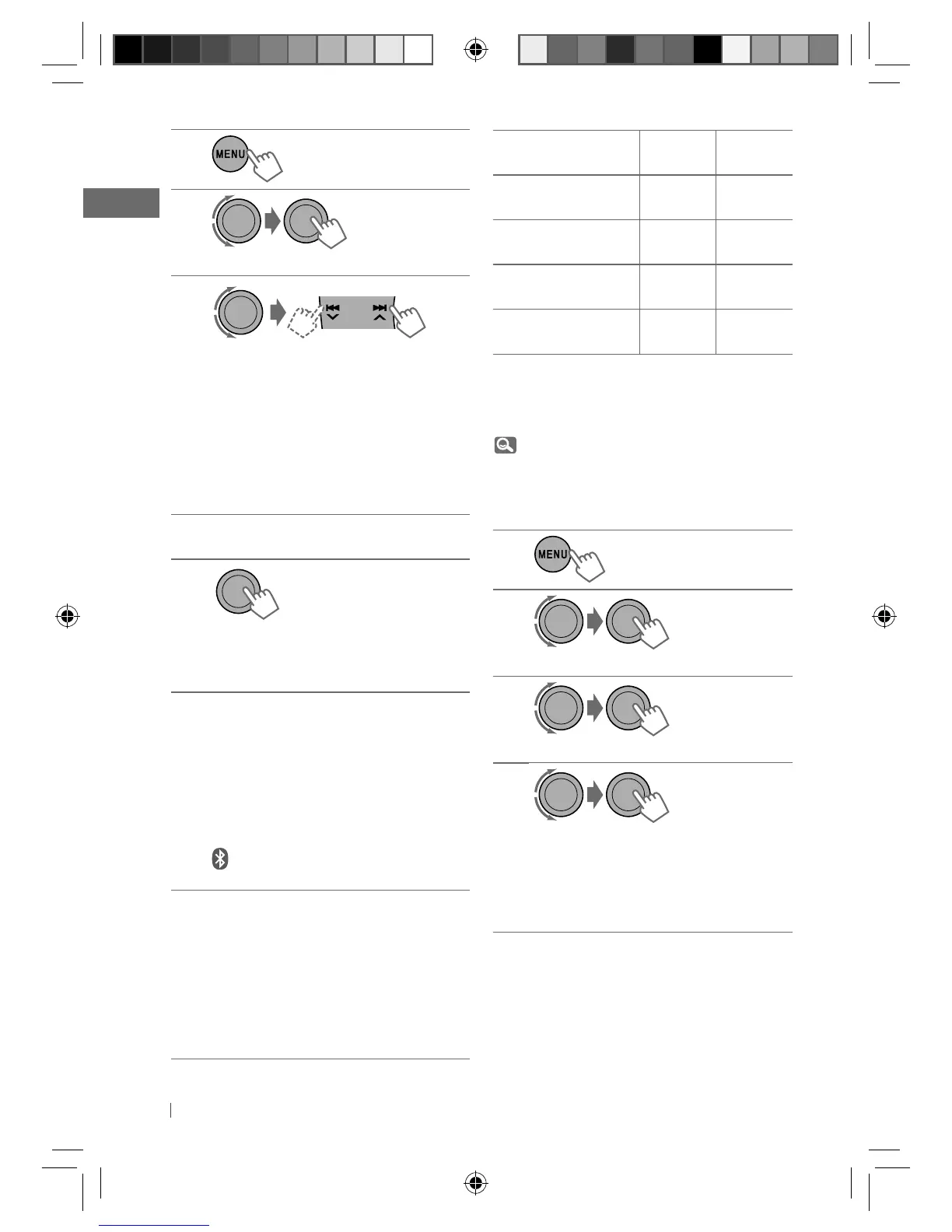
1
2
] <BLUETOOTH> ] <NEW PAIRING>
3
]
Enter a PIN (Personal Identification
Number) code in to the unit.
You can enter any number you like
(1-digit to 16-digit number).
[Initial: 0000]
• Some devices have their own PIN
code. Enter the specified PIN code in
to the unit.
4
Repeat step 3 until you have finished
entering the PIN code.
5
]
Confirm the entry.
“SEARCH NOW” and “USING PHONE”
appear alternately on the display.
6
Use the Bluetooth device to search.
On the device to be connected, enter
the same PIN code you have just
entered for this unit.
“PAIRING OK“ and “[Device Name]”
appear alternately when the pairing is
established.
appears when Bluetooth connection
is established.
7
Use the Bluetooth device to connect *
when “CONNECT NOW” and “USING
PHONE” alternate on the display.
• Refer to the table on the right column
for connectivity results shown on the
display.
* Operations may be different according
to the connected device.
Display result
Hands-
Free Call
Audio
Streaming
CONNECT OK
j
[Device Name]
‡‡
H.FREE OK
j
[Device Name]
‡
—
A. STREAM OK
j
[Device Name]
—
‡
CONNCT FAIL
j
TRY CONNECT
——
The device remains registered even after you
disconnect the device. Use <CONNECT PH> or
<CONNECT AU> (or activate <AUTO CNNCT>,
19) to connect the same device from next
time on.
Deleting a registered device
1
2
] <BLUETOOTH> ] <DELETE PAIR>
3
]
Select a device you want to delete.
4
]
Select <DELETE YES> to confirm.
“DELETED” appears when the device is
deleted.
• If <DELETE NO> is selected, the unit
returns to step 3 above.
[Hold]
[Hold]
EN12-21_KD-R711_003A_5.indd 14EN12-21_KD-R711_003A_5.indd 14 12/17/09 5:24:05 PM12/17/09 5:24:05 PM



 To Next Page
 Loading...