35ENGLISH
1
2
]
<Color Setup>
]
<Day Color>
]
<Button Zone>
3
]
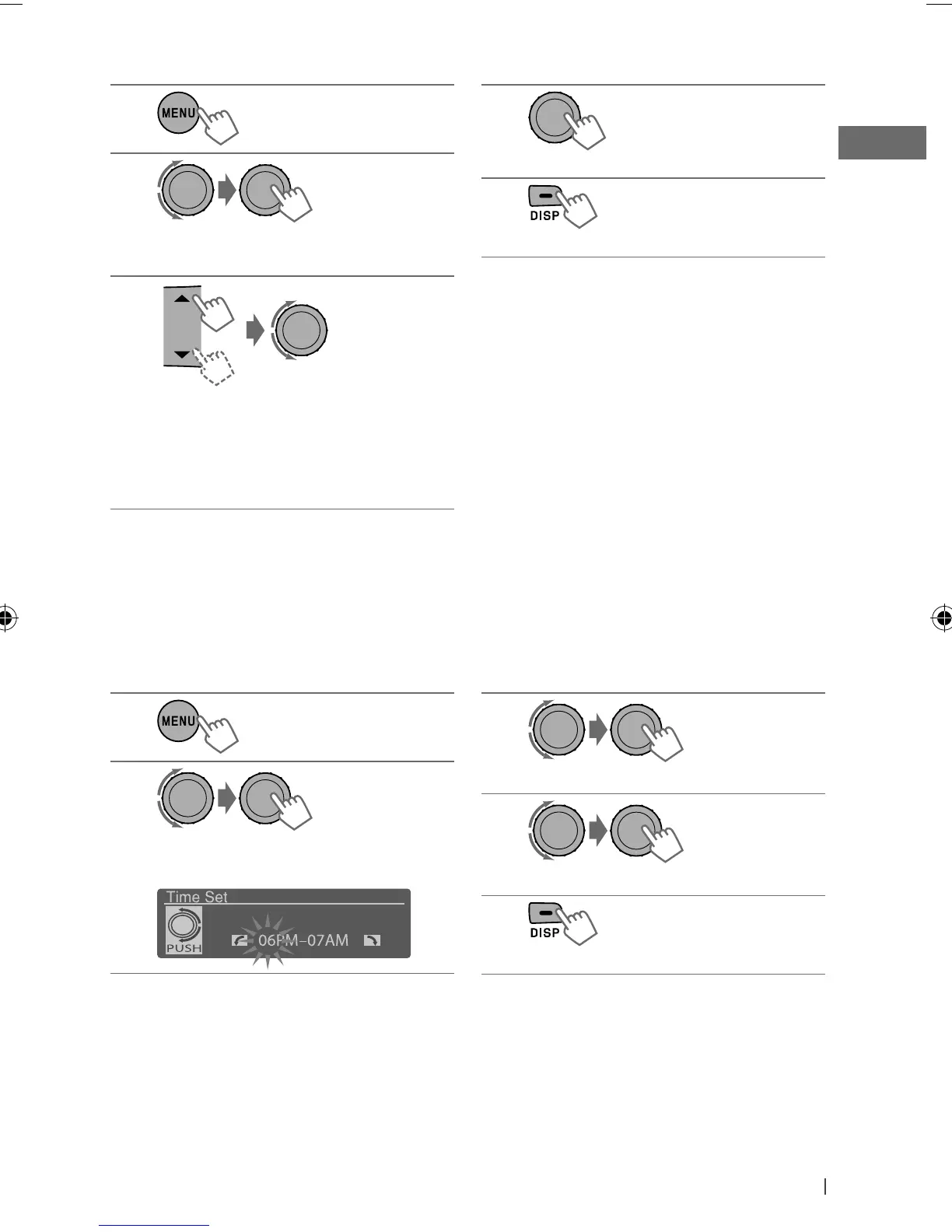
Select a primary color (Red
j
Green
j
Blue), then adjust the level
(00 to 31).
• Repeat this procedure until you have
adjusted all the three primary colors.
1
2
]
<Display>
]
<Dimmer>
]
<Time Set>
Setting the time for dimmer
You can set the start/end time for dimmer.
[Hold]
[Hold]
4
]
Confirm the settings.
5
]
Exit from the setting.
If “00” is selected for all the primary colors (as in
step 3) for <Display Zone>, nothing appear on
the display.
3
]
Adjust the dimmer start time.
4
]
Adjust the dimmer end time.
5
]
Exit from the setting.
Ex.: Creating <User> color for <Button Zone> in <Day Color>.
EN30-39_KD-A815[J]2.indd 35EN30-39_KD-A815[J]2.indd 35 12/14/09 12:52:36 PM12/14/09 12:52:36 PM



 To Next Page