13ENGLISH
Storing your own sound mode
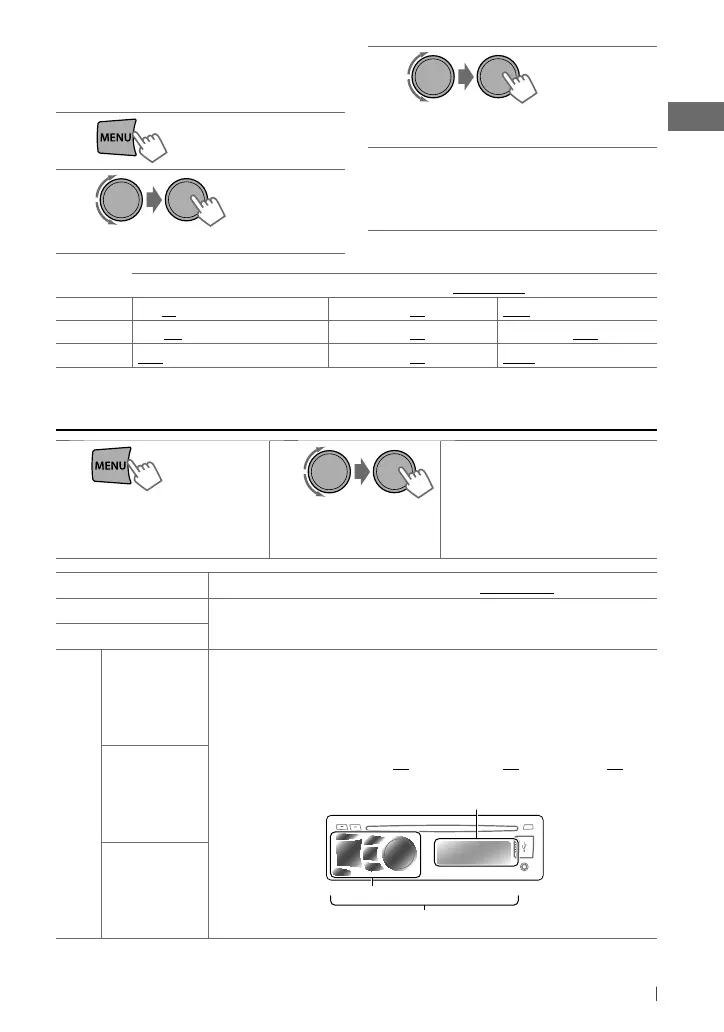
You can store your own adjustments in
memory.
1
2
] <PRO
EQ> ] <BASS/ MIDDLE/ TREBLE>
3
Adjust the sound elements (see table
below) of the selected tone.
4
Repeat steps 2 and 3 to adjust other
tones.
The adjustments made is automatically
stored and changed to “USER.”
BASS [
Initial: 80 Hz, 00, Q1.0
]
Frequency: 60 Hz, 80 Hz, 100 Hz,
200 Hz
Level: –06 to +06
Q: Q1.0, Q1.25, Q1.5, Q2.0
MIDDLE [
Initial: 1.0 kHz, 00, Q1.25
]
Frequency: 0.5 kHz, 1.0 kHz, 1.5 kHz,
2.5 kHz
Level: –06 to +06
Q: Q0.75, Q1.0, Q1.25
TREBLE [
Initial: 10 kHz, 00, Q FIX
]
Frequency: 10.0 kHz, 12.5 kHz,
15.0 kHz , 17.5 kHz
Level: –06 to +06
Q: FIX
You can select a preset sound mode suitable
for the music genre.
FLAT
=
NATURAL
=
DYNAMIC
=
VOCAL BOOST
=
BASS BOOST
=
USER
=
(back to the beginning)
While listening, you can adjust the subwoofer
level and tone level of the selected sound
mode.
1
2
Adjust the level:
SUB.W * : 00 to 08
BASS/ MID/ TRE : –06 to +06
The sound mode is automatically stored
and changed to “USER.”
*
Subwoofer level is adjustable only when
<L/O MODE> is set to <SUB.W>. (page 15)
[Hold]
[Hold]
Selecting a preset sound mode
EN02-19_KD-S38_S28[J]_f.indd 13EN02-19_KD-S38_S28[J]_f.indd 13 6/17/11 4:53:03 PM6/17/11 4:53:03 PM



 To Next Page