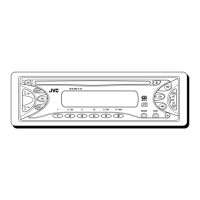
EasyManua.ls Logo

JVC KD-S71R - User Manual

JVC KD-S71R
32 pages
Print Icon
To Next Page IconTo Next Page
Loading...
ENGLISH
DEUTSCH
NEDERLANDS
FRANÇAIS
GET0118-001A
[E/EX]
INSTRUCTIONS
BEDIENUNGSANLEITUNG
MANUEL DINSTRUCTIONS
GEBRUIKSAANWIJZING
KD-S73R/KD-S71R/
KD-S743R/KD-S741R
CD RECEIVER
CD-RECEIVER
RECEPTEUR CD
CD-RECEIVER
For installation and connections, refer to the separate manual.
Für den Einbau und die Anschlüsse siehe das eigenständige Handbuch.
Pour l’installation et les raccordements, se référer au manuel séparé.
Bijzonderheden over de installatie en aansluiting van het apparaat vindt u in de
desbetreffende handleiding.
COMPACT
DIGITAL AUDIO
SEL
DISP
SSM
SCMMODE
7 9 10 12
RND
11
RPT
8
MO
AM
CD
FM
TP/PTY
Cover_001A_KD-S743R[E_EX]f.p65 11/19/02, 6:45 PM3

Other manuals for JVC KD-S71R

Questions and Answers

  • R
    Richard JohnsonJul 30, 2025
    Why is there no sound coming from the speakers of my JVC KD-S71R?
    • E
      Emily SaundersJul 30, 2025
      If you can't hear sound from the speakers of your JVC Car Receiver, there are several possible causes. First, the volume level might be set too low; try adjusting it to a higher, more audible level. Second, the connections may be faulty; in this case, check all cords and connections to ensure they are correctly and firmly in place. Third, the built-in microcomputer may be malfunctioning due to external noise. To resolve this, reset the unit by holding the SEL button for more than 2 seconds. Note that resetting will erase clock settings and preset stations.
  • J
    Jeremy MorrisAug 7, 2025
    What to do if my JVC Car Receiver CD automatically ejects?
    • D
      debra13Aug 7, 2025
      If your JVC Car Receiver's CD player is automatically ejecting CDs, several factors could be responsible. Make sure the CD is inserted correctly, with the label side up. If using a CD-R/CD-RW, ensure it has been finalized. Another reason might be that the CD is locked; in this case, unlock the CD by holding the button and pressing 0 for more than 2 seconds. You should also stop playback while driving on rough roads. Also, check the cords and connections. Finally, ensure that there is a CD in the loading slot.
  • L
    Lauren DouglasAug 15, 2025
    Why is there no sound coming from my JVC Car Receiver speakers?
    • F
      Frederick CurryAug 15, 2025
      If you cannot hear any sound from the speakers of your JVC Car Receiver, there might be a few reasons. First, check if the volume level is set too low and adjust it to a suitable level. Also, inspect the connections to ensure they are correctly and firmly in place. Finally, if the microcomputer has malfunctioned due to external noise, reset the unit by holding the SEL button for more than 2 seconds.
  • M
    mary31Aug 21, 2025
    Why is the SSM (Strong-station Sequential Memory) automatic preset not working on my JVC KD-S71R?
    • J
      Jessica GriffinAug 22, 2025
      If the SSM (Strong-station Sequential Memory) automatic preset is not working on your JVC Car Receiver, it could be due to weak signals. Also, ensure the antenna is firmly connected.

Summary

INSTRUCTIONS

Position and Reproduction of Labels

Important Laser Product Safety

Safety precautions for laser products, emphasizing no direct exposure to the beam.

How to Reset Your Unit

Procedure to reset the unit's built-in microcomputer using specific button presses.

Basic Operations

Power On;Off and Source Selection

How to power the unit on/off and select audio sources like CD, FM, or AM.

Setting the Clock

Radio Operations

Searching for Radio Stations

Instructions for automatically and manually searching for radio stations.

Storing Stations in Memory

Automatic FM Station Preset (SSM)

Automatic storage of up to 6 FM stations per band based on signal strength.

Manual Station Preset

Manual method to store up to 6 stations in memory for each band (FM1, FM2, FM3, AM).

RDS Operations

Network-Tracking Reception Modes

Details on how to use network-tracking to maintain reception of the same program.

Using TA Standby Reception

Activating TA Standby Reception

Procedure to enable Traffic Announcement standby reception via TP/PTY button.

Using PTY Standby Reception

CD Operations

Playing a CD

Instructions for inserting a CD and starting playback.

Sound Adjustments

Adjusting Sound Characteristics

How to adjust bass, treble, fader, balance, and volume.

Storing Your Own Sound Adjustments

Troubleshooting

General Troubleshooting

Common issues and their solutions for general operation problems.

CD Playback Troubleshooting

Solutions for issues with CD playback, such as skipping or no disc detection.

Maintenance

Installation

In-Dash Mounting Procedure

Step-by-step guide for installing the unit into a car dashboard.

Connecting Other Equipment

Steering Wheel Remote Controller Connection

Power and Speaker Connection Precautions

Speaker Wiring Warnings

Critical warnings about car speaker wiring and potential unit damage.

JVC KD-S71R Specifications

General IconGeneral
BrandJVC
ModelKD-S71R
CategoryCar Receiver
LanguageEnglish

Related product manuals