11
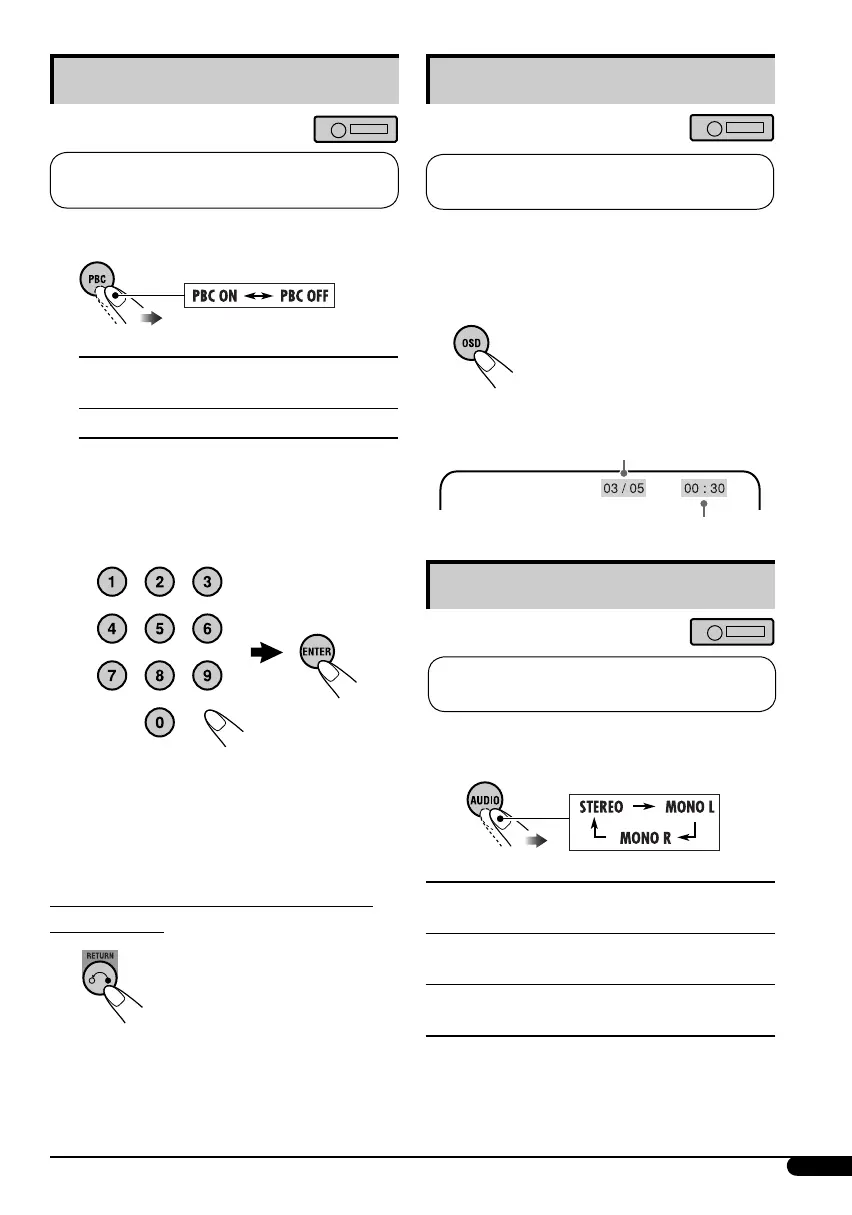
Playback Control (PBC) operations
This operation is only possible when using
the remote controller.
1 While playing a VCD....
PBC ON : A menu appears on the
monitor.
PBC OFF : Cancels.
• A menu may be a list of items, submenus,
or some moving pictures.
2 Select the item you want.
• To select an item from the submenus,
repeat this step.
The selected item starts playback
automatically.
To correct a mis-entry and to return to the
previous menu
On-Screen (OSD) information
This operation is only possible when using
the remote controller.
You can check the track number and elapsed
playing time if the monitor is turned on.
While playing a disc....
• To turn off the On-Screen
Display, press the button
again.
Selecting the audio channel
This operation is only possible when using
the remote controller.
You can select the audio channel to play. ( is is
convenient when playing a Karaoke VCD.)
STEREO : To listen to normal stereo (left/
right) playback.
MONO L : To listen to the L (left) audio
channel.
MONO R : To listen to the R (right) audio
channel.
• The audio channel is automatically set to
“STEREO” when you change the disc or
source.
Current/total track
number
Elapsed playing time
EN08-13_KD-SV3204[UI]2.indd 11EN08-13_KD-SV3204[UI]2.indd 11 1/23/06 5:53:14 PM1/23/06 5:53:14 PM



 To Next Page
 Loading...