12
MP3/WMA control screen operations
You can also control the playback of an MP3/
WMA disc by referring to the monitor.
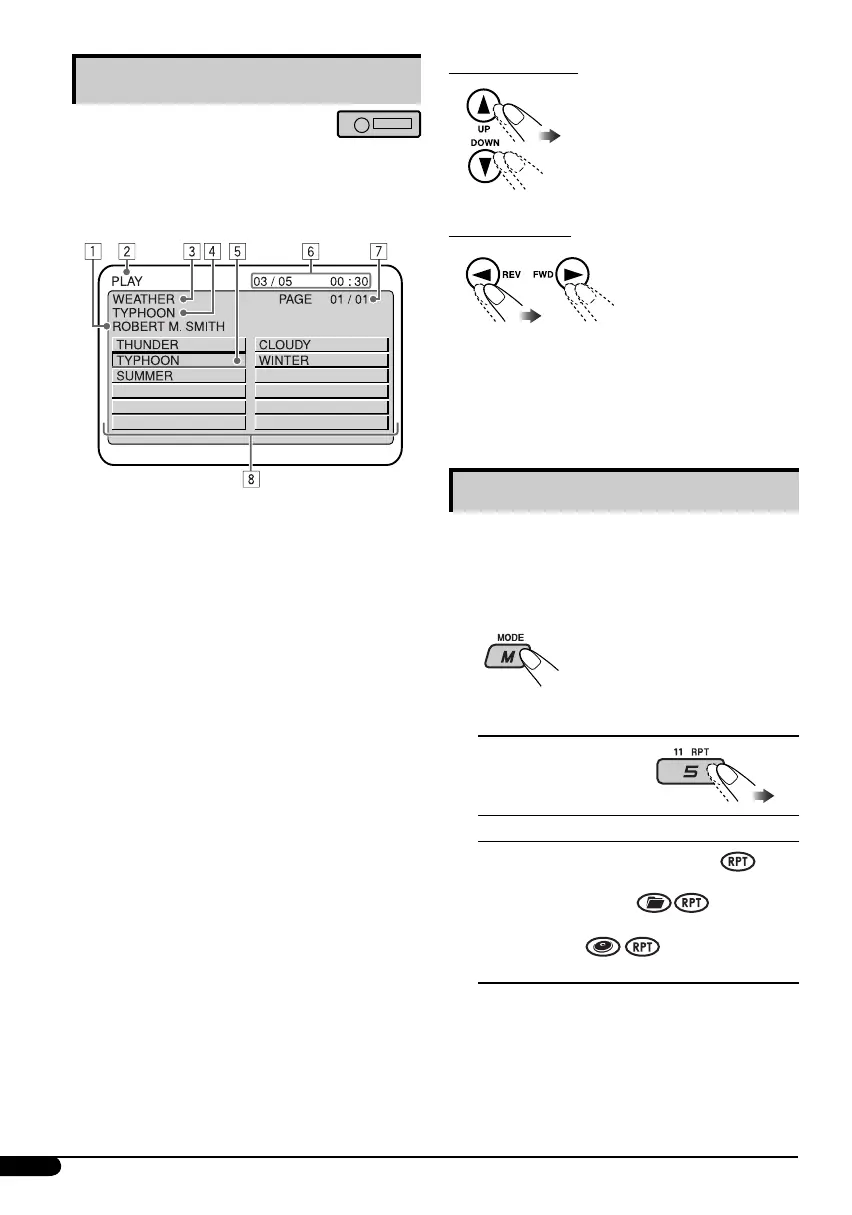
• The control screen automatically appears on the
monitor when you insert an MP3/WMA disc.
1 Artiste name* (only for MP3 discs)
• The artiste name will scroll on the
monitor if it cannot be shown at a time.
2 Operation mode—PLAY, PAUSE,
FF (fast-forward), FR (fast-reverse),
SELECT (selected track number), REPEAT
TRACK, REPEAT FOLDER, REPEAT OFF,
RANDOM FOLDER, RANDOM DISC,
RANDOM OFF
• Operation mode appears for a while on
the monitor.
3 Folder name*
4 Track title* (only for MP3 discs)
• The track title will scroll on the monitor if
it cannot be shown at a time.
5 Highlighted bar for the current file name*
6 OSD indication—Current/total track
number, Elapsed playing time
• Appears only if you turn on the OSD (see
page 11).
7 Current list/total list number
8 Track list
• The monitor can show 12 tracks at a time
and a maximum of 239 tracks for a disc.
* Some symbols will not be shown (and will be
substituted or blanked) on the control screen.
To select a folder
To select a track
• Pressing these buttons
repeatedly can also
select tracks from the
previous/next folders.
• See also page 10 for using the buttons on the
control panel to select a folder or track.
Selecting the playback modes
You can use only one of the following playback
modes at a time.
• For VCD: While PBC (see page 11) is not in
use.
1
2 Select your desired playback mode.
7 Repeat play
Mode Plays repeatedly
TRK RPT : The current track.
FLDR RPT*
1
: All tracks of the current
folder.
DISC RPT*
2
: All tracks of the current disc.
RPT OFF : Cancels.
EN08-13_KD-SV3204[UI]2.indd 12EN08-13_KD-SV3204[UI]2.indd 12 1/23/06 5:53:15 PM1/23/06 5:53:15 PM



 To Next Page
 Loading...