ENGLISH
9
Data Size: B6L (182 mm x 128 mm)
Book Size: B6L (182 mm x 128 mm)
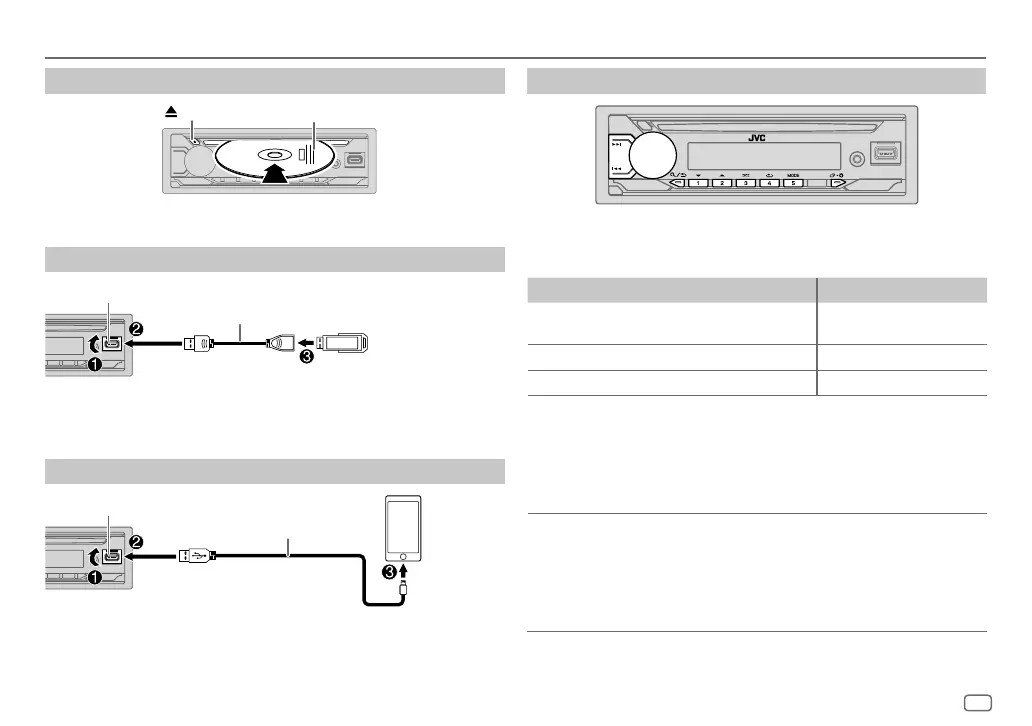
Insert a disc
Eject disc
Label side
The source changes to CD automatically and playback starts.
Connect a USB device
USB device
USB input terminal
USB 2.0 cable*
(commercially available)
The source changes to USB automatically and playback starts.
* Do not leave the cable inside the car when not in use.
Connect an iPod/iPhone
(for KD-T912BT)
USB input terminal
Accessory of the iPod/iPhone*
iPod/
iPhone
The source changes to iPod USB automatically and playback starts.
• You can also connect iPod/iPhone via Bluetooth. (Page 14)
* Do not leave the cable inside the car when not in use.
CD/USB/iPod
Basic operations
Selectable source:
• KD-T912BT: CD/USB/iPod USB or iPod BT
• KD-T712BT: CD/USB
To On the faceplate On the remote control
Reverse/
Fast-forward
Press and hold S / T. Press and hold H / I.
Select a track/file
Press S / T. Press H / I.
Select a folder*1
Press 2 J / 1 K. Press J / K.
Repeat play*2
Press 4 repeatedly.
[TRACK REPEAT]
/
[ALL REPEAT]
: Audio CD
[TRACK REPEAT]
/
[FOLDER REPEAT]
/
[ALL REPEAT]
:
MP3/WMA/AAC/WAV/FLAC file
[REPEAT
ONE]
/
[REPEAT
ALL]
/
[REPEAT OFF]
: iPod
Random play*2
Press 3 repeatedly.
[ALL RANDOM]
/
[RANDOM OFF]
: Audio CD
[FOLDERRANDOM]
/
[ALL RANDOM]
/
[RANDOM OFF]
:
MP3/WMA/AAC/WAV/FLAC file
[SHUFFLE
OFF]
/
[SHUFFLE
ON]
: iPod
*1 For CD: Only for MP3/WMA/AAC files. This does not work for iPod.
*2 For iPod: Applicable only when [HEAD MODE] is selected. (Page 10)
JS_JVC_KD_T912BT_M_EN_1.indd 9JS_JVC_KD_T912BT_M_EN_1.indd 9 5/31/2019 12:20:24 PM5/31/2019 12:20:24 PM



 To Next Page
 Loading...