EasyManua.ls Logo

JVC KW-R515 - User Manual

JVC KW-R515
16 pages
Print Icon
To Next Page IconTo Next Page
Loading...
Data Size: B6L (182 mm x 128 mm)
Book Size: B6L (182 mm x 128 mm)
ENGLISH
B5A-0231-00 [U]
KW-R515
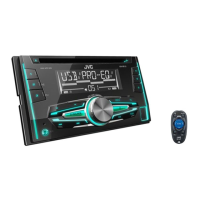
CD RECEIVER
INSTRUCTION MANUAL
Please read all instructions carefully before
operation to obtain the best possible performance
from the unit.
JS_JVC_KW_R515_U_C00_1.indd 1JS_JVC_KW_R515_U_C00_1.indd 1 4/7/2014 12:44:39 PM4/7/2014 12:44:39 PM
Question and Answer IconNeed help?

Do you have a question about the JVC KW-R515 and is the answer not in the manual?

Overview

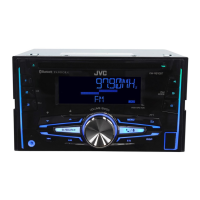
This document is an instruction manual for the JVC KW-R515 CD Receiver, a car audio unit designed for playing CDs, USB devices, and radio. It also supports auxiliary input and Bluetooth connectivity with an optional adapter.

Function Description:

The JVC KW-R515 is a versatile car audio system that serves as a central hub for in-car entertainment. Its primary functions include:

  • CD Playback: Plays standard audio CDs, as well as MP3/WMA/WAV files stored on CD-R/RW discs. It supports multi-session discs and various bit rates and sampling frequencies for compressed audio.
  • USB Playback: Connects to USB mass storage class devices to play MP3/WMA/WAV audio files. It supports a hierarchical folder structure and a large number of files and folders.
  • Radio Tuner: Features an FM/AM/SW1/SW2 tuner with the ability to store multiple preset stations. It includes advanced radio features like Radio Data System (RDS) for FM, which provides station names, program types, and traffic announcements.
  • Auxiliary Input: Allows connection of portable audio players via a 3.5 mm stereo mini plug.
  • Bluetooth Connectivity (Optional): With the KS-BTA100 Bluetooth adapter, the unit can connect to Bluetooth devices for audio streaming and hands-free calling (Tel muting function).
  • Audio Customization: Offers extensive audio settings, including a 3-band parametric equalizer (PRO EQ), preset equalizers (EASY EQ), bass boost, loudness control, and subwoofer output control.
  • Display Customization: Provides options to customize the display and button illumination colors, brightness, and scrolling behavior.

Important Technical Specifications:

  • Power Supply: 12 V DC, negative ground.
  • Maximum Output Power: 50 W x 4 channels.
  • Full Bandwidth Power (at less than 1% THD): 22 W x 4 channels.
  • Speaker Impedance: 4 Ω – 8 Ω.
  • Preout Level/Load (CD): 2 500 mV/10 kΩ load.
  • Preout Impedance: ≤ 600 Ω.
  • FM Tuner:
    • Frequency Range: 87.5 MHz – 108.0 MHz (50 kHz step).
    • Usable Sensitivity (S/N = 26 dB): 8.2 dBf (0.71 µV/75 Ω).
    • Quieting Sensitivity (DIN S/N = 46 dB): 17.2 dBf (2.0 µV/75 Ω).
    • Frequency Response (±3 dB): 30 Hz – 15 kHz.
    • Signal-to-Noise Ratio (MONO): 64 dB.
    • Stereo Separation (1 kHz): 40 dB.
  • AM Tuner:
    • Frequency Range: Band 1 (MW): 531 kHz – 1 611 kHz (9 kHz step); Band 2 (SW1): 2 940 kHz – 7 735 kHz (5 kHz step); Band 3 (SW2): 9 500 kHz – 10 135 kHz (5 kHz step), 11 580 kHz – 18 135 kHz (5 kHz step).
    • Usable Sensitivity (S/N = 20 dB): MW: 29 dBμ (28.2 μV); SW: 30 dBμ (32 μV).
  • CD Player:
    • Laser Diode: GaAIAs.
    • Digital Filter (D/A): 8 times over sampling.
    • Spindle Speed: 500 rpm – 200 rpm (CLV).
    • Frequency Response (±1 dB): 20 Hz – 20 kHz.
    • Total Harmonic Distortion (1 kHz): 0.01%.
    • Signal-to-Noise Ratio (1 kHz): 105 dB.
    • Dynamic Range: 90 dB.
    • Channel Separation: 85 dB.
    • MP3/WMA Decode: Compliant with MPEG-1/2 Audio Layer-3 / Windows Media Audio.
  • USB Standard: USB 1.1, USB 2.0 (Full speed).
  • USB Maximum Supply Current: DC 5V 1A.
  • Auxiliary Input:
    • Frequency Response (±3 dB): 20 Hz – 20 kHz.
    • Input Maximum Voltage: 1 200 mV.
    • Input Impedance: 30 kΩ.
  • General:
    • Operating Voltage: 14.4 V (10.5 V – 16 V allowable).
    • Maximum Current Consumption: 10 A.
    • Operating Temperature Range: 0°C to +40°C.
    • Installation Size (W × H × D): 180 mm × 100 mm × 158 mm.
    • Weight: 1.5 kg.

Usage Features:

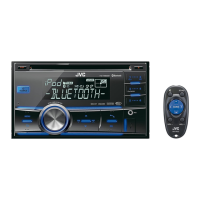
  • Intuitive Controls: Operations are primarily managed through the volume knob (turn/press) and dedicated buttons on the faceplate. A remote control (RM-RK52) is also included for convenience.
  • Source Selection: Easily switch between CD, USB, FM, AM, SW1, SW2, AUX, and BT AUDIO (with adapter) sources.
  • Display Information: The DISP button allows cycling through various display information such as track/file names, artist/album, playing time, station name, frequency, and clock.
  • Quick Search: For USB and CD sources with many files, quickly turning the volume knob allows for faster navigation.
  • Repeat and Random Play: Supports various repeat (track, folder) and random play (folder, all) modes for CD and USB audio files.
  • Radio Timer: Allows scheduling the radio to turn on at a specific time (once, daily, or weekly).
  • PTY Search: For FM radio, search for stations broadcasting specific program types (e.g., News, Sport, Music).
  • Traffic Announcement (TA) Standby: Temporarily switches to traffic announcements when available, even from other sources.
  • Digital Track Expander (D.T.EXP): Enhances sound quality by compensating for high-frequency components lost in audio data compression.
  • Tel Muting: Mutes audio when using a cellular phone (not connected via KS-BTA100).
  • Subwoofer Control: Dedicated settings for subwoofer output level, on/off, and low-pass filter frequency.
  • Firmware Update: Supports firmware updates via USB to ensure optimal performance and compatibility.
  • Demonstration Mode: An initial setup step to cancel the demonstration mode.
  • Clock Setting: Allows setting the clock manually or automatically via FM Radio Data System signal.

Maintenance Features:

  • Cleaning: The faceplate can be cleaned with a dry silicone or soft cloth.
  • Disc Handling: Instructions are provided for proper disc handling, including avoiding touching the recording surface, not sticking tape, cleaning from the center outward with a dry cloth, and removing burrs from the center hole.
  • USB Device Care: Advises against leaving the USB cable inside the car when not in use and ensuring proper connection.
  • Battery Replacement: Clear instructions for replacing the CR2025 battery in the remote control, including safety warnings about incorrect replacement and keeping batteries out of reach of children.
  • Troubleshooting Guide: A comprehensive section to diagnose and resolve common issues such as no sound, wiring errors, poor radio reception, display problems, and disc ejection issues. It also includes instructions for resetting the unit if problems persist.

JVC KW-R515 Specifications

General IconGeneral
BrandJVC
ModelKW-R515
CategoryCar Receiver
LanguageEnglish

Related product manuals