22
EN
O
PTIONAL SETTING
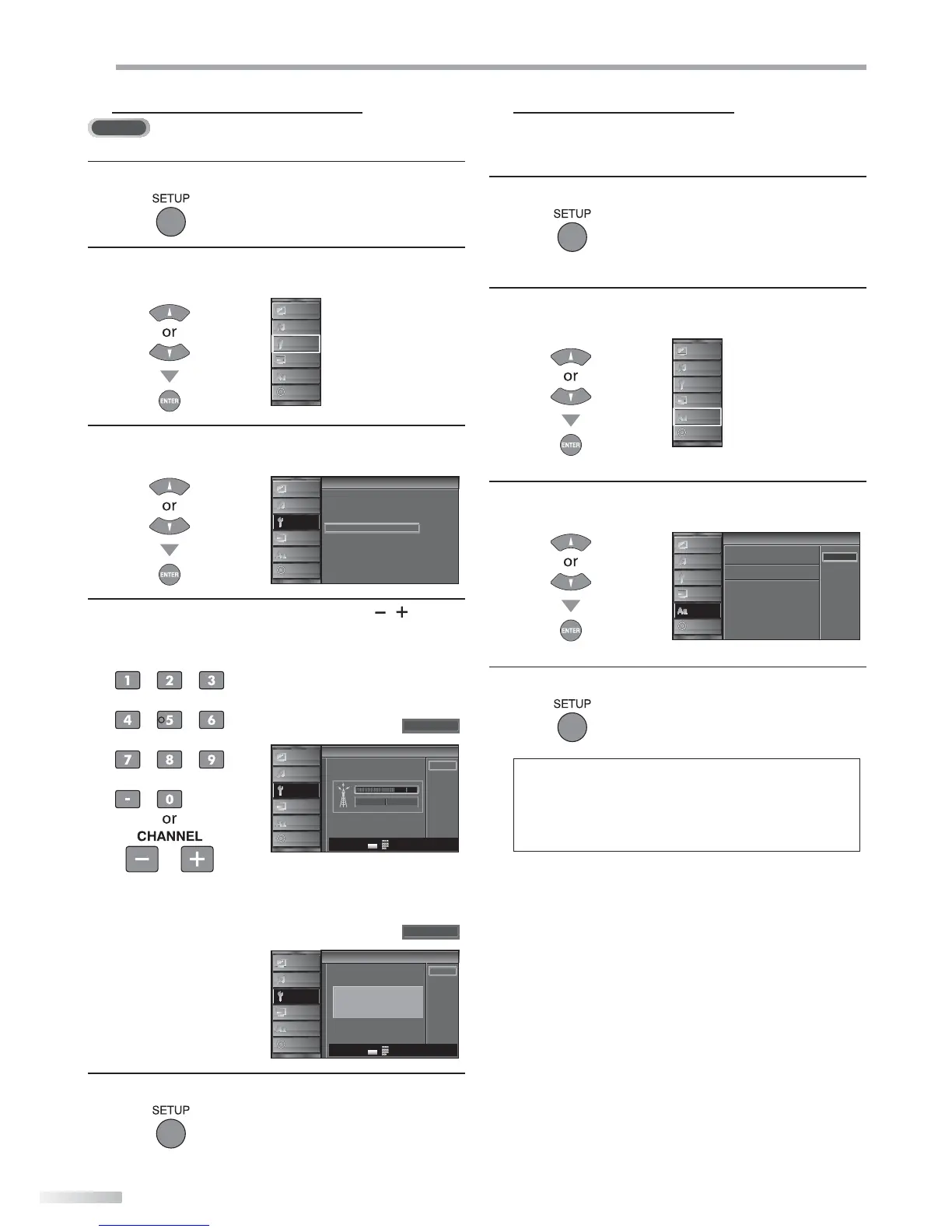
5 Antenna Confirmation
DTV
This function lets you check the digital signal strength of each channel.
1
Press [SETUP] to display the main menu.
2
Use [Cursor K
/
L] to select “CHANNEL”, then press
[ENTER].
PICTURE
S OUND
CHANNEL
DETAIL
LANGUAGE
DVD
3
Use [Cursor K
/
L] to select “Antenna”, then press
[ENTER].
Channel
Channel
Autoscan
Channel List
Manual Register
Antenna
PICTURE
S OUND
CHANNEL
DETAIL
LANGUAGE
DVD
4
Use [the Number buttons] or [CHANNEL / ] to
select the channel for which you want to check the
digital signal strength.
na
Antenna
Back
Ch Change
11-1
Current 50 50 Max
PICTURE
S OUND
CHANNEL
DETAIL
LANGUAGE
DVD
CH
-
+
• If the channel is set to analog channel or external
input, you cannot confirm the antenna condition.
na
Antenna
Back
Indicator s available
for digital broadcasting
only
Video
PICTURE
S OUND
CHANNEL
DETAIL
LANGUAGE
DVD
Ch Change
CH
-
+
5
Press [SETUP] to exit.
5 Language Selection
You can choose English, Spanish, or French as your on-screen language.
1
Press [SETUP] to display the main menu.
2
Use [Cursor K
/
L] to select “LANGUAGE”, then press
[ENTER].
PICTURE
S OUND
CHANNEL
DETAIL
LANGUAGE
DVD
3
Use [Cursor K
/
L] to select “English”, “Español” or
“Français”, then press [ENTER].
Language
Language
Se ect the language for setup disp ay
Elija el idioma de ajuste
Sélect onner langue écran config
Español
França s
English
PICTURE
S OUND
CHANNEL
DETAIL
LANGUAGE
DVD
4
Press [SETUP] to exit.
Note:
• If you need the English menus instead of the Spanish or
French menus, press [SETUP]. Use [Cursor K / L] to select
“IDIOMA” or “LANGUE”, then press [ENTER].
Use [Cursor K
/ L] to select “English”, then press [ENTER].
Press [SETUP] to exit the main menu.



 To Next Page