- 12 -
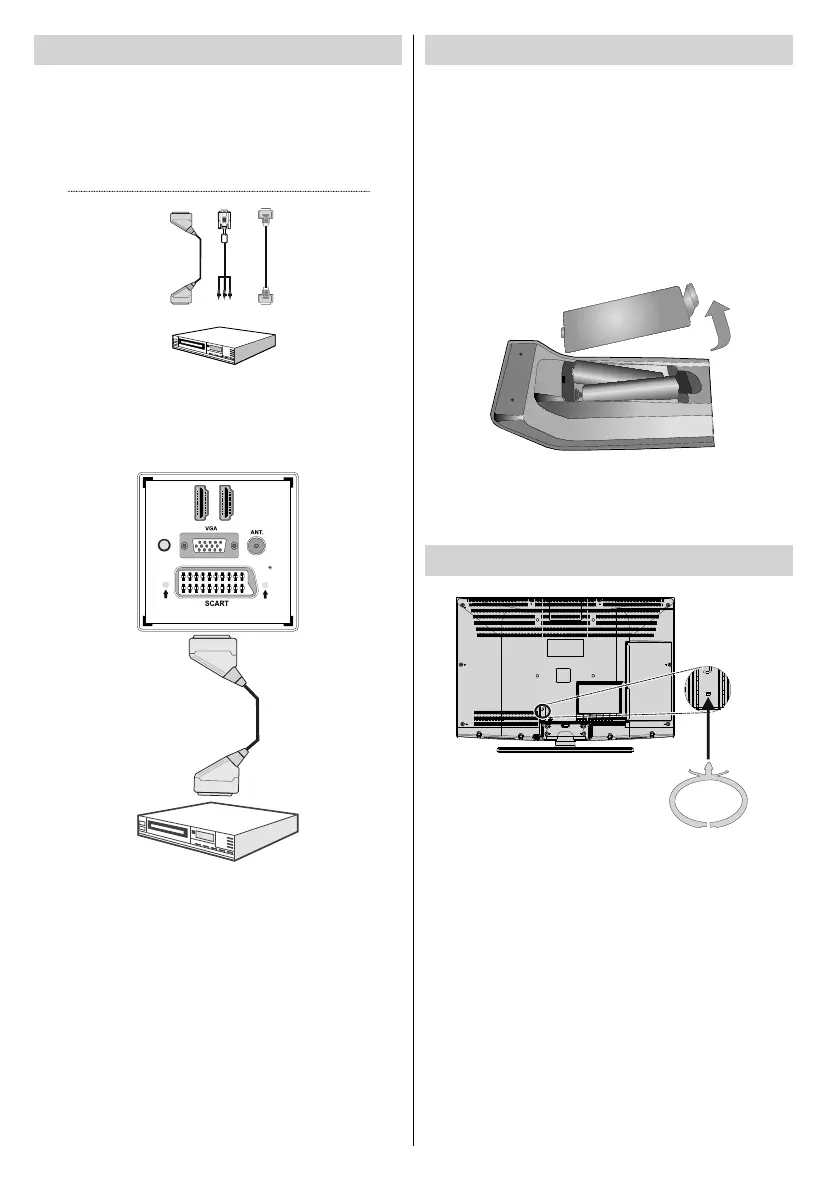
Connecting to a DVD Player
Some DVD players are connected through •
COMPONENT SOCKETS (YPbPr). YPbPr can be
used only when you connect a device that has a
YPbPr component video output. You need a special
YPbPr to PC (VGA) input cable (supplied).
Video Connection
HDMI
inputs
Scart socket
DVD Player
YPbPr to PC
cable (supplied)
When the connection is made, switch to • YPbPr source.
See, Input selection section.
You may also connect through the • SCART input.
D
I
H
M
1
SPDIF
Coax.OUT
DI
H
M
2
Scart Cable
(not supplied)
External device
Note: These two methods of connection perform the
same function but in different levels of quality. It is not
necessary to connect by all three methods.
Remote Control Handset
Inserting Batteries
Remove the battery cover located on the back of •
the handset by gently pulling backwards from the
indicated part.
Insert two • AAA/R3 or equivalent type batteries
inside. Observe the correct polarity (+/-) when
inserting batteries and replace the battery cover.
Batteries should not be exposed to excessive heat
such as sunshine, fi re or the like.
+
+
-
-
Note: Remove the batteries from the remote control
handset when it is not to be used for a long period.
Otherwise it can be damaged due to any leakage of
batteries. Remote range is approximately 7m/23ft.
Using the Cable Holder
You can use the supplied cable holder as the
following:
Place the cable holder into the cable holder hole •
located on the rear side of the TV as illustrated
above.
Place cables into the cable holder after all necessary •
connections are made.
01_MB62_[GB]_woypbpr_3902UK_IDTV_NICKEL17_32925W_10075176_5020xxxx.indd 1201_MB62_[GB]_woypbpr_3902UK_IDTV_NICKEL17_32925W_10075176_5020xxxx.indd 12 27.10.2011 13:24:1027.10.2011 13:24:10



 To Next Page