25
ENGLISH
LCD
S
T
B
A
UDIO
MENUTOP
GUIDE
GUIDE
DT V AT V R A DI O
Etc.AdvancedBasicsGetting started
Using the search code function
This function searches through the codes one by one, beginning from
the rst code in the list.
1
Turn on the device manually.
2
Switch the remote control mode to a mode that matches your
device.
Press to select the mode.
3
Activate the search code function.
Hold down (stand-by) and until the mode indicator
blinks.
4
Point the remote control at your device and press the stand-by
button. If there is no response, try the next code by pressing 3
and press the stand-by button again. Repeat the process until
your device turns off.
5
Press to register the code.
The code is now set. Conrm that the mode indicator goes
out.
If your TV’s remote control still does not work even after using the
search code function, use your device’s own remote control. The
TV’s remote control is not guaranteed to work with all models, brands
or operations.
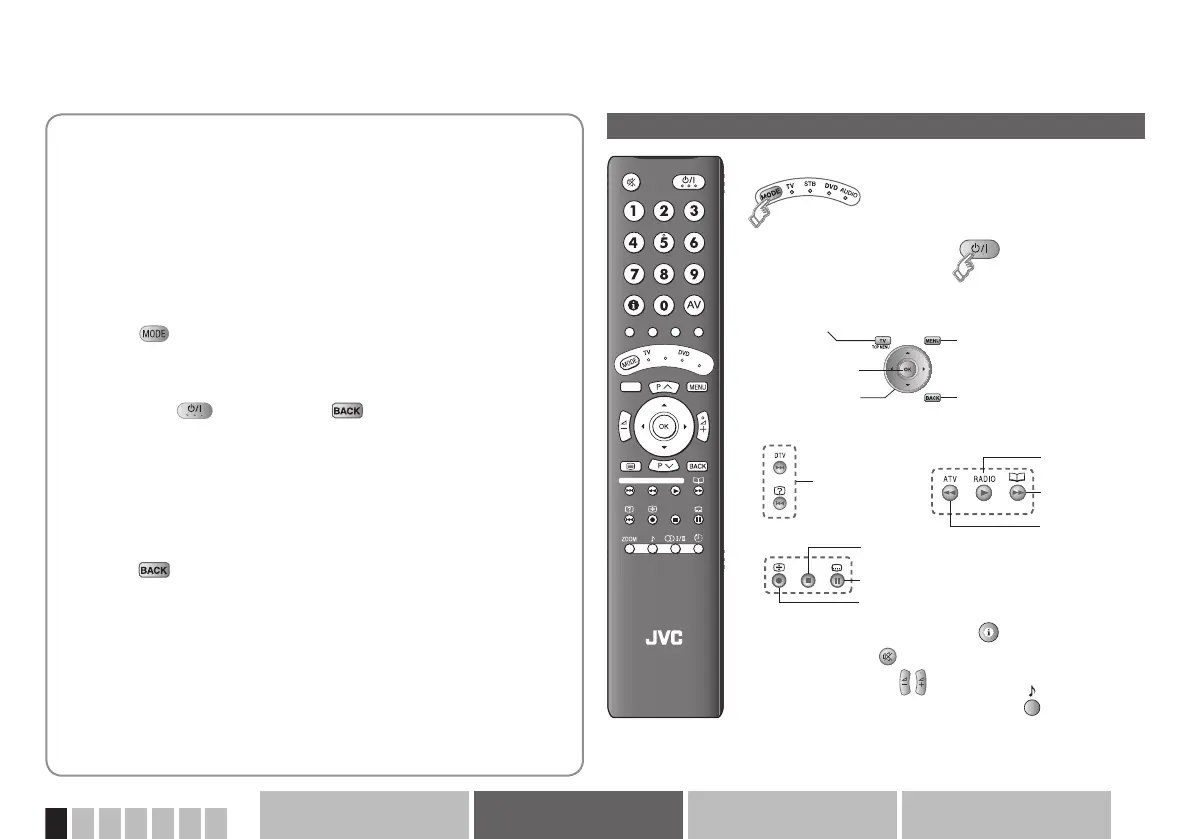
Display on screen Æ Press “ ”
Mute Æ Press “ ”
Volume Æ Press “ ”
Select a surround mode Æ Press “ ”
For STB, it displays Electric Programme Guide.
Depending on your device, some functions may not
be operable with this remote control.
Turn on/off the device
Navigate the menus
Display top menu
OK
Display menu
Back to previous pageSelect
Playback / Record, etc.
Select a
chapter
Play
Forward
Reverse
Stop
Pause
Record
Change the remote control mode
Button functions



 To Next Page
 Loading...








