4
Getting started
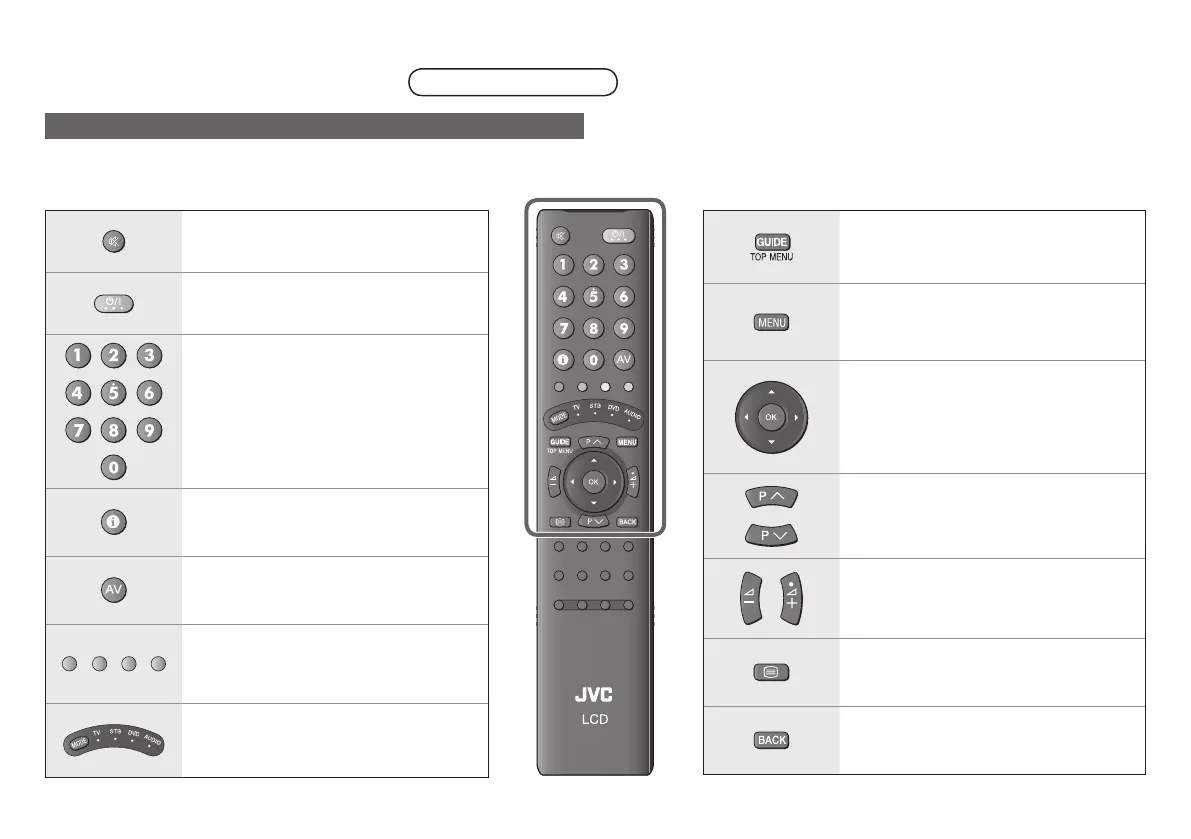
The functions of the remote control buttons are explained as follows.
This remote control can be congured to operate up to four different devices simply by changing the remote code.
“Conguring your remote control” (P. 24)
Mute.
Turn on / off (standby) the TV.
Enter channel / page number.
Channel information. “Watching TV”
(P. 16)
Watch video etc. “Watching videos /
DVDs” (P. 23)
Colour buttons:
Select a page when viewing teletext.
Operate functions in menus.
Switch between “TV / STB / DVD /
AUDIO”. (P. 24)
Display the Electronic Programme
Guide (P. 20)
Display on-screen menu. “Using the
menu functions” (P. 26)
Select and conrm settings in menus.
Change channel / page.
Volume control.
The volume settings for headphone and
speaker will be memorised separately.
View teletext. “Viewing teletext” (P. 22)
To the previous channel.
Package Contents
Remote control
Buttons and functions



 To Next Page