31
ENGLISH
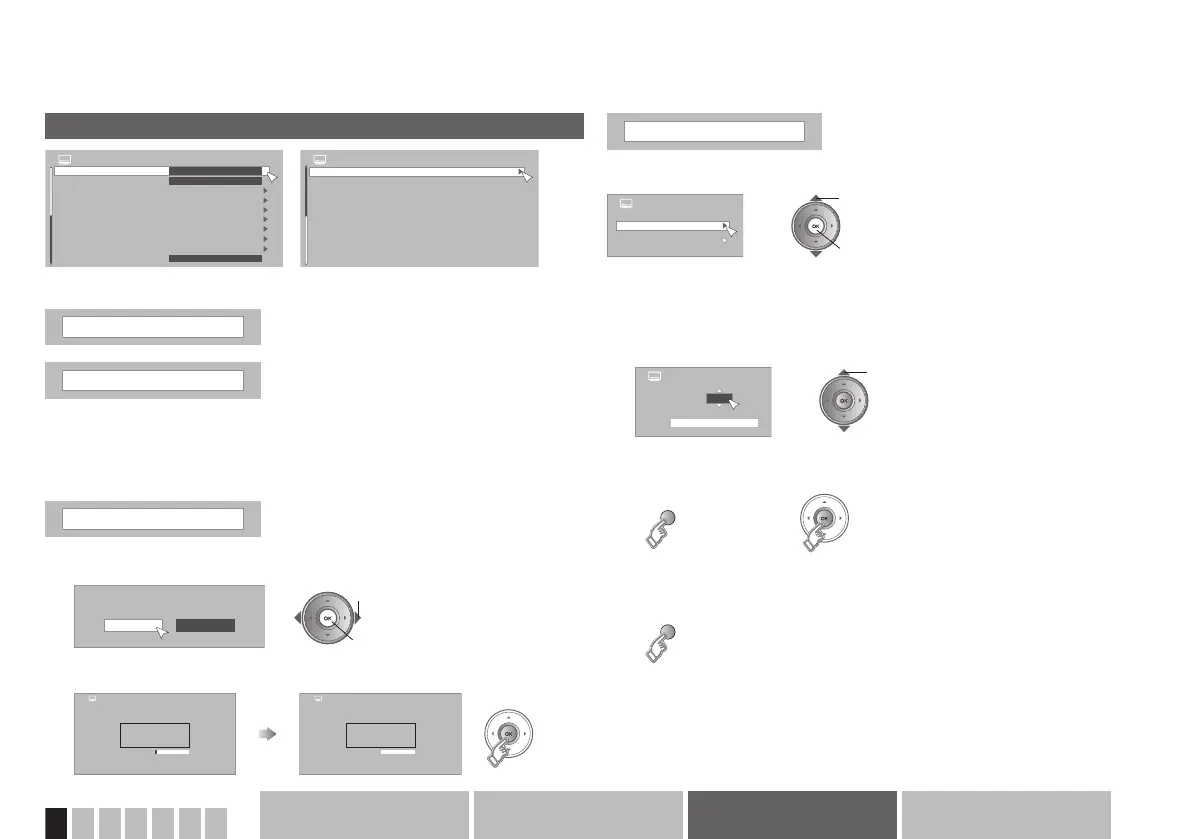
PR Installation 1/2
Menu Language
Favourite Setting
PR Lock
Edit PR
Signal Check
Antenna Power
Auto Scan
Manual Scan
Update Scan
Off
English
Auto Demonstration
Off
PR Installation 2/2
Factory Setting
All existing or locked services, Favourite Settings,
and Timer Settings will be deleted!
Continue Cancel
Digital
0
Analogue
8%
0
Service Found
Service Found
> Auto Scan
100%
> Auto Scan
Digital
Scan Completed
13
Analogue
14
Service Found
Service Found
> Manual Scan
Digital
Analogue
>> Digital Manual Scan
21
0%
CHUHF
Germany 5-12,21-69:
Etc.AdvancedBasicsGetting started
PR Installation menu
Menu Language
Select a language for on-screen menus
Antenna Power
Power supply for indoor aerial
When using an indoor aerial which requires external power, set “Antenna
Power” to “On”. The TV will supply DC 5 V, 50 mA (max) from the aerial
socket through the cable to the aerial.
“Power supply for the indoor aerial” Æ (P. 12)
Auto Scan
Scans and updates all receivable channels
Manual Scan
Manually scan and update a channel
1
Select “Continue”
2 set
1 select
2
Start “Auto Scan”
Select “Digital” or “Analogue”
2 set
1 select
Digital
1
Select the CH number
select
2
Start “Manual Scan”
3
Store channel
(yellow)
(green)
“Signal Check” is available only for digital channels.
CH number Æ “Frequency table” Æ (P. 42)
or



 To Next Page