32
TV (V-Chip)
Customizing your TV
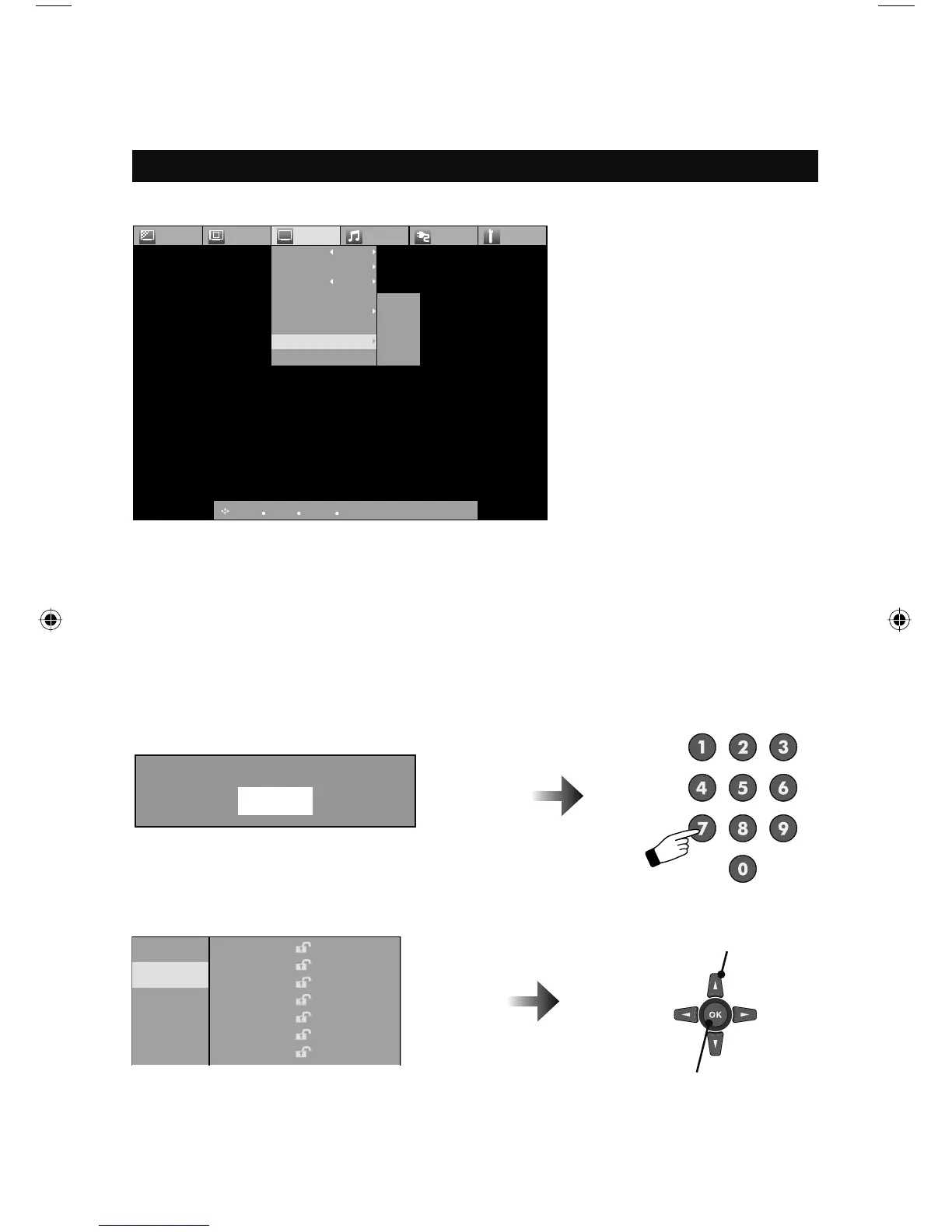
Closed Caption
CC Setting
Tuner Mode
Autoscan
Add Channel
Edit Channel
V-Chip
Guide
ON
Air
Picture Display TV Sound Power Setting
Password
MPAA
Can. Eng.
Can Fre.
TVPG
:Select
:Operate
OK
:Back
BACK
:Exit
MENU
Password
MPAA
Can. Eng.
Can Fre.
TVPG
NR
G
PG
PG13
R
NC-17
X
Notes:
• V-CHIP will not work with video signals from VCRs, DVD players, Blu-ray, HD DVD players or
camcorders connected to the TV.
• (For Canadian viewers only): V-CHIP is designed specifically for the US and may not work
properly in Canada.
– When entering the password –
When you try and access the V-Chip menu, “Please input password” will appear. Press the “0”
button four times on your remote to access the V-Chip menu for the first time.
Allows you to block channels or content that you deem inappropriate for children.
1 Select
2 Lock / Unlock
Please input password
– When you lock or unlock channels –
You can lock or unlock ratings as shown below.
Note:
• If you lock a rating, any rating that is higher is automatically blocked.
LCT2389-001A-A English.indd 32LCT2389-001A-A English.indd 32 3/25/08 3:32:21 PM3/25/08 3:32:21 PM



 To Next Page