18
Connection to other equipment
Attention: Preparation:
• Disconnect all equipment from the AC-supply, to prevent any possible damage.
• Make the necessary connections.
• Make sure all connections are safe & secure before reconnecting your equipment the AC-supply.
Note:
Select a appropriate external input mode. (See page 9)
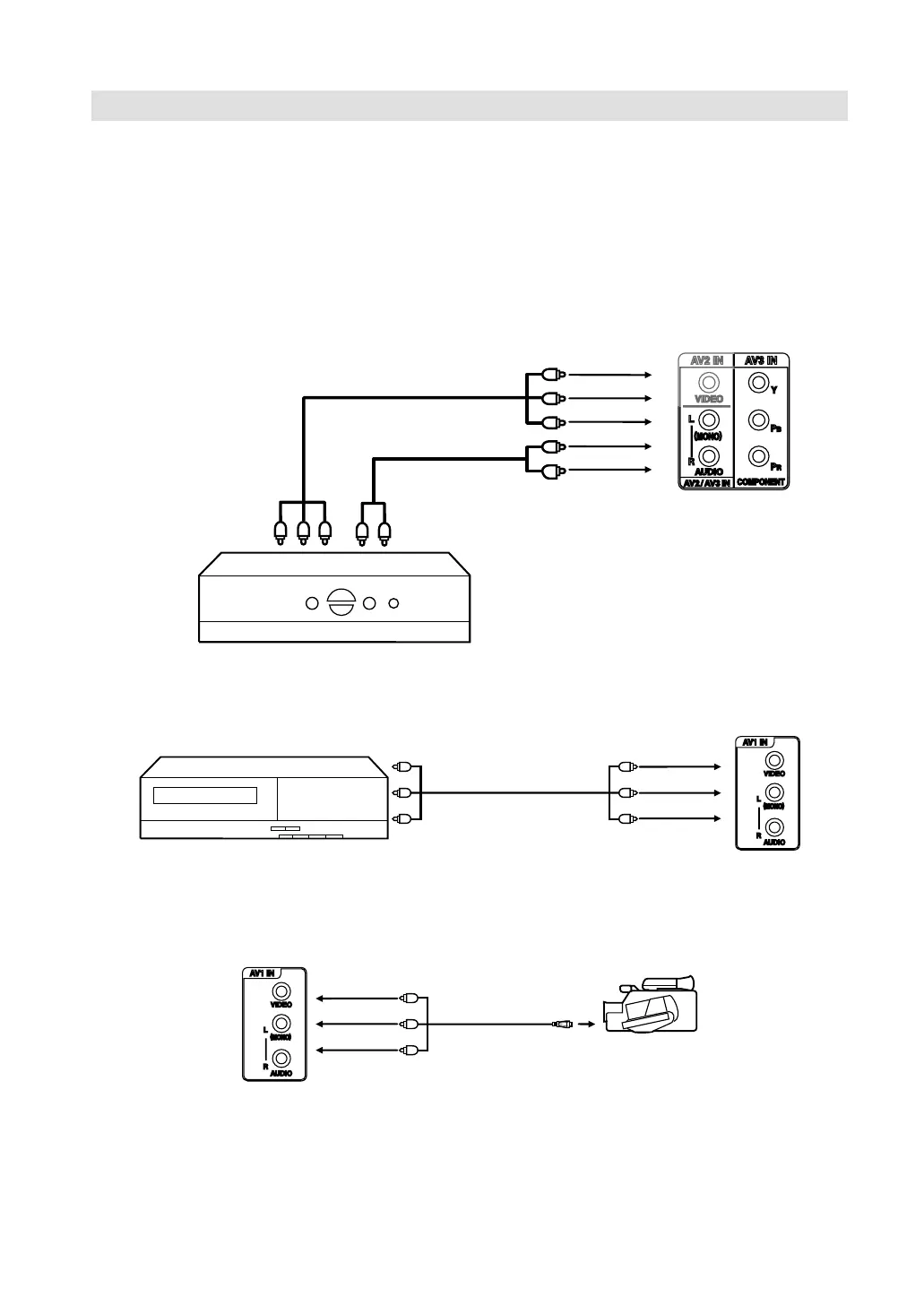
1. Connect to a receiver/set-top box
If you connect a receiver/set-top box, connect your Television to a receiver/set-top box using a
component video cord.
YPbPr
2. Connect to a VCR
3. Connecting a Video camera or Games console to AV input
•
TV (Side view)
To Component OUT To Audio OUT
Video cable (not supplied)
Audio cable (not supplied)
To COMPONENT IN
TV (Side view)
Video/Audio cable
(not supplied)
To AUDIO IN
TV (Side view)
(AV cable, not supplied)
AV output
Video camera
(example)
3IZ0101C_EN.indd 183IZ0101C_EN.indd 18 10/21/11 12:05:42 PM10/21/11 12:05:42 PM



 To Next Page