27 EN
Connection to other equipment
3. Connecting to other equipment
Please make the following settings inside your receiver’s / DVD-player’s setup-menu:
Video signal: composite (CVBS)
TV-Format: 16:9
Volume: MAX
If you miss to make these settings properly, picture quality will be inferior and parts of the picture might be
missing. This is not a fault of this TV-set.
In case you need help to make this adjustment with your satellite-receiver / DVD-player, please consult the
related instructions or contact the supplier or maker of those apparatus for support.
Please use the satellite’s remote-control handset to select Teletext or desired TV-station. Generally it is not
possible to store satellite TV-stations into a standard TV.
Press INPUT SELECT, select AV. Press PICTURE SIZE several times, until appropriate size is displayed.
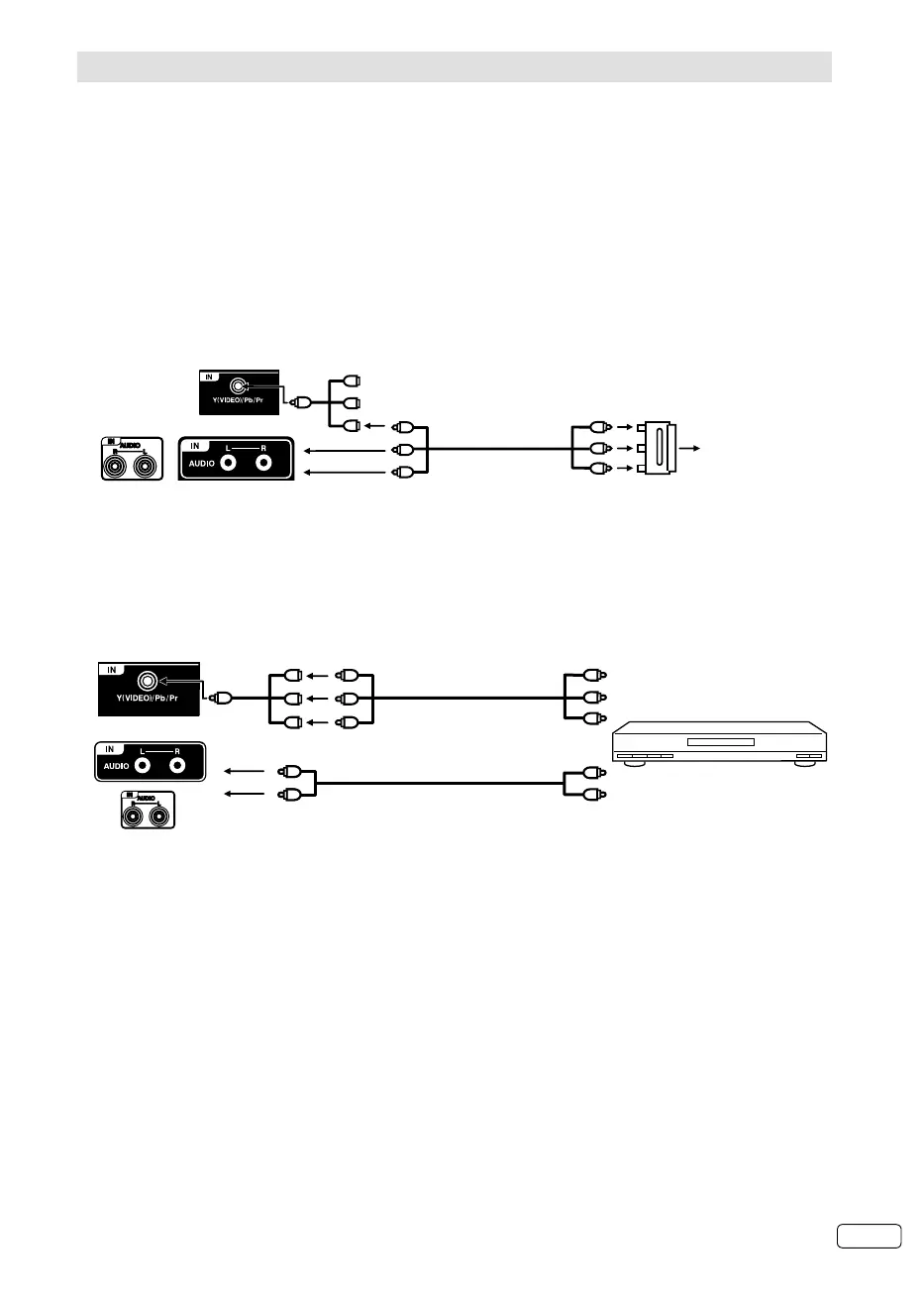
SCART-RCA-
Adapter
(supplied)
Connecting a SCART player
AV-cable
(supplied)
To SCART player
Mini-pin cable
(supplied)
Red
Blue
Green
Ye l l o w
White
Red
(Back view)
(Side view)
4. Connecting to a DVD player or other AV device with Component Video outputs
If your DVD player (or other device) has Component Video output jacks, use a suitable set of leads (RCA/
Phono) to connect these to the Component Video inputs on this TV via supplied Mini-pin cable as shown
- it can greatly enhance the picture quality and performance. Please remember that you will also need to
connect separate leads (RCA/Phono) for the audio signals.
Note:
The Component Video input of this unit are for use with equipment which outputs interlaced signals (PAL: 576i/1080i or
NTSC: 480i/1080i) and progressive signals (PAL: 576p/720p or NTSC: 480p/720p).
•
Y
Pb
Pr
Component output
Audio output
Video cable
(not supplied)
To COMPONENT IN
DVD player
Audio cable (not supplied)
Mini-pin cable
(supplied)
Red
Blue
Green
Red
Blue
Green
(Side view)
(Back view)
To AUDIO (L/R) IN
LT-29HA48E/
LT-39HG48E
(Back view)
LT-29HA48E/
LT-39HG48E
(Back view)
J3NW2151A_EN.indd 27J3NW2151A_EN.indd 27 3/4/13 2:51:50 PM3/4/13 2:51:50 PM



 To Next Page
 Loading...










