13
Remote Control
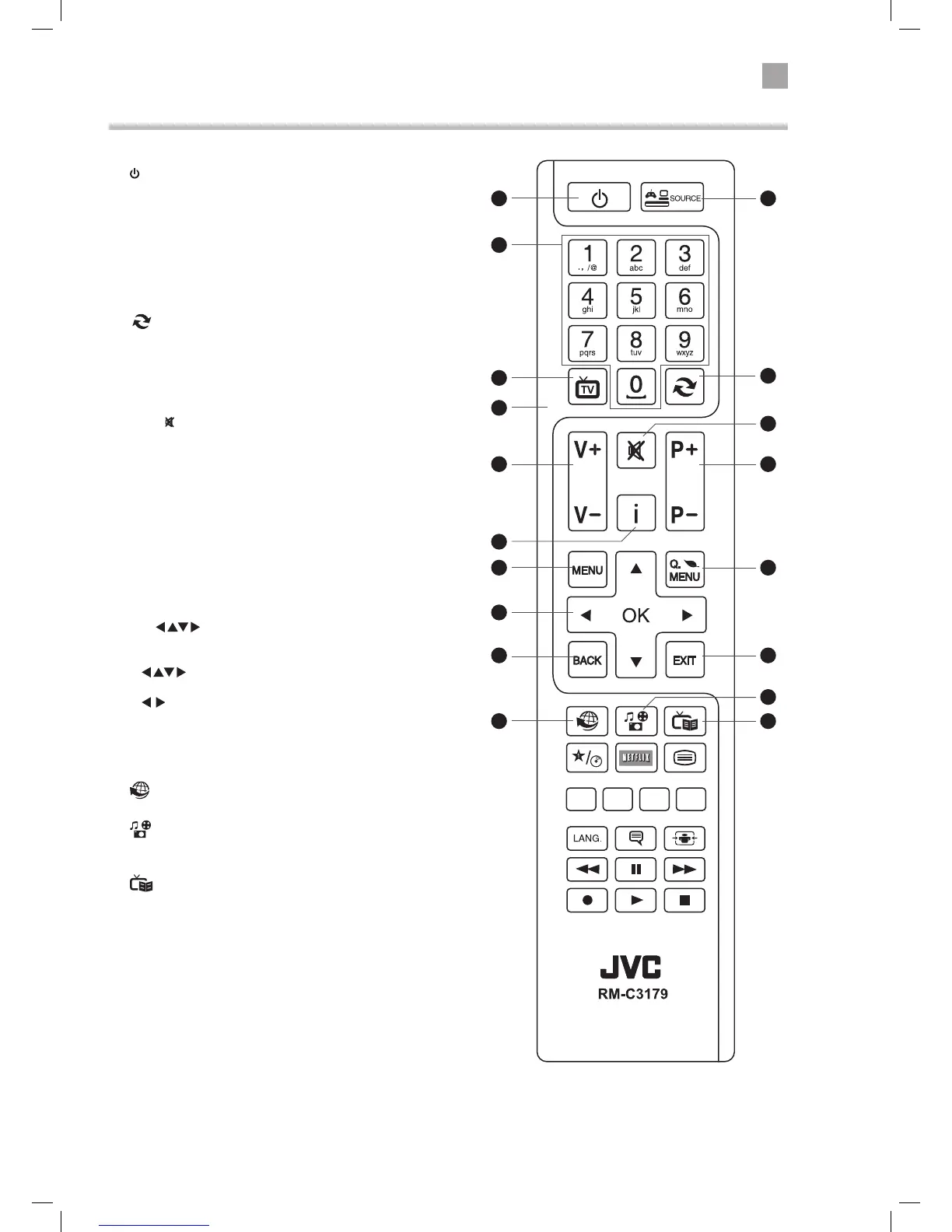
1.
Switch the TV between on and standby mode.
2. SOURCE
Press to change the source you are viewing.
TV - SCART - AV - DVD - HDMI 1 - HDMI 2 - HDMI3 - YPbPr -
VGA/PC.
3. 0-9 Number Button
• Press to select a programme. (TV / RADIO mode)
• Select numbered items in a menu. (DVD mode)
4.
(Previous programme/source)
• Press to switch between the previous programme or source
that was selected.
5. TV
• Press to enter TV mode when viewing other sources.
• Press to view the channel list when in TV mode.
6. MUTE
Mute and restore the sound.
7. V + / –
Adjust the volume.
8. P+ / P-
Press to select the next channel up or down the channel list.
9. i (info)
Press to see programme information in TV mode.
10. MENU
Display the main menu.
11. Q. MENU
Press the select the Settings menu.
12. OK /
• Press OK to select or save a setting in menus.
• Press OK to select the Channel list while watching TV.
• Allows you to navigate the OSD menus and adjust
the system settings to your preference.
• skip chapters in DVD mode.
13. BACK
Press to move backwards through menus.
14. EXIT
Press to exit a menu.
15.
Connects to the internet (internet connection required).
16.
(Media Browser)
Press to enter the media browser menu, a hard drive will need
to be attached to the USB port.
17.
(Programme Guide)
Press to view the Programme Guide.
5
3
1
6
16
2
8
11
14
17
10
9
13
15
7
12
11
4
LT-40C755_IB.indd 13 23/01/2015 11:33



 To Next Page