10
Timer
1
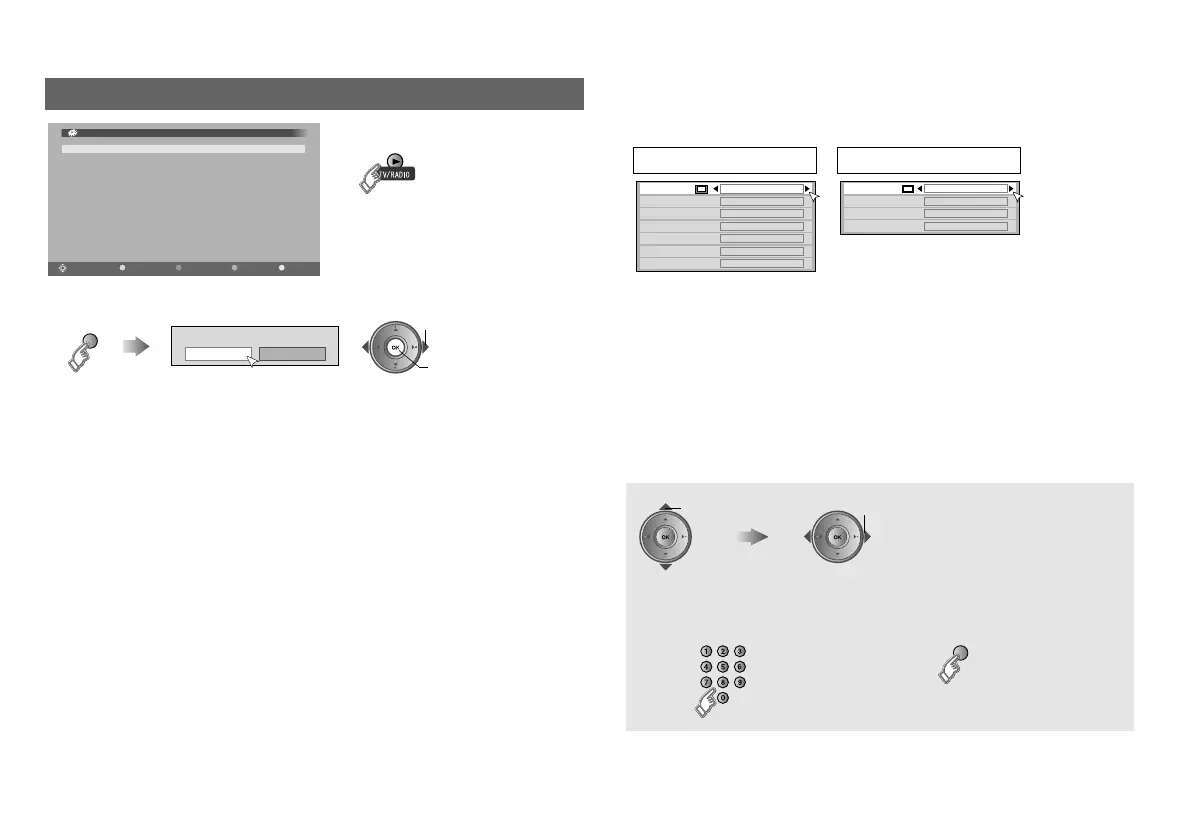
Display the timer select menu
Timer list empty
PR Start End Date Mode
Select
OK
Add Delete EPGNavigate
Timer
14:00
05/05/2008
䡵 Switch TV/RADIO
z Up to 20 programmes can be
reserved.
Please select timer
Record Remind
(red)
B set
A select
Record : Reserve a programme to record
Remind : Reserve a programme to watch
2
Programme the timer setting
z If you select the programme using “EPG” (P. 6), all items will be set
automatically. Change the setting if necessary.
PR : Select the channel
Start / End / Date : Enter the time and date
Mode : Select the reservation mode (Once, Daily,
Weekly)
Audio : Normally set to “PCM / Analogue”. For details,
see ““Dolby Digital” output from the DIGITAL
AUDIO OUT terminal” (P. 18).
Subtitle : Set subtitle recording (Off, On)
Record
PR BBC ONE
Start 17:15
End 18:00
Date 05/05/2008
Mode Once
Audio PCM / Analogue
Subtitle Off
Remind
PR BBC ONE
Start 17:15
Date
05/05/2008
Mode
Once
select
䡵 Select a programme using “EPG”
select
(yellow)
䡵 To enter time and date
Customising your TV
LT-42DR9BJ_DTV_003A_EN.book Page 10 Wednesday, July 16, 2008 4:42 PM



 To Next Page
 Loading...