14
n
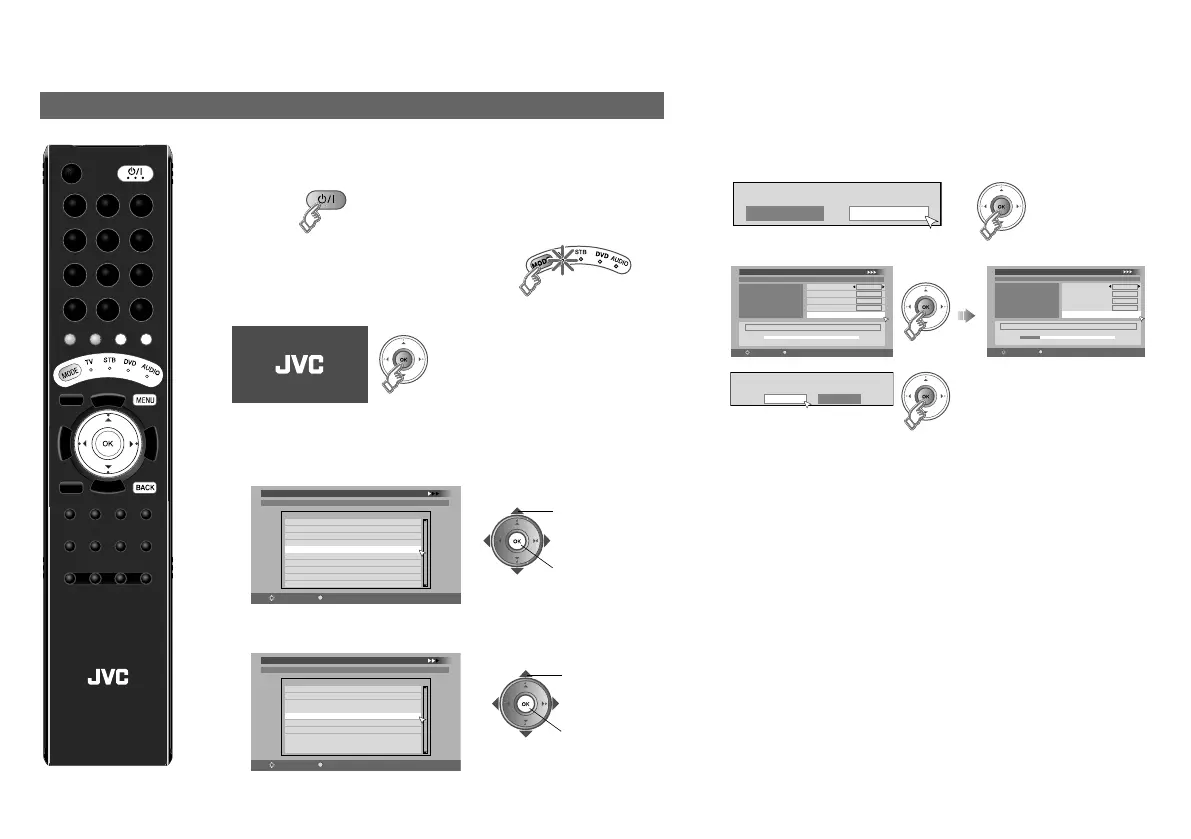
The initial settings will begin automatically when the TV is turned
on for the very first time. Follow the on-screen instructions to
perform the settings.
1 Turn on
z If the remote control doesn’t work,
confirm that the mode is set to “TV”.
2 Start initial settings
z If the JVC logo does not appear, refer to “To perform initial
settings again” (P. 15).
3 Set digital channels
1 Select a language for on-screen displays and DTV menus.
2 Select the country of installation. Receivable digital
channels will differ depending on the “Country” setting.
3 Confirm that the aerial power supply is set to “Off”.
Select “On” only when using an aerial which requires
external power. (P. 12)
4 Register digital channels
z If “No services found” appears, press the “OK” button to
proceed to the next step to complete the other settings.
Then, refer to “No digital channels” (P. 15).
z You can edit the digital channels after the initial settings.
For details, refer to “Edit PR (Edit PR List)” (P. 9) on the
separate manual “WATCHING DIGITAL CHANNELS”.
z Some digital channels cannot be watched on this TV.
For details, refer to page 17 on the separate manual
“WATCHING DIGITAL CHANNELS”.
z For information on the country and language selections
available for digital channel settings, refer to page 1 on
the separate manual “WATCHING DIGITAL
CHANNELS”.
Initial settings (DR9)
Castellano
Català
First Time Installation > Language Setting
Step 1: Please choose language
Language
Dansk
Deutsch
Select
OK
Navigate
English
Français
Italiano
Nederlands
Suomi
Svenska
B set
A select
Denmark
First Time Installation > Country Setting
Step 2: Please choose country
Country
Finland
Select
OK
Navigate
Austria
Germany
Italy
France
Spain
Sweden
Switzerland
Netherlands
A select
B set
Mode
Start Scan
On
Off
Antenna Power
First Time Installation > Service Scan
Step 3: Please press OK
Select
OK
Navigate
Automatic
Service
Scan
_ _
Start Channel
_ _
Stop Channel
Add
Mode
Start Scan
First Time Installation > Service Scan
Step 3: Please press OK
Select
OK
Navigate
Automatic
Service
Scan
_ _
Start Channel
_ _
Stop Channel
Add
Mode
Start Scan
UHF33 : 3 Services found
Doku/Kika
ZDF
Info/3sat
Scan completed! Store services?
Yes No
Getting started
LCD
LT-42DR9BU.book Page 14 Tuesday, February 19, 2008 11:46 AM



 To Next Page
 Loading...