20
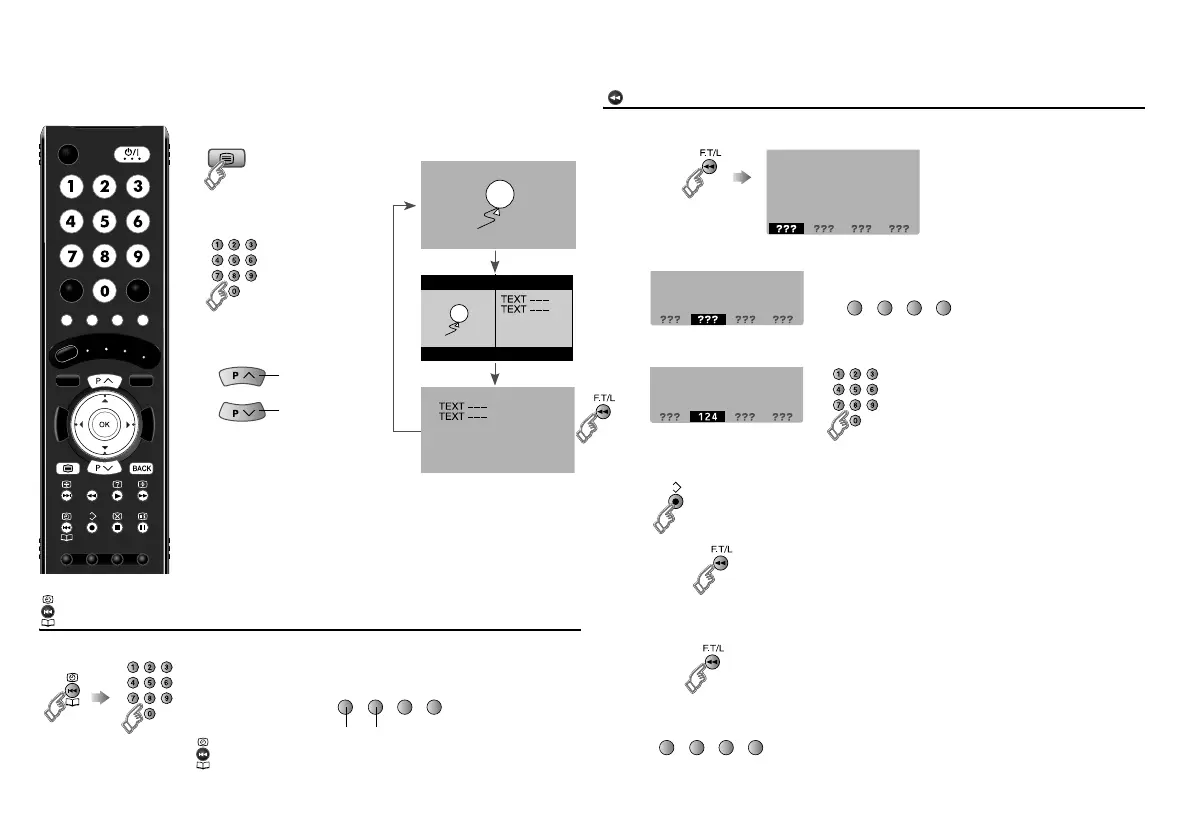
This TV can display TV broadcasts and teletext on the same channel in two
windows.
View sub-pages
Display sub-pages
Bookmark your favourite page
F. T / L
(red) (green)
updown
䡵 Move up or down a page
䡵 Release g Press “ ” again
F.T/L
1 Display your favourites list
2 Select a coloured button to save your page to
3 Enter the number of the page to save
4 Save
䡵 Recall your favourite page
1 Display your favourites list
2 Press a coloured button
(red) (green) (yellow) (blue)
䡵 Exit g
(red) (green) (yellow) (blue)
Viewing teletext
1
2
Enter a teletext page
䡵 Move up or down a
page
TEXT
TV
TEXT
up
down
When watching TV
LT-42DR9BU.book Page 20 Tuesday, February 19, 2008 11:46 AM



 To Next Page
 Loading...