16
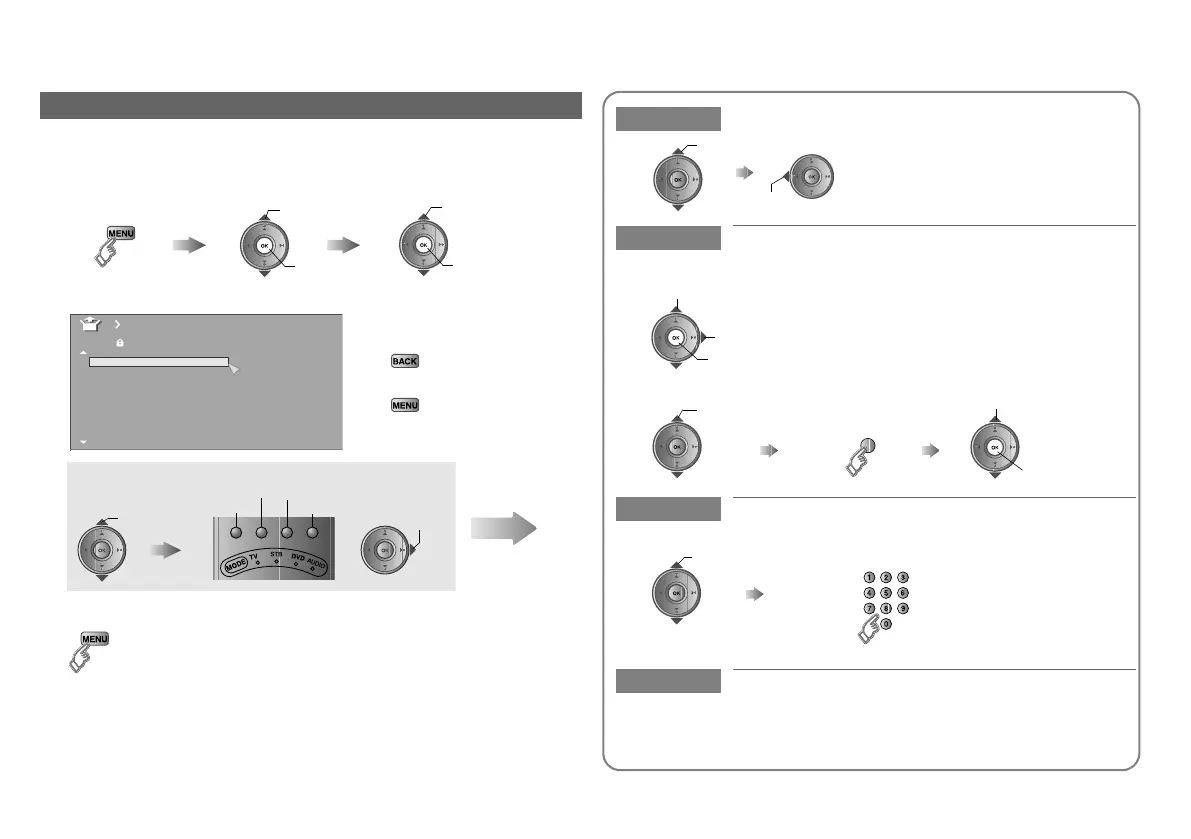
You can edit the analogue channel list.
Editing analogue channels
1
Display the “Edit” menu
2 Edit channels
䡵 To the previous menu
g
䡵 Exit
g
3 Finish
A select
B next
B next
A select
Select “Set Up”
Select “Edit/Manual”
Display the menu bar
ARD
_ _ _ _ _ _
AV
PR ID
Edit
CH/CC
01 02CH
02 03CH
03 04CH
04
05
06
07
08
09
05CH
06CH
01CC
02CC
03CC
04CC
select a
channel
Select channel Select edit function
ID
Insert
Delete
Manual
Move
Next
Move Move a channel’s position (PR)
ID Edit a channel name (ID)
Insert Insert a new channel directly by entering the
CH/CC number
Delete Delete a channel
z Pressing the button deletes the channel.
set
select
䡵 When selecting a preset name from the “ID List”
B set
A select character
B move position
C set
A select
enter the first
character
(blue)
am
ng a c
anne
z “CH/CC” list g (P. 35)
Select a “CH/CC”
z Receives the
broadcast signal.
Enter a number
Getting started
LT-42DR9BU.book Page 16 Tuesday, February 19, 2008 11:46 AM



 To Next Page
 Loading...