INSTALLATION
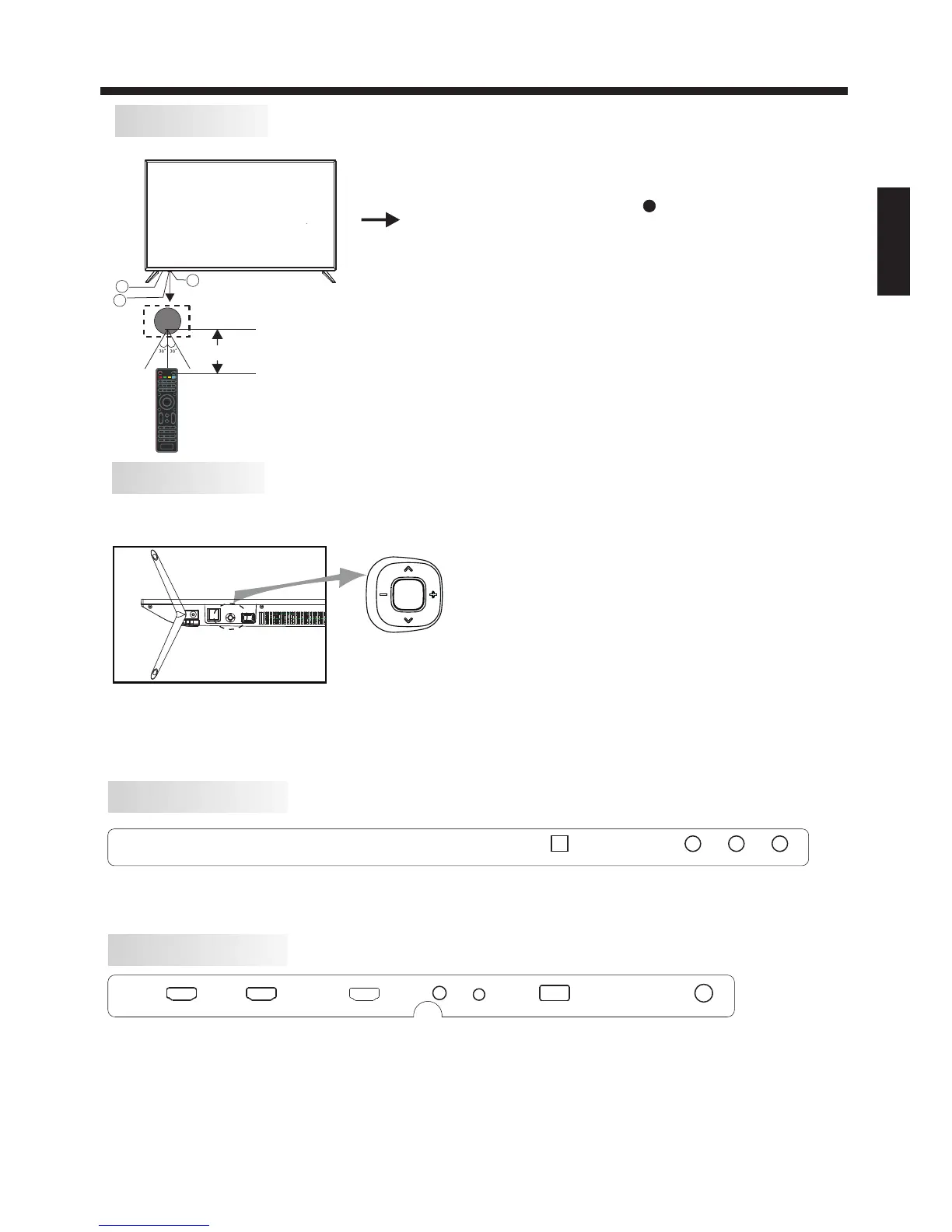
Front panel
REAR Connections
SIDE Connections
ENGLISH
A ll the terminals are(from left to right): OPTICAL, VIDEO INPUT, AUDIO INPUT.
VIDEO L ROPTICAL
1: Remote control sensor.
2: Indicator LED: RED STANDBY.
3: Key board
3
2
1
≤8m
Bottom
1. Middle Button: press longtime for “power” function;
2. Up/Down: CH+/-
3. Left/Righ: VOL-/+
press once for “source” function
The keyboard is located at the bottom left near the right side of signal indicator.
KEYBOARD
Rocker
-6-
All the terminals are (from left to right):
, HDMI2, HDMI3, Headphone, YPbPr, USB, RF.
HDMI1(ARC)
HDMI1(ARC) HDMI2 HDMI3
HEADPHONE
USB
RF
YPbPr


 To Next Page