34
M-1:23:45
SP
PLAYBACK
Basic Playback
NOTE:
Make sure you connect your camcorder as directed in
“Basic Connections” (
Z
pg. 33).
LOAD A CASSETTE
1
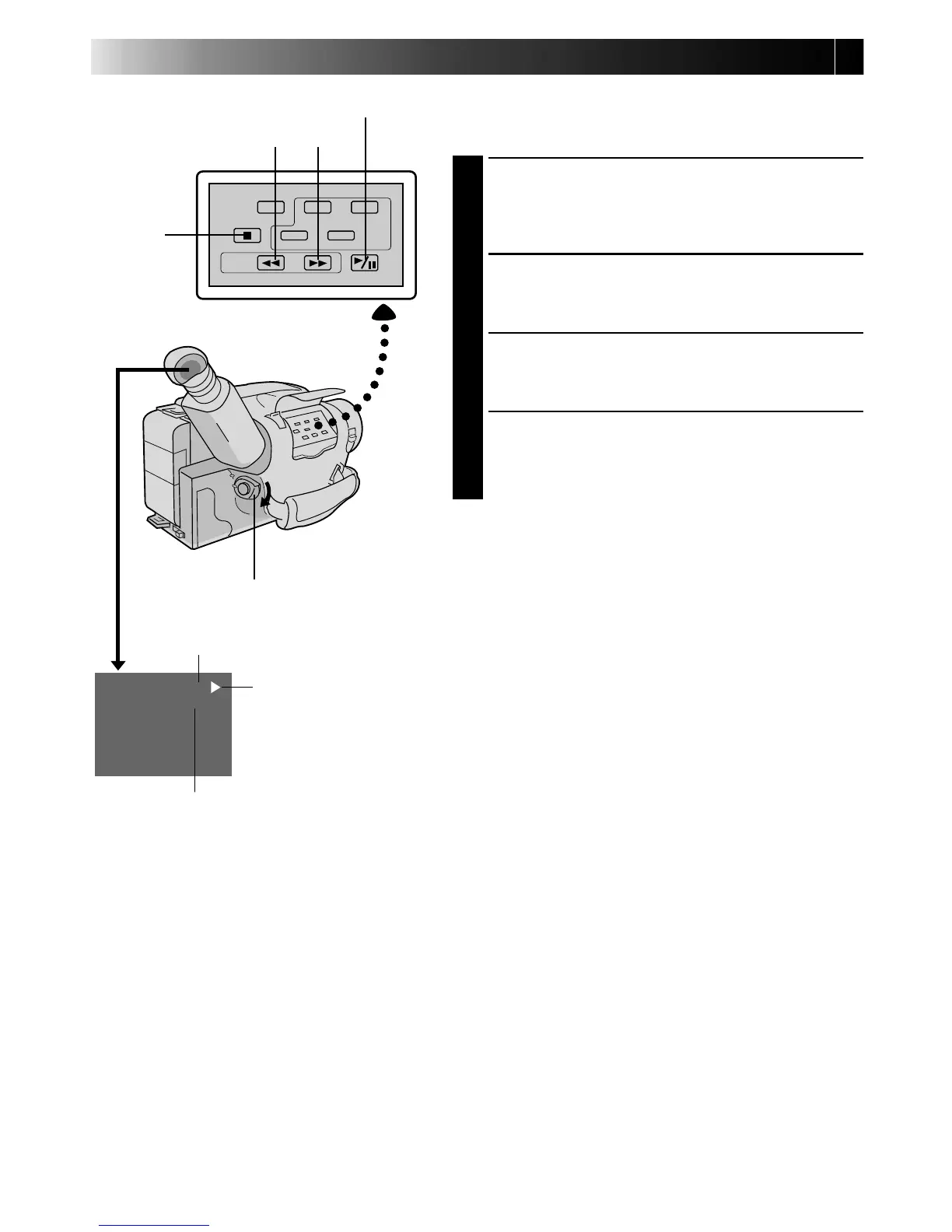
Slide EJECT to open the cassette holder, then insert
the cassette with the label facing out. Press PUSH to
ensure the holder is closed and locked.
SELECT MODE
2
Set the Power switch to “PLAY”. The Power On
indicator lights.
PLAYBACK
3
Press PLAY/PAUSE. The playback picture appears in
the viewfinder and the connected TV.
STOP PLAYBACK
4
Press STOP.
Rewind or Fast-forward the tape
Press REW to rewind, or FF to fast-forward the tape
during Stop mode.
NOTE:
The camcorder shuts off automatically after about 5
minutes in Stop mode or Still Playback mode. To turn on
again, set the Power switch to “POWER OFF”, then to
“PLAY”.
REW
STOP
PLAY/PAUSE
FF
POWER
Tape running indicator
4
: Playback
3
: Fast-Forward/
Forward Search
2
: Rewind/Reverse
Search
6 : Still Playback
Recording mode indicator
Tape counter


 To Next Page