EasyManua.ls Logo

JVC MX-J30 - Page 44

JVC MX-J30
102 pages
Print Icon
To Next Page IconTo Next Page
To Previous Page IconTo Previous Page
Loading...
MX-J30/MX-J330/MX-J35R
Mi
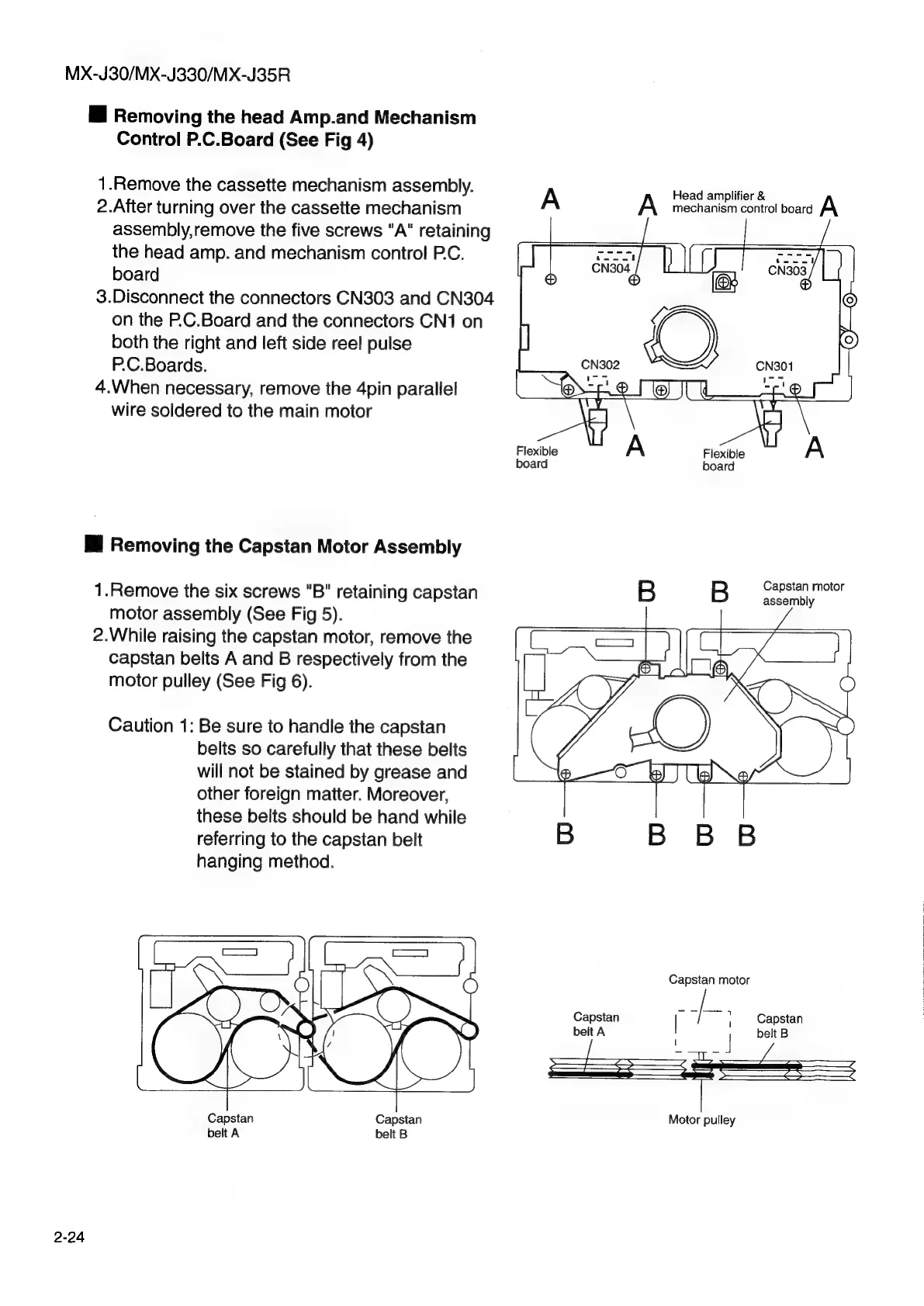
Removing
the
head
Amp.and
Mechanism
Control
P.C.Board
(See
Fig
4)
1.Remove
the
cassette
mechanism
assembly.
A
A
Head
ampitier
mechanism
control
board
2.After
turning
over
the
cassette
mechanism
assembly,remove
the
five
screws
"A"
retaining
the
head
amp.
and
mechanism
control
PC.
board
3.Disconnect
the
connectors
CN303
and
CN304
on
the
P.C.Board
and
the
connectors
CN1
on
both
the
right
and
left
side
ree!
pulse
P.C.Boards.
4.When
necessary,
remove
the
4pin
parallel
wire
soldered
to
the
main
motor
Flexible
iT
A
Flexible
Ws
A
board
board
i
Removing
the
Capstan
Motor
Assembly
1.Remove
the
six
screws
"B"
retaining
capstan
B B
nective
motor
assembly
(See
Fig
5).
2.While
raising
the
capstan
motor,
remove
the
capstan
belts
A
and
B
respectively
from
the
motor
pulley
(See
Fig
6).
Caution
1:
Be
sure
to
handle
the
capstan
belts
so
carefully
that
these
belts
will
not
be
stained
by
grease
and
other
foreign
matter.
Moreover,
these
belts
should
be
hand
while
referring
to
the
capstan
belt
B
B B
B
hanging
method.
Capstan
motor
Capstan
;
Capstan
belt
A
|
;
|
belt
B
Motor
pulley
Capstan
Capstan
belt
A
belt
B
2-24

Other manuals for JVC MX-J30

Related product manuals