12
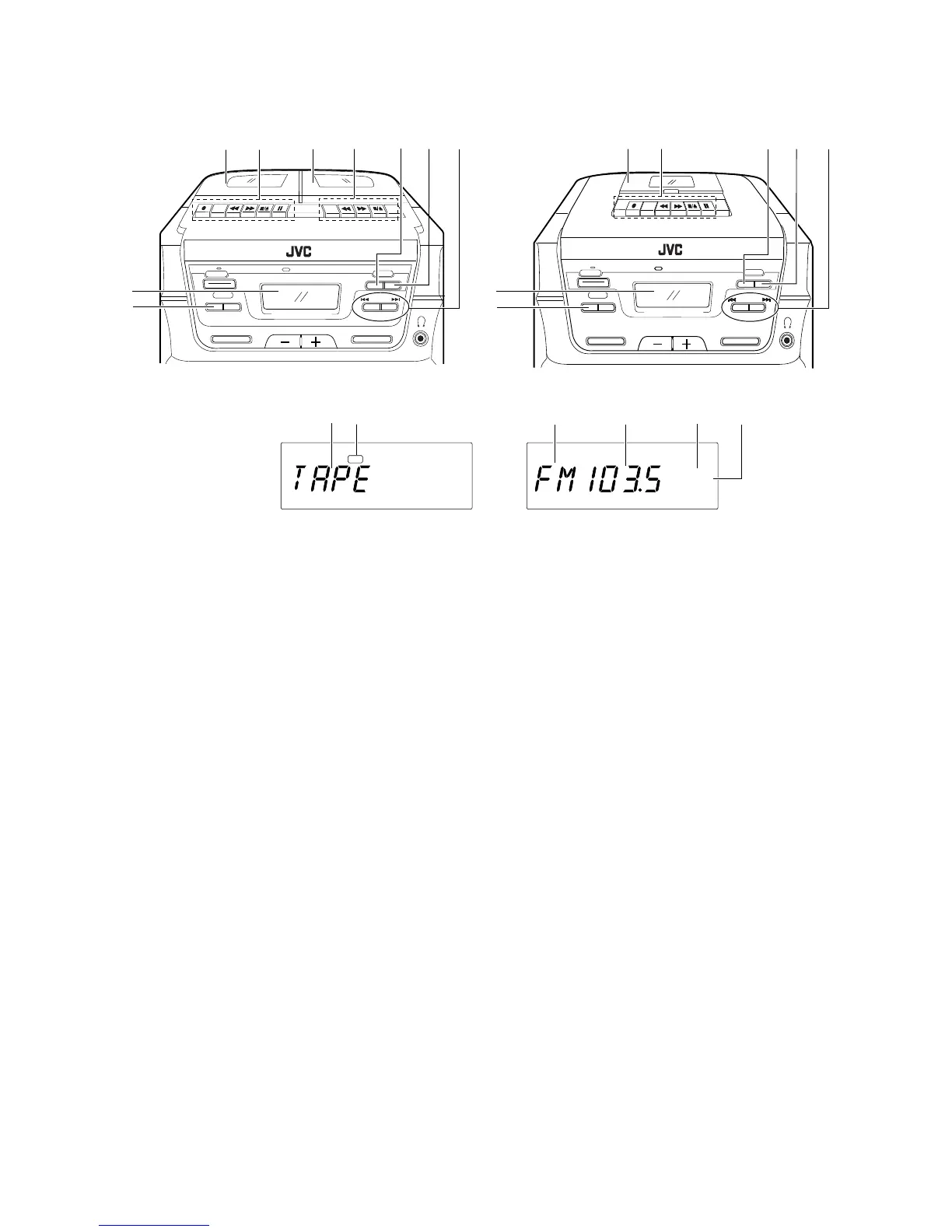
Tuner/Deck section Sección del sintonizador/platina Section syntoniseur/platine
1 Cassette holder (Deck A) (PC-XC12 only)
Cassette holder (PC-XC8 only)
2 Cassette operation buttons (Deck A) (PC-
XC12 only)
Cassette operation buttons (PC-XC8 only)
‡ REC : Press this button with the 3
PLAY button to start recording.
3 PLAY : Press to play the tape.
1 REW: Press to rewind the tape rapidly.
¡ FF: Press to wind the tape forward
rapidly.
7/0 STOP/EJECT: Press to stop the tape.
Pressing this button when the
tape has stopped opens the
cassette holder.
8 PAUSE: Press to stop the tape
temporarily. Press again to
release the pause mode.
3 Casette holder (Deck B) (PC-XC12 only)
4 Casette operation buttons (Deck B) (PC-
XC12 only)
3 PLAY : Press to play the tape.
1 REW: Press to rewind the tape rapidly.
¡ FF: Press to wind the tape forward
rapidly.
7/0 STOP/EJECT: Press to stop the tape.
Pressing this button when the
tape has stopped opens the
cassette holder.
5 TUNER/BAND button
Press to select tuner mode.
Press to select the band.
6 PRESET TUNING/AUTO PRESET button
7 Tuning buttons (UP/DOWN)
1 Portacassette (Platina A) (PC-XC12
exclusivamente)
Portacassette (PC-XC8 exclusivamente)
2 Botones para operación del cassette
(Platina A) (PC-XC12 exclusivamente)
Botones para operación del cassette (PC-
XC8 exclusivamente)
‡ REC: Presione este botón
conjuntamente con el botón 3
PLAY para iniciar la grabación.
3 PLAY: Presiónelo para reproducir la
cinta.
1 REW: Presiónelo para rebobinar
rápidamente la cinta.
¡ FF: Presiónelo para avanzar la cinta
hacia adelante rápidamente.
7/0 STOP/EJECT: Presiónelo para detener
la cinta. El presionar este
botón cuando la cinta está
detenida abre el portacassette.
8 PAUSE: Presiónelo para detener la
cinta temporariamente.
Presiónelo otra vez para
desactivar el modo de pausa.
3 Portacassette (Platina B) (PC-XC12
exclusivamente)
4 Botones para operación del cassette
(Platina B) (PC-XC12 exclusivamente)
3 PLAY: Presiónelo para reproducir la
cinta.
1REW: Presiónelo para rebobinar
rápidamente la cinta.
¡ FF: Presiónelo para avanzar la cinta
hacia adelante rápidamente.
7/0 STOP/EJECT: Presiónelo para detener
la cinta. El presionar este
botón cuando la cinta está
detenida abre el portacassette.
5 Botón sintonizador/banda (TUNER/BAND)
Presiónelo para seleccionar el modo de
sintonizador.
Presiónelo para seleccionar la banda.
6 Botón de presintonización/presintonización
automática (PRESET TUNING/AUTO
PRESET)
7 Botones arriba/abajo de sintonización (UP/
DOWN)
1
Porte cassette (Platine A) (PC-XC12
uniquement)
Porte cassette (PC-XC8 uniquement)
2
Touches de fonctionnement cassette
(Platine A) (PC-XC12 uniquement)
Touches de fonctionnement cassette (PC-
XC8 uniquement)
‡
REC: Appuyer sur cette touche avec
la touche
3
PLAY pour lancer
l’enregistrement.
3
PLAY: Appuyer pour lire la bande.
1
REW: Appuyer pour rembobiner
rapidement la bande.
¡
FF: Appuyer pour faire défiler
rapidement la bande en avant.
7
/
0
STOP/EJECT: Appuyer pour arrêter la
bande. Une pression sur cette
touche quand la bande est
arrêtée ouvre le porte cassette.
8
PAUSE: Appuyer pour arrêter
momentanément la bande.
Appuyer à nouveau pour
relâcher le mode de pause.
3
Porte cassette (Platine B) (PC-XC12
uniquement)
4
Touche de fonctionnement cassette
(Platine B) (PC-XC12 uniquement)
3
PLAY: Appuyer pour lire la bande.
1
REW: Appuyer pour rembobiner
rapidement la bande.
¡
FF: Appuyer pour faire défiler
rapidement la bande en avant.
7
/
0
STOP/EJECT: Appuyer pour arrêter la
bande. Une pression sur cette
touche quand la bande est
arrêtée ouvre le porte cassette.
5
Touche de syntoniseur/gamme (TUNER/
BAND)
Appuyer pour sélectionner le mode
syntoniseur.
Appuyer pour sélectionner la gamme.
6
Touche de syntonisation des préréglages
(PRESET TUNING)/préréglage automatique
(AUTO PRESET)
7
Touches de syntonisation (UP/DOWN)
8
PC-XC8
PC-XC12
RECREC
STEREO
MONO
MHz
1 2
3
4
5
6
CD/TUNER MULTI DISPLAY
TIMER
POWER
TUNER
VOLUME
SOUND
ACTIVE HYPER-BASS PRO
CD PORTABLE COMPONENT SYSTEM
REC/
PLAY
PLAY
A
B
PLAY
PLAY
ON
WAKE UP
SLEEP
BEAT CUT
BAND
PRESET TUNING
AUTO PRESET
CD SEARCH
ACTIVE HYPER-BASS PRO
REMOTE SENSOR
DOWN
TUNING
UP
PC
X
-
C
12
TIMER
WAKE UP
SLEEP
BEAT CUT
CD SEARCH
VOLUME
SOUND
ACTIVE HYPER-BASS PRO
DOWN
TUNING
UP
PLAY
PC
X
-
C
8
CD PORTABLE COMPONENT SYSTEM
CD/TUNER MULTI DISPLAY
POWER
TUNER
ON
BAND
PRESET TUNING
AUTO PRESET
ACTIVE HYPER-BASS PRO
REMOTE SENSOR
5 6
1
27
8
9
3 4
7
1
2
6
8
9
5


 To Next Page