EasyManua.ls Logo

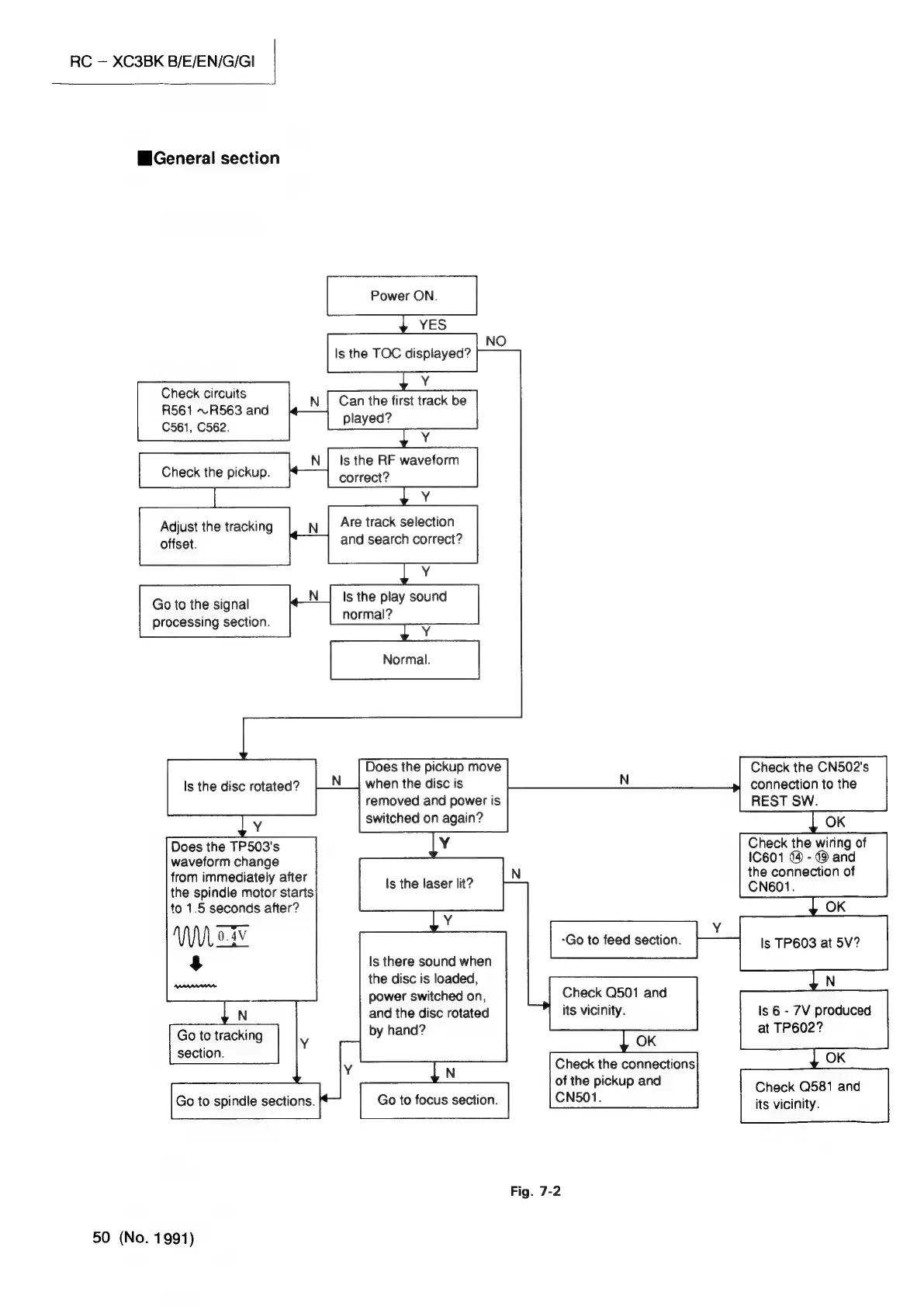
JVC RC-XC3BK - General section; Check the pickup.; Adjust the tracking offset.

JVC RC-XC3BK
90 pages
Print Icon
To Next Page IconTo Next Page
To Previous Page IconTo Previous Page
Loading...
RC
XC3BK
B/E/EN/G/GI
General
section
Power
ON.
YES
Is
the
TOC
displayed?
Check
circuits
R561
~R563
and
N
|
Can
the
first
track
be
played?
C561,
C562.
ls
the
RF
waveform
Check
the
pickup.
correct?
z
re
z
oO
Are
track
selection
and
search
correct?
Adjust
the
tracking
offset.
Y
Go
to
the
signal
N_|
Is
the
play
sound
2
processing
section.
normal?
Normal.
a
Does
the
pickup
move
Check
the
CN502's
Is
the
disc
rotated?
when
the
disc
is
N
connection
to
the
removed
and
power
is
REST
SW.
switched
on
again?
OK
Does
the
TP503's
Check
the
wiring
of
waveform
change
IC601
@
-
@
and
from
immediately
after
the
connection
of
the
spindle
motor
starts
CN601.
to
1.5
seconds
after?
OK
a
Go
to
feed
section.
Is
TP603
at
5V?
$
Is
there
sound
when
soe
the
disc
is
loaded,
N
Check
Q501
and
its
vicinity.
power
switched
on,
and
the
disc
rotated
by
hand?
N
Go
to
tracking
section.
Go
to
spindle
sections.
is
6
-
7V
produced
at
TP602?
Y
N
Check
the
connections
of
the
pickup
and
Go
to
focus
section.
CN501.
Check
Q581
and
its
vicinity.
Fig.
7-2
50
(No.
1991)

Related product manuals