EasyManua.ls Logo

JVC RM-G810U - Automatic Editing

JVC RM-G810U
10 pages
Print Icon
To Next Page IconTo Next Page
To Previous Page IconTo Previous Page
Loading...
REMOTE
CONTROL
OF
TAPE
TRANSPORT
AND
DIAL
SEARCH
AUTOMATIC
EDITING
@
This
chart
shows
the
procedure
for
automatic
editing.
The
conversational
operation
system
lets
you
know
the
next
step
to
follow
by
a
flashing
indicator.
@
Engagement
of
each
mode
is
signaled
by
an
electronic
beep.
©
Of
these
steps,
some
can
be
omitted
depending
on
the
editing
technique.
For
example,
if
preview
editing
is
not
required,
steps
4
and
5
can
be
omitted.
®@
Do
not
use
the
beginning
section
of
about
10
seconds
of
the
tape
for
editing
or
recording.
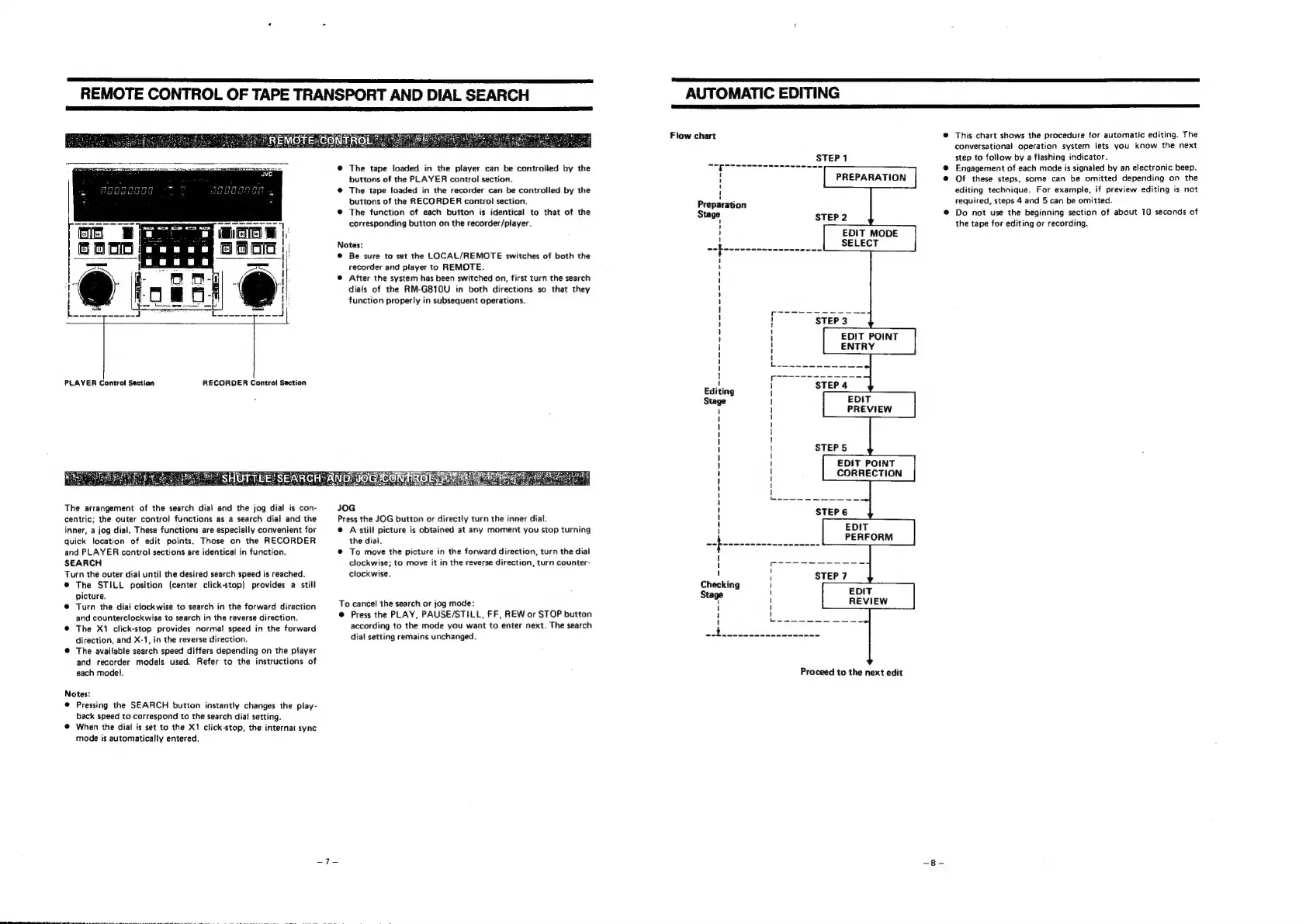
@
The
tape
loaded
in
the
player
can
be
controiled
by
the
buttons
of
the
PLAYER
control
section.
@
The
tape
loaded
in
the
recorder
can
be
controlled
by
the
buttons
of
the
RECORDER
contro!
section.
®
The
function
of
each
button
is
identical
to
that
of
the
corresponding
button
on
the
recorder/player.
Notes:
@
Be
sure
to
set
the
LOCAL/REMOTE
switches
of
both
the
recorder
and
player
to
REMOTE.
@
After
the
system
has
been
switched
on,
first
turn
the
search
dials
of
the
RM-G810U
in
both
directions
so
that
they
function
properly
in
subsequent
operations.
PLAYER
Control
Section
RECORDER
Control
Section
The
arrangement
of
the
search
dial
and
the
jog
dial
is
con-
JOG
centric;
the
outer
control
functions
as
a
search
dial
and
the
Press
the
JOG
button
or
directly
turn
the
inner
diat.
inner,
a
jog
dial,
These
functions
are
especially
convenient
for
@
A
still
picture
is
obtained
at
any
moment
you
stop
turning
quick
location
of
edit
points.
Those
on
the
RECORDER
the
dial.
and
PLAYER
control
sections
are
identical
in
function.
@
To
move
the
picture
in
the
forward
direction,
turn
the
dial
SEARCH
clockwise;
to
move
it
in
the
reverse
direction,
turn
counter-
Turn
the
outer
dial
until
the
desired
search
speed
is
reached.
clockwise.
®
The
STILL
position
(center
click-stop)
provides
a
still
picture.
@
Turn
the
dial
clockwise
to
search
in
the
forward
direction
To
cancel
the
search
or
jog
mode:
and
counterclockwise
to
search
in
the
reverse
direction.
©
Press
the
PLAY,
PAUSE/STILL,
FF,
REW
or
STOP
button
@
The
X1
click-stop
provides
normal
speed
in
the
forward
according
to
the
mode
you
want
to
enter
next.
The
search
direction,
and
X-1,
in
the
reverse
direction.
dial
setting
remains
unchanged.
@
The
available
search
speed
differs
depending
on
the
player
and
recorder
models
used.
Refer
to
the
instructions
of
each
model.
Proceed
to
the
next
edit
Notes:
®
Pressing
the
SEARCH
button
instantly
changes
the
play-
back
speed
to
correspond
to
the
search
dial
setting.
@
When
the
dial
is
set
to
the
Xt
click-stop,
the
internal
sync
mode
is
automatically
entered.