EasyManua.ls Logo

JVC RM-G810U - Page 7

JVC RM-G810U
10 pages
Print Icon
To Next Page IconTo Next Page
To Previous Page IconTo Previous Page
Loading...
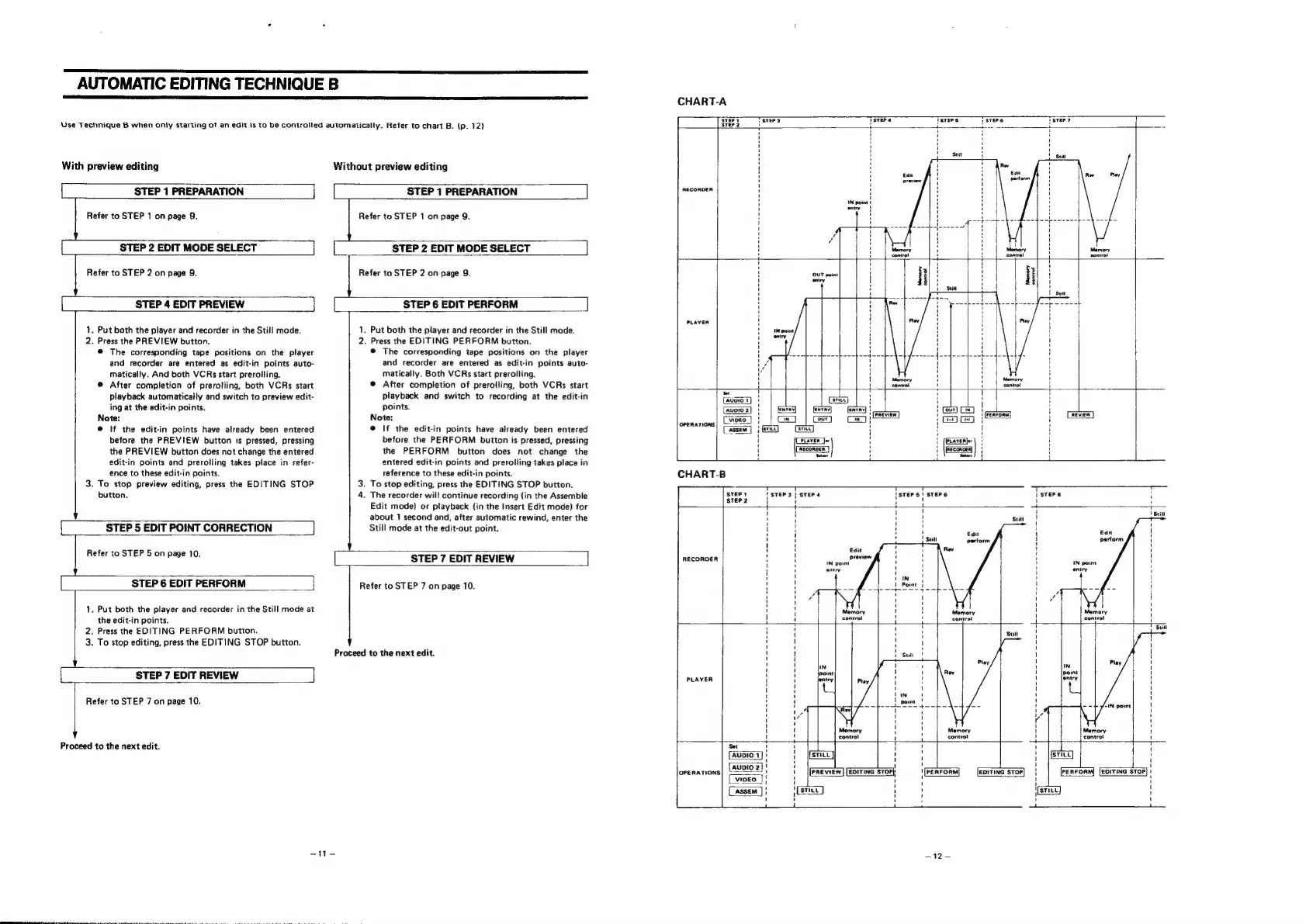
AUTOMATIC
EDITING
TECHNIQUE
B
Use
Technique
B
when
only
starting
of
an
edit
is
to
be
controlled
automatically.
Refer
to
chart
B.
(p.
12)
With
preview
editing
Without
preview
editing
STEP
1
PREPARATION
STEP
1
PREPARATION
LJ
Refer
to
STEP
1
on
page
9.
Refer
to
STEP
1
on
page
9.
STEP
2
EDIT
MODE
SELECT
L_
STEP
2
EDIT
MODE
SELECT
Refer
to
STEP
2
on
page
9.
Refer
to
STEP
2
on
page
9.
STEP
4
EDIT
PREVIEW
STEP
6
EDIT
PERFORM
1,
Put
both
the
player
and
recorder
in
the
Still
mode.
2.
Press
the
PREVIEW
button.
@
The
corresponding
tape
positions
on
the
player
and
recorder
are
entered
as
edit-in
points
auto-
matically.
And
both
VCRs
start
prerolling.
@
After
completion
of
prerotling,
both
VCRs
start
playback
automatically
and
switch
to
preview
edit-
ing
at
the
edit-in
points.
Note:
@
If
the
edit-in
points
have
already
been
entered
before
the
PREVIEW
button
is
pressed,
pressing
the
PREVIEW
button
does
not
change
the
entered
edit-in
points
and
prerolling
takes
place
in
refer-
ence
to
these
edit-in
points.
3.
To
stop
preview
editing,
press
the
EDITING
STOP
1.
Put
both
the
player
and
recorder
in
the
Still
mode.
2.
Press
the
EDITING
PERFORM
button.
@
The
corresponding
tape
positions
on
the
player
and
recorder
are
entered
as
edit-in
points
auto-
matically.
Both
VCRs
start
prerolling.
®
After
completion
of
prerolling,
both
VCRs
start
playback
and
switch
to
recording
at
the
edit-in
points.
Note:
@
If
the
edit-in
points
have
already
been
entered
before
the
PERFORM
button
is
pressed,
pressing
the
PERFORM
button
does
not
change
the
entered
edit-in
points
and
prerolling
takes
place
in
reference
to
these
edit-in
points.
3.
To
stop
editing,
press
the
EDITING
STOP
button.
CHART-A
T
STErS
Tsrer«
Tsters
Tsvere
RECORDER
>
i
4--4-------4..-------4-------------
PLAYER
Memory
contro!
eee
ar
ey
i
Ce
ee
es
eee
eee
eee
CHART-B
button.
4.
The
recorder
will
continue
recording
{in
the
Assemble
sveey
STEP
3
|
STEP
4
STEP
2
i
Edit
mode)
or
playback
{in
the
Insert
Edit
mode)
for
STEP
5
EDIT
POINT
CORRECTION
Sui
about
1
second
and,
after
automatic
rewind,
enter
the
Still
mode
at
the
edit-out
point.
sri
A
!
1
}
i
1
1
:
H
|
i
:
j
Hl
!
H
{
'
1
Fevers)
ek
RON
pee:
|
STEP
7
EDIT
REVIEW
]
nEconoen
Pt
'
'
' y
|
i
H
'
{
\
'
\
STEP
6
EDIT
PERFORM
Refer
to
STEP
7
on
page
10.
'
'
1
I
«gh
(
'
'
' 1
(
1.
Put
both
the
player
and
recorder
in
the
Still
mode
at
H
i
;
Memory
:
Memory
:
the
edit-in
points.
4
:
{oo
Sontcel
-
y
Sent
4
2.
Press
the
EDITING
PERFORM
button.
'
3.
To
stop
editing,
press
the
EDITING
STOP
button.
Y
H
i
t
Proceed
to
the
next
edit.
i
'
'
i
1
1
1
t
1
1
[
STEP
7
EDIT
REVIEW
raven
14
H
'
I
!
l
1
I '
1
}
Refer
to
STEP
7
on
page
10.
i
i
eee
!
'
i
4
Loy
|
:
I
t
'
Memory
i
'
P
d
h
di
=
+
+
control
4
i
roceed
to
the
next
edit.
u
1
i
!
i
AubiIo
1]:
{sruc]
a
'
{unio
2]!
zi
i
orenations|
U4
D102
:
1
[PREVIEW]
[EDITING
STOP)
t
PERFORM
EDITING
STOP]
|
PERFORM]
[EDITING
STOP]
:
(vipeo
7}
f
1
f
\
(assem
]}
H
:
STILL
;
1
H
t
t
)
1
aqrs —12-