11
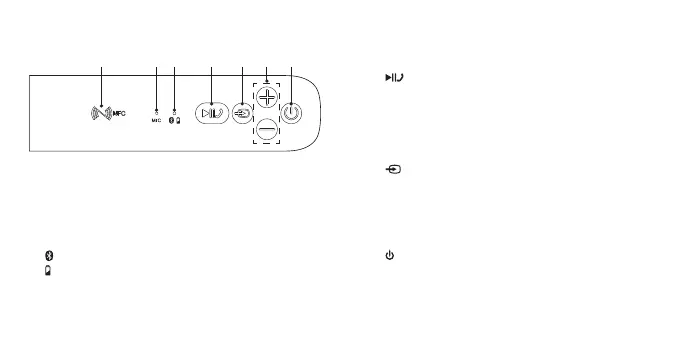
Top View
1 2 3 4 5 76
1. NFC (Near Field Communication) Sensor
2. MIC
Microphone for taking calls when the mobile phone
is connected to the speaker with Bluetooth®.
3. Bluetooth® Indicator (blue)
Battery Indicator (red)
4. Button
• Play / pause / resume playback in Bluetooth®
mode.
• Mute the unit or resume the sound in AUX mode.
• Control various call functions in Phone Calls
mode.
5. Button
Switch between Bluetooth® mode or AUX mode.
6. + / – Button
• Adjust the volume.
• Reject an incoming call.
7. Button
Switch the unit On / O.
SP-AD70-A_B_IB_Final180717V5.indd 11 30/7/2018 11:04 AM



 To Next Page
 Loading...