Filename [DVM600US_05Name.fm]
Masterpage:Left+
14 EN
INDEX
Page 14 Monday, 25 September 2006 13:54
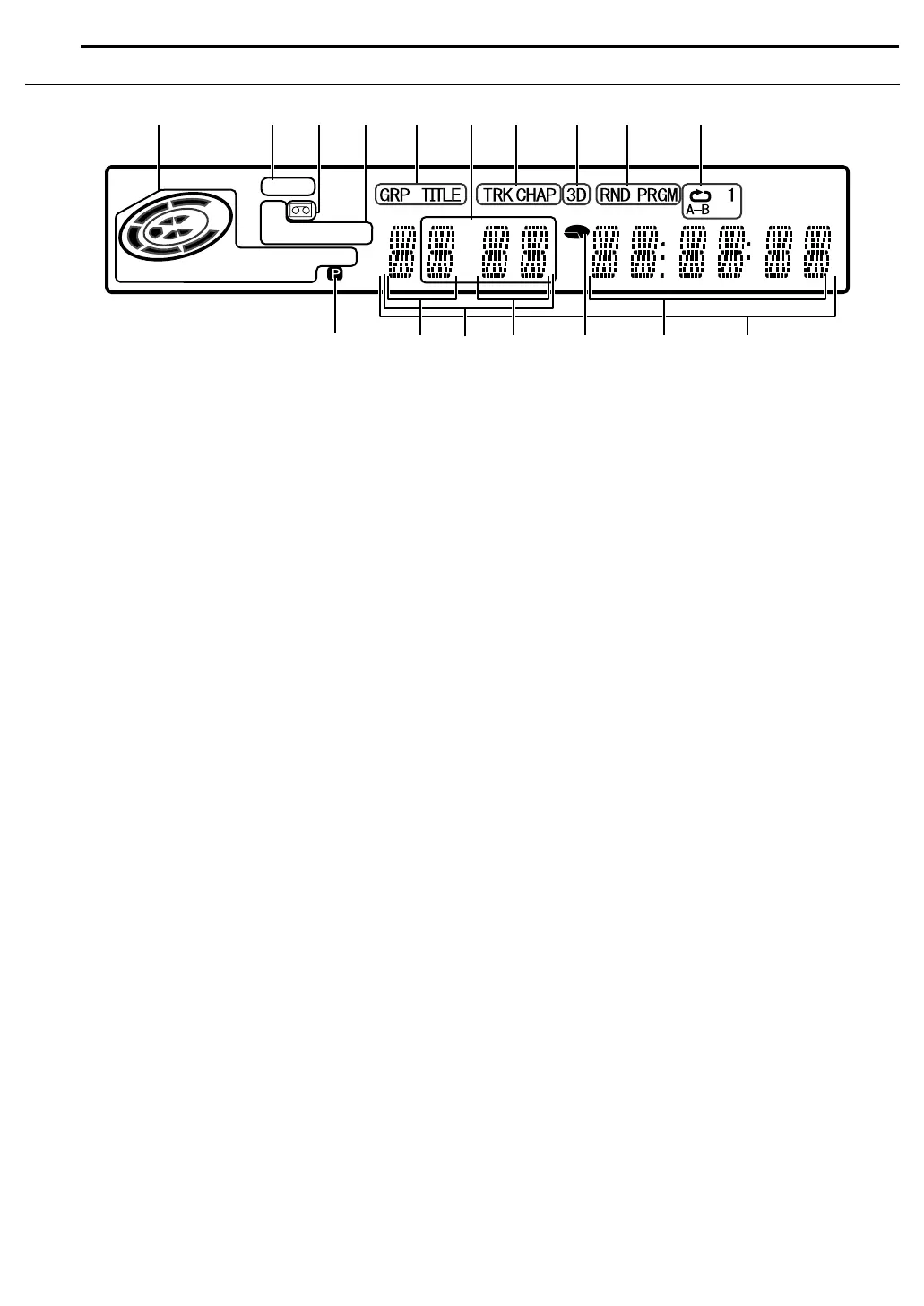
Front Display Panel
A Disc Type Indicator
When a disc is loaded, the type of the disc is indicated.
Disc Status Indicator
When a disc is running, the disc marks rotate.
VR Mode Indicator (VR) A pg. 61
Lights when a DVD-R/RW disc is formatted in VR mode.
B Linear PCM Indicator (LPCM)
Lights when AXP MODE REC AUDIOB is set to ALINEAR PCMB
(A pg. 59) for recording with HDD, DVD-RAM, DVD-R and
DVD-RW discs, and when Linear PCM audio is played.
C Cassette Loaded Mark (u)
Indicates the present of a cassette in the DV deck.
Lights when a cassette is loaded into the DV deck. It will remain
lit as long as the cassette is loaded, even if the HDD or DVD
deck is being selected.
D Recording Mode Indicator (XP/SP/LP/EP/FR) A pg. 50
Blinks when recording mode is being set.
While AFRB is blinking, the left 3 digits of the Multi Display (L
N) indicate setting values ranging from A60B to A480B. After the
value has been set, only AFRB lights.
E Group/Title Indicator (GRP/TITLE)
AGRPB or ATITLEB lights depending on a disc loaded while the
left 2 digits of the Multi Display (L) indicate the numbers
explained below.
AGRPB: Total number of groups or group number being played
back are displayed on the Multi Display.
ATITLEB: Total number of titles or title number being played
back are displayed on the Multi Display.
F External Input Indicator
Indicates the external input selected.
G Track/Chapter Indicator (TRK/CHAP)
ATRKB or ACHAPB lights depending on a disc loaded while the
3rd and 4th digits from the left of the Multi Display (N) indicate
the numbers explained below.
ATRKB: Total number of tracks or track number being played
back are displayed on the Multi Display.
ACHAPB: Chapter number being played back are displayed on
the Multi Display.
H Simulated Surround Effect Indicator (3D) A pg. 29
Lights when a simulated surround effect is set to A3D-ONB on
the on-screen bar.
I Random/Program Playback Mode Indicator (RND/PRGM)
A pg. 30
ARNDB: Lights when Random Playback mode is set.
APRGMB: Lights when Program Playback mode is set.
J Repeat Mode Indicator (x/1/A-B) A pg. 27
Select Repeat Playback mode on the on-screen bar.
AxB: Whole disc is played back repeatedly.
Ax1B: A single title/chapter/track is played back
repeatedly.
AxA-BB: The selected part (A-B) is played back repeatedly.
No display: Repeat Playback mode is off.
K Video Output Indicator (q) A pg. 65
No display: Indicates that interlace mode is engaged.
q: Indicates that progressive mode is engaged.
(Example) q lights when video output mode is in progressive
mode.
L Group/Title Number Display
M Audio Dubbing/Insert Editing Indicator
AADUBB or AINSB lights up during Audio Dubbing or Insert
Editing respectively.
N Track/Chapter Number Display
O Remaining Time/Elapsed Time Indicator A pg. 25
Lights when remaining time of HDD, DVD-RAM, DVD-R and
DVD-RW discs is displayed, and lights out when elapsed time is
displayed.
The right 6 digits of the Multi Display (P) indicate elapsed or
remaining time of each track.
No display: Indicates elapsed time of the disc.
Displayed: Indicates remaining time of the disc.
P Remaining Time/Elapsed Time Display A pg. 25
Time Code Display A pg. 34
Q Multi Display
Displays clock, received channel, elapsed time, and remaining
time.
Also displays status of the unit (NO DISC/OPEN/CLOSE/
READING).
VR
-
RAM
LPCM
FR
XP SP LP EP
+
-
RW VCD
L
P
Q
N
M
O
AB ED
K
CGFH
J
I
DVM600US_00.book Page 14 Monday, September 25, 2006 1:54 PM



 To Next Page