Filename [DVM600US_05Name.fm]
Masterpage:Left0
12 EN
Page 12 Monday, 25 September 2006 13:54
INDEX
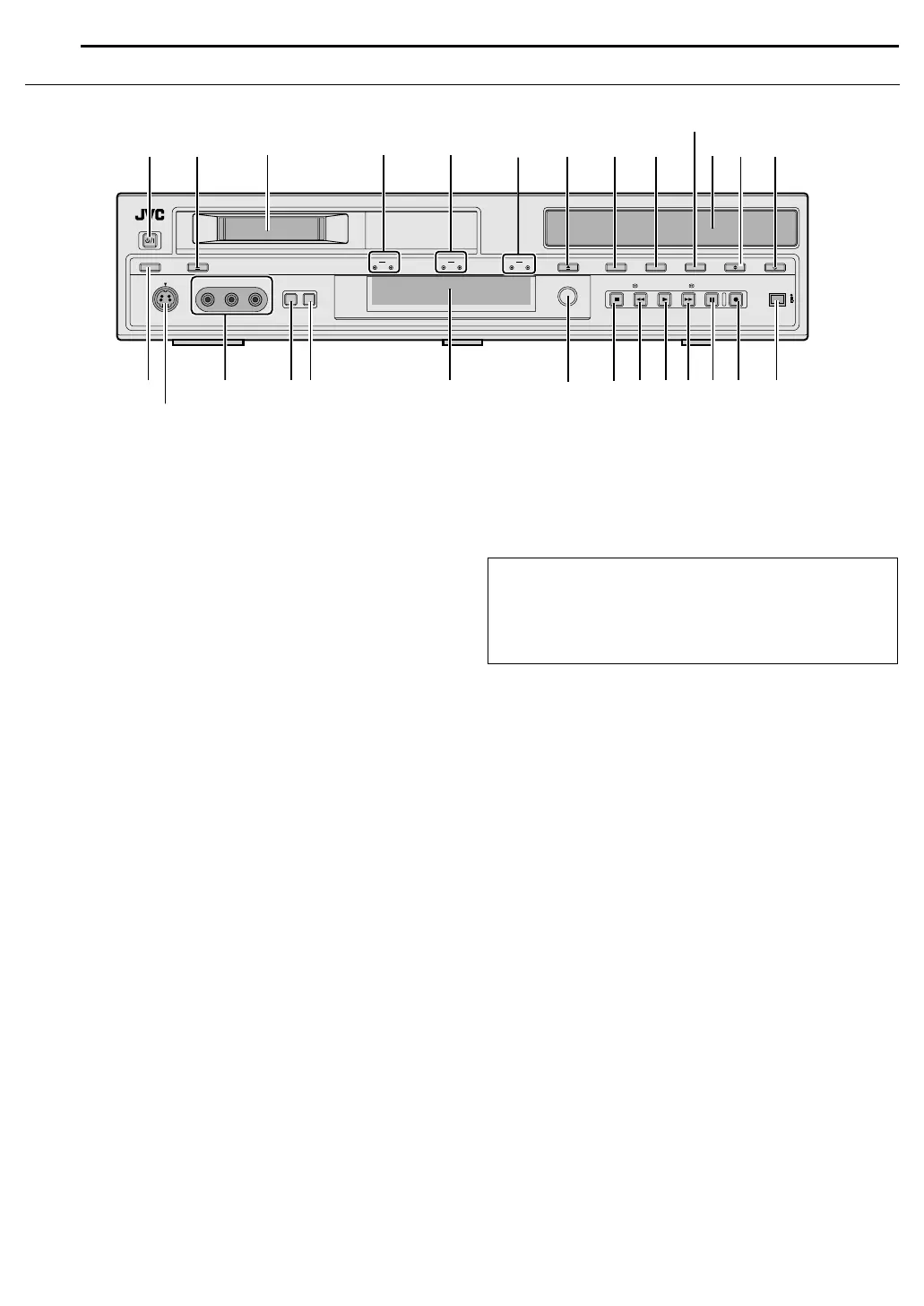
Front View
A STANDBY/ON Button (A)
B Eject Button (M) (DV) A pg. 33
C Mini DV Cassette Loading Slot
D DV Lamp (DV) A pg. 33
DV Recording Lamp (REC)
E HDD Lamp (HDD) A pg. 20
HDD Recording Lamp (REC)
F DVD Lamp (DVD) A pg. 20, 22
DVD Recording Lamp (REC)
G Eject Button (M) (DVD) A pg. 10
H DV/HDD/DVD Select Button (DV/HDD/DVD) A pg. 22, 31, 33
● This button will not function during navigation mode or set up
mode.
I Recording Mode Button (REC MODE) A pg. 49
J Instant Replay Button (INSTANT REPLAY) A pg. 24, 32, 34
K Disc Tray
L Audio Dubbing Button (AUDIO DUB.) A pg. 54
M Insert Button (INSERT) A pg. 55
N Display Button (DISPLAY) A pg. 25
O S-video Input Connector [S-VIDEO] A pg. 51
P Video/Audio Input Connectors
[VIDEO/AUDIO ((MONO) L/R)] A pg. 51
Q Input Select Button (INPUT SELECT) A pg. 49, 51
R Output Select Button (OUTPUT SELECT)
● Switches between AALLB (DV/HDD/DVD output) and ADVB (DV
output) when pressed. When AALLB is selected, DV, HDD or
DVD signals are output from the [DV/HDD/DVD OUTPUT]
connectors on the rear panel depending on the deck selected.
When ADVB is selected, DV signals are output regardless of the
deck selected.
S Front Display Panel A pg. 14
T Infrared Beam Receiving Window
U Stop Button (o) A pg. 22, 31
V Reverse Search Button (O) (HDD & DVD deck) A pg. 23,
36
Rewind Button (O) (DV deck) A pg. 33, 34
W Play Button (I) A pg. 22, 31
X Forward Search Button (N) (HDD & DVD deck) A pg. 23,
36
Fast Forward Button (N) (DV deck) A pg. 33, 34
Y Pause Button (W) A pg. 22, 31
Z Record Button (R)
a DV Input/Output Connector [DV IN/OUT(A*)] A pg. 49
● This connector can also be used as a direct connection to NLE
(Non-Linear Editing) systems or to a PC for downloading,
editing and archiving.
● [DV OUT] is available for DV deck only.
* A (i.Link) refers to the IEEE1394-1995 industry specification and
extensions thereof. The
A logo is used for products compliant with the
i.Link standard.
EJECTEJECTDISPLAY
STANDBY/ON
DV/HDD/DVD REC MODE INSTANT REPLAY AUDIO DUB. INSERT
S-VIDEO
IN F-1
VIDEO (MONO)L - AUDIO - R
RECDVDRECHDDRECDV
DV IN/ O UT
RECPAU S EPLAY
INPUT
SELECT
OUTPUT
SELECT
FFREWSTOP
N
D
E
HGI
J
K
LMBA
O
S
T
U
V
W
X
Y
Z
a
Q
R
P
F
C
ATTENTION:
If ADVB is selected, ADVB and AOUTPUT DVB blink on the front
display panel and TV screen respectively when EDIT or
NAVIGATION is pressed while in the HDD/DVD deck mode.
Press OUTPUT SELECT to stop the blinking and return to the
previous display.
DVM600US_00.book Page 12 Monday, September 25, 2006 1:54 PM



 To Next Page