13
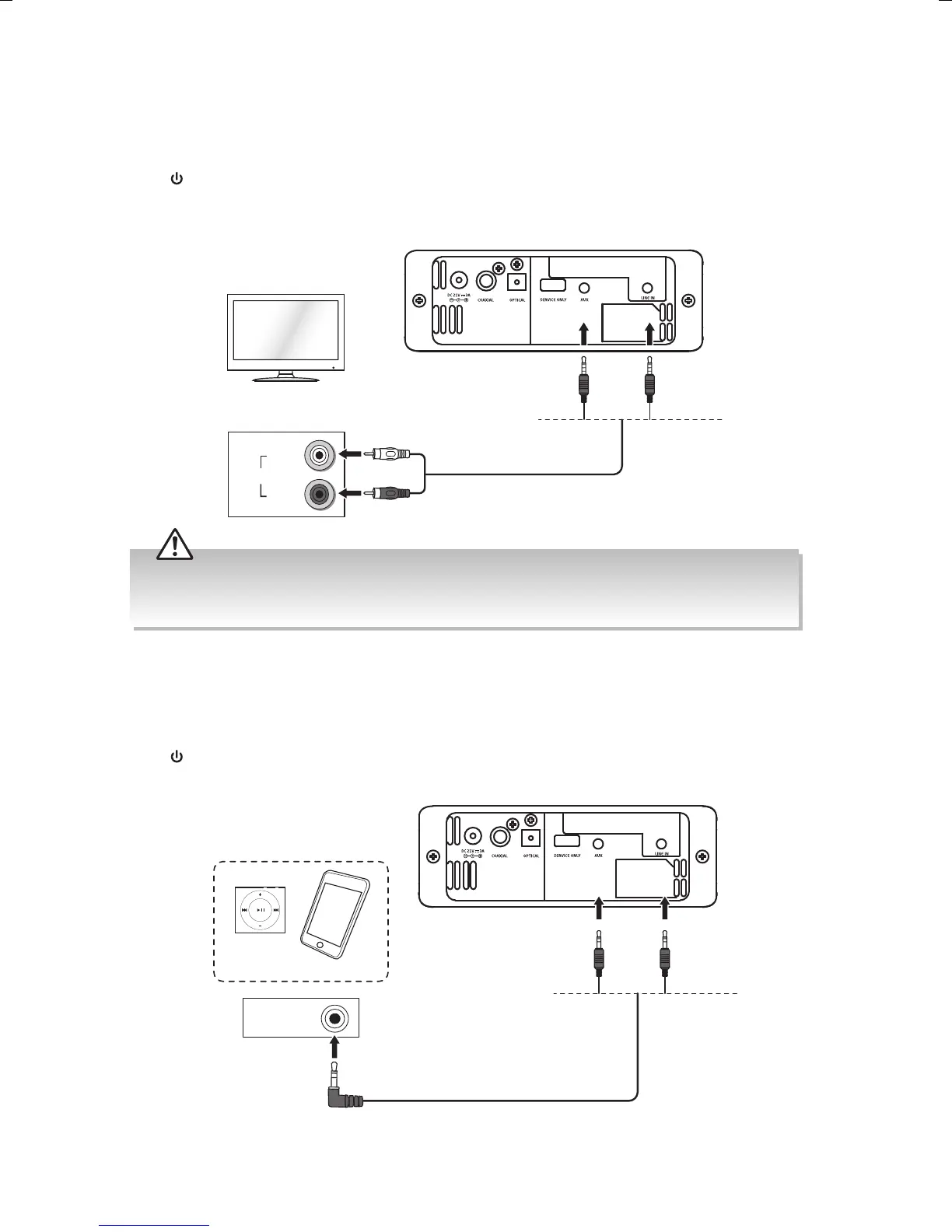
L
(WHITE)
R
(RED)
AUDIO OUT
RCA stereo audio cable (not included)
TV
Rear View of the Soundbar
• Some TVs will have more than one AUDIO L / R sockets, ensure you use the sockets marked OUT. If
you don’t have an AUDIO OUT socket, this connection won’t allow sound to your soundbar.
• Ensure to match the colours on the cable plugs to the colours on the output sockets.
Method 2: AUX Connection
This is a basic connection for connecting your TV to your soundbar.
Connect a RCA to 3.5mm stereo audio cable (not included) to AUX / LINE IN socket on your
soundbar and the AUDIO OUT L / R (white / red) sockets on your TV.
Press on the unit or remote control and then press SOURCE repeatedly to select AUX /
LINE IN mode.
Connecting to an External Audio Device
Use a 3.5mm to 3.5mm stereo audio cable (included) to connect the soundbar’s AUX / LINE
IN socket to the headphone socket of the external devices.
Press on the unit or remote control and then press SOURCE repeatedly to select AUX /
LINE IN mode.
HEADPHONE
3.5mm to 3.5mm stereo audio
cable (included)
Rear View of the Soundbar
Mobile Devices
TH-W513B_IB_Final171124V5.indd 13 24/11/2017 3:58 PM



 To Next Page